
1. Uvod
This manual provides essential instructions for the installation, operation, maintenance, and troubleshooting of the APC Smart-UPS SRT3000RMXLT 3kVA 208V Rackmount Uninterruptible Power Supply (UPS). Please read this manual thoroughly before installing or operating the equipment to ensure proper usage and safety.
2. Varnostne informacije
Observe all warnings and operating instructions in this manual. Failure to do so may result in injury or equipment damage.
- Električna varnost: Ta enota vsebuje nevarne voltagNe poskušajte razstavljati UPS-a. Servisiranje naj izvaja le usposobljeno osebje.
- Varnost baterije: Baterije lahko predstavljajo nevarnost električnega udara in visokega kratkega stika. Pred rokovanjem z baterijami snemite ure, prstane ali druge kovinske predmete. Uporabljajte orodja z izoliranimi ročaji.
- Teža: The UPS is heavy. Use proper lifting techniques and ensure adequate support during installation.
- Okolje: Install the UPS indoors in a controlled environment, free from excessive dust, moisture, and extreme temperatures.
3. Vsebina paketa
Carefully unpack the UPS and inspect for shipping damage. The package should contain the following items:
- APC Smart-UPS SRT3000RMXLT Unit
- Power Supply (Built-In)
- Strojna oprema za pritrditev v stojalo
- CD z dokumentacijo
- USB kabel
- Serijski kabel
4. Nastavitev
4.1 Fizična namestitev
The SRT3000RMXLT is designed for rack installation. Ensure the rack is stable and capable of supporting the UPS weight (approximately 69 pounds).
- Mount the UPS into a standard 19-inch rack using the provided rack-mounting hardware.
- Zagotovite zadosten pretok zraka okoli enote. Ne blokirajte prezračevalnih odprtin.

Slika 4.1: Spredaj view of the APC Smart-UPS SRT3000RMXLT. This image shows the front panel with the display and ventilation grille.
4.2 Priključitev UPS-a
Connect the UPS to the utility power and your equipment.
- Connect the UPS input power cord to a dedicated 208V AC outlet. The UPS uses a Type B - 3 pin (North American) power plug.
- Connect your equipment to the output receptacles on the rear of the UPS. The unit provides 12 IEC 320 C13/C14 outlets.
- For communication, connect the USB cable or serial cable from the UPS to your computer or network management card.
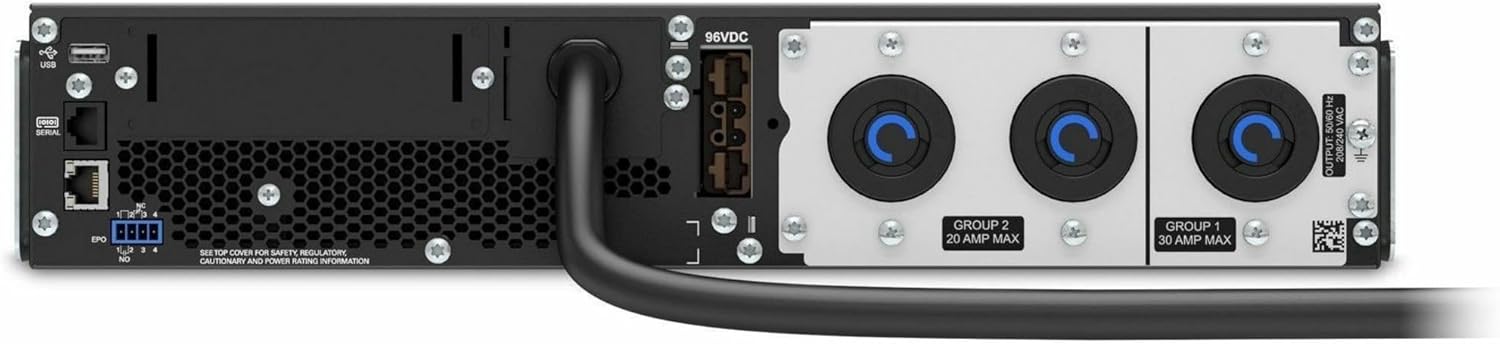
Slika 4.2: Zadaj view of the APC Smart-UPS SRT3000RMXLT. This image displays the various input and output ports, including USB, serial, EPO, and the 12 output receptacles, along with the main power input.
4.3 Začetni vklop
Ko so vse povezave varne:
- Press the power button on the front panel to turn on the UPS.
- The UPS will perform a self-test and the display will show the current status.
- Allow the batteries to charge for at least 6 hours before relying on them for extended backup time.
5. Upravljanje UPS-a
5.1 Zaslon in krmilniki na sprednji plošči
The front panel features an LCD display and control buttons for monitoring and configuring the UPS.
- LCD zaslon: Shows real-time status, load, battery charge, input/output voltage, and event logs.
- Gumb ESC: Exits the current menu or cancels an operation.
- Gumb V redu: Potrdi izbiro ali vstopi v meni.
- Puščice gor/dol: Pomikanje po možnostih menija ali prilagajanje nastavitev.
5.2 Osnovna operacija
- Vklop: Pritisnite in držite gumb za vklop, dokler se zaslon ne prižge.
- Izklop: Press and hold the power button until the UPS powers down. Ensure all connected equipment is safely shut down first.
- Baterijski način: V primeru izpada električne energijetage, the UPS will automatically switch to battery power. The display will indicate 'On Battery'.
- Samotestiranje: Initiate a manual self-test through the front panel menu to verify battery and UPS functionality.
6. Vzdrževanje
6.1 Zamenjava baterije
The UPS uses sealed lead-acid batteries. Battery life is typically 3-5 years, depending on environmental conditions and usage. Replace batteries when the UPS indicates a 'Battery Fault' or 'Replace Battery' warning.
- Contact APC support or a certified service technician for battery replacement.
- Always use genuine APC replacement battery cartridges (RBCs) to ensure compatibility and optimal performance.
- Recycle old batteries responsibly.
6.2 Čiščenje
Keep the UPS free from dust and debris to ensure proper ventilation.
- Use a soft, dry cloth to clean the exterior of the UPS.
- Ne uporabljajte tekočih čistil ali topil.
- Prepričajte se, da prezračevalne odprtine nimajo ovir.
7. Odpravljanje težav
V tem razdelku so rešitve za pogoste težave. Za bolj zapletene težave se obrnite na tehnično podporo.
| Težava | Možen vzrok | rešitev |
|---|---|---|
| UPS se ne vklopi | No input power; Battery disconnected or discharged | Check power cord connection; Ensure utility power is present; Allow batteries to charge. |
| UPS neprekinjeno piska | On battery power; Overload condition | Check utility power; Reduce connected load. |
| 'Replace Battery' indicator | Baterija se bliža koncu življenjske dobe | Order and replace the battery cartridge. |
| UPS not providing power to outlets | Output circuit breaker tripped; UPS in fault mode | Reset circuit breaker; Check display for fault codes and consult manual. |
8. Specifikacije
Key technical specifications for the APC Smart-UPS SRT3000RMXLT.
| Funkcija | Specifikacija |
|---|---|
| Številka modela | SRT3000RMXLT |
| Znamka | APC |
| Izhodna moč | 3000 VA / 2700 vatov |
| Nominalna izhodna voltage | 208 V AC |
| Nominalni vhod Voltage | 208V AC / 230V AC |
| Vhodna frekvenca | 60 Hz |
| Izhodne povezave | 12 x IEC 320 C13/C14 |
| Vrsta baterije | Svinčena kislina |
| Običajni čas polnjenja | 6 ur |
| Tipični čas varnostnega kopiranja (polna obremenitev) | 4 minut |
| Faktor oblike | Rack |
| Dimenzije (V x Š x G) | 9 x 23 x 34 palcev |
| Teža | 69 funta |
| Delovna temperatura | 0–40 °C (32–104 °F) |
9. Garancija in podpora
9.1 Informacije o garanciji
APC provides a standard warranty for this product. Please refer to the warranty card included with your product or visit the official APC webZa podrobne garancijske pogoje, specifične za vašo regijo, obiščite spletno mesto.
9.2 Tehnična podpora
For technical assistance, product information, or troubleshooting beyond the scope of this manual, please contact APC customer support. Have your model number (SRT3000RMXLT) and serial number ready when contacting support.
- Visit the official APC webspletno mesto za vire podpore, pogosta vprašanja in kontaktne podatke.
- Online resources often include updated manuals, firmware, and diagnostic tools.