
Uvod
The Quad Lock Action Camera Adaptor (Model QLA-GPR) is designed to securely attach action cameras with a standard GoPro fitting to your existing Quad Lock Out Front Mount. This adaptor allows for convenient video recording during activities such as cycling, providing a stable platform for your camera.
Opomba: The Quad Lock Out Front Mount is not included with this adaptor and must be purchased separately.
Navodila za namestitev
1. Attaching the Adaptor to the Out Front Mount
- Ensure your Quad Lock Out Front Mount is securely installed on your bicycle handlebars.
- Align the Quad Lock Action Camera Adaptor with the mounting points on the underside of your Out Front Mount.
- Insert the provided screws through the adaptor and into the Out Front Mount.
- Using an appropriate tool, tighten the screws until the adaptor is firmly attached. Do not overtighten.
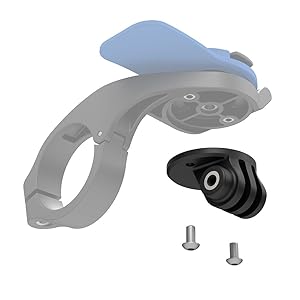
Image: Quad Lock Action Camera Adaptor components, showing the adaptor and screws.
2. Attaching an Action Camera
- Position your action camera (e.g., GoPro) onto the standard fitting of the Quad Lock Action Camera Adaptor.
- Secure the camera using its standard mounting screw and nut. Ensure the camera is stable and does not wobble.

Image: An action camera and a smartphone securely mounted on bicycle handlebars using the Quad Lock system.

Image: A cyclist's perspective showing an action camera and phone mounted on the bike, ready for recording.
Navodila za uporabo
Once the Action Camera Adaptor and your camera are securely mounted, operate your action camera according to its manufacturer's instructions. The adaptor provides a stable base for recording video while riding.
- Ensure the camera's lens is clear and unobstructed.
- Verify the camera's battery level and memory card capacity before starting your ride.
- Adjust the camera's angle as needed for optimal recording.
Vzdrževanje
- Čiščenje: Wipe the adaptor with a damp krpo za odstranjevanje umazanije in ostankov. Izogibajte se močnim kemikalijam.
- Pregled: Občasno preverite vse vijake in povezave, da se prepričate, da so trdno priviti. Po potrebi jih ponovno privijte.
- Shranjevanje: Store the adaptor in a cool, dry place when not in use.
Odpravljanje težav
Camera Wobbles or is Loose
- Check Camera Screw: Ensure the action camera's mounting screw is fully tightened to the adaptor.
- Check Adaptor Screws: Verify that the screws attaching the adaptor to the Out Front Mount are secure.
- Združljivost: Confirm your action camera uses a standard GoPro fitting.
Adaptor Does Not Fit Out Front Mount
- Preverjanje modela: Ensure you have a genuine Quad Lock Out Front Mount. This adaptor is specifically designed for Quad Lock Out Front Mounts.
- Orientacija: Double-check the orientation of the adaptor against the mount.
Specifikacije
| Številka modela | QLA-GPR |
| Dimenzije izdelka | 0.79 x 2.36 x 3.94 palcev |
| Teža predmeta | 1.92 unč |
| barva | Črna |
| Združljive naprave | Action Cameras with standard GoPro fitting |
| Vrsta namestitve | Front Mount (requires Quad Lock Out Front Mount) |
| Posebne lastnosti | Lahka |
| Proizvajalec | Annex Products Pty Ltd |
Uradni videoposnetek izdelka
Video: Demonstration of Quad Lock products in use. This video provides a general overview of the Quad Lock ecosystem and how various mounts and adaptors function.
Garancija in podpora
For warranty information and customer support, please refer to the official Quad Lock website or contact their customer service directly. Details regarding product guarantees and assistance with any issues can be found through these channels.
Uradno Webspletno mesto: www.quadlockcase.com