
Uvod
This manual provides detailed instructions for the setup, operation, and maintenance of your Homtime C12PRO Docking Station Speaker. The C12PRO integrates a Bluetooth speaker, FM radio, alarm clock, and dual USB charging capabilities, designed for convenient everyday use.
Vsebina paketa
Prosimo, preverite, ali so v vašem paketu priloženi vsi spodaj navedeni artikli:
- 1 x Homtime C12PRO Speaker Unit
- 1 x napajalnik
- 1 x uporabniški priročnik
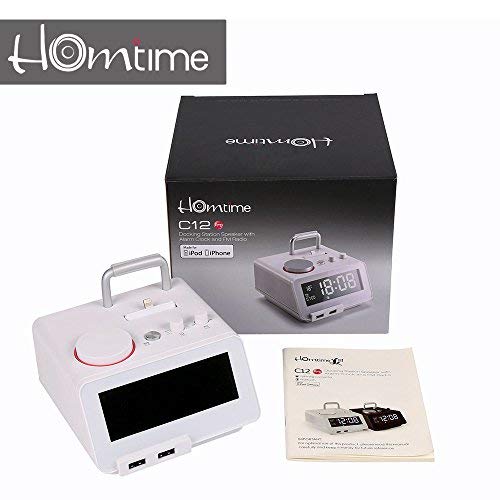
Slika: Contents of the Homtime C12PRO package, showing the main speaker unit, power adapter, and the user manual.
Konec izdelkaview
Familiarize yourself with the various components and controls of your C12PRO unit.

Slika: Spredaj view of the Homtime C12PRO with an iPhone docked. The large digital display shows time and temperature, and the front features dual USB charging ports.

Slika: Spredaj view of the Homtime C12PRO without a phone docked. This image clearly shows the digital display, the docking connector, and the control buttons on the top surface.
Sprednja plošča in zaslon
- Large 4.2-inch LCD Display: Shows time, alarm status, and room temperature (Celsius or Fahrenheit). Brightness is adjustable.
- Dvojna vrata USB za polnjenje: Located at the front base for convenient charging of external devices.
Nadzor na zgornji plošči
- Priključek za priklop: Apple Certified Lightning connector for iPod/iPhone.
- Kontrolni gumbi/gumbi: For setting time, alarm, volume, mode selection, and FM radio tuning.
Priključki na zadnji plošči
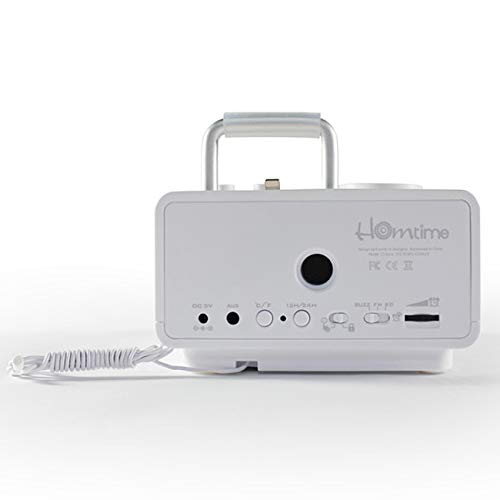
Slika: Zadaj view of the Homtime C12PRO. This image displays the DC 9V power input, AUX-in port, 12H/24H time format button, and other rear controls.
- Vhodna moč DC 9V: Priloženi napajalnik priključite tukaj.
- Vhod AUX: 3.5 mm priključek za priključitev zunanjih avdio virov.
- 12H/24H Button: Preklaplja med 12-urnim in 24-urnim formatom prikaza časa.
- Druge kontrole: May include snooze/dimmer, alarm on/off, and FM antenna connection.
Nastavitev
- Razpakirajte enoto: Carefully remove the C12PRO speaker and all accessories from the packaging.
- Priključite napajanje: Insert the DC plug of the power adapter into the DC 9V input port on the rear of the unit. Plug the power adapter into a standard wall outlet. The display will illuminate.
- Začetna nastavitev časa:
- Pritisnite in držite ČAS NAST button (location may vary, typically on top or rear).
- Uporabite +/- buttons or rotary knob to adjust the hour. Press ČAS NAST ponovno za potrditev.
- Adjust the minute using the +/- buttons or rotary knob. Press ČAS NAST za potrditev in izhod iz načina nastavitve časa.
- Za preklop med 12-urnim in 24-urnim formatom časa pritisnite 12H/24H gumb na zadnji plošči.
- Prilagodite svetlost zaslona: Pritisnite DREMŽAJ/ZATEMNILO button (often combined) repeatedly to cycle through brightness levels.
- Nastavite temperaturno enoto: Če je primerno, pritisnite ° C / ° F button to switch between Celsius and Fahrenheit display for room temperature.
Navodila za uporabo
Vklop/izklop
Pritisnite MOČ button to turn the unit on or off. When off, the clock display remains active.
Nastavitev alarma
- Pritisnite in držite ALARM NASTAVLJEN gumb. Ura budilke bo utripala.
- Uporabite +/- buttons or rotary knob to adjust the alarm hour. Press ALARM NASTAVLJEN za potrditev.
- Adjust the alarm minute. Press ALARM NASTAVLJEN za potrditev.
- Select the alarm source (Buzzer, FM Radio, or Docked Device). Use +/- or rotary knob and press ALARM NASTAVLJEN za potrditev.
- Za vklop/izklop alarma pritisnite VKLOP / IZKLOP ALARMA gumb. Ko je aktiven, se na zaslonu prikaže ikona alarma.
- Ko se oglasi alarm, pritisnite tipko DREMEŽ button to temporarily silence it for a few minutes. Press MOČ da izklopite budilko za tisti dan.
Delovanje radia FM
- Pritisnite NAČIN gumb, dokler se na zaslonu ne prikaže "FM".
- For automatic station scanning, press and hold the PREDVAJAJ/PAVZA gumb (ali namenski gumb SCAN button). The radio will scan and save available stations.
- Za ročno nastavitev uporabite PREJ/NAPREJ buttons or rotary knob to adjust the frequency.
- To select a saved station, press the PREDNASTAVITEV gumb in nato uporabite PREJ/NAPREJ za navigacijo.
- Glasnost prilagodite s tipko GLASNOST gumb ali gumbi.
Bluetooth združitev
- Pritisnite NAČIN button until "BT" or "Bluetooth" appears on the display. The Bluetooth indicator will flash, indicating pairing mode.
- Na mobilni napravi omogočite Bluetooth in poiščite nove naprave.
- Select "Homtime C12PRO" from the list of available devices.
- Once paired, the Bluetooth indicator on the C12PRO will stop flashing and remain solid. You can now play audio wirelessly from your device.
- Adjust volume on both the C12PRO and your connected device.
Uporaba priklopne postaje
The C12PRO features an Apple Certified Lightning connector for compatible iPod/iPhone devices.
- Carefully align your iPhone/iPod with the Lightning connector on the top of the unit.
- Gently push down until the device is securely seated.
- The C12PRO will automatically charge your device and can play audio from it.
- Pritisnite NAČIN button to select the docking station as the audio source.
USB polnjenje
The unit includes dual USB ports for charging other devices.
- Connect your USB charging cable to one of the USB ports on the front of the C12PRO.
- Connect the other end of the cable to your device (e.g., Android phone, tablet).
- The C12PRO will provide power to charge your device.
AUX-in Connection
Connect external audio players via the 3.5mm AUX-in port.
- Connect a 3.5mm audio cable (not included) from your external audio device's headphone jack to the AUX-in port on the rear of the C12PRO.
- Pritisnite NAČIN gumb, dokler se na zaslonu ne prikaže "AUX".
- Play audio from your external device. Adjust volume on both the C12PRO and the external device.
Vzdrževanje
- Čiščenje: Disconnect the power adapter before cleaning. Use a soft, dry cloth to wipe the exterior surfaces. Do not use abrasive cleaners, waxes, or solvents.
- Shranjevanje: Če enoto shranjujete dalj časa, jo izključite iz električnega omrežja in jo shranite na hladnem in suhem mestu, stran od neposredne sončne svetlobe in ekstremnih temperatur.
- Baterija: The unit contains a CR2 battery (included) for clock memory backup. This battery is not user-replaceable for general operation and should only be replaced by qualified service personnel if necessary.
Odpravljanje težav
| Težava | Možen vzrok | rešitev |
|---|---|---|
| Ni napajanja/zaslon izklopljen | Napajalnik ni priključen ali pa je vtičnica pokvarjena. | Prepričajte se, da je napajalnik varno priključen v enoto in delujočo stensko vtičnico. |
| Ni zvoka iz zvočnika | Volume too low; incorrect source selected; device not connected properly. | Povečaj glasnost. Pritisnite NAČIN to select the correct audio source (BT, FM, Dock, AUX). Reconnect Bluetooth device or docked phone. |
| Bluetooth povezovanje ne uspe | C12PRO not in pairing mode; device too far; interference. | Ensure C12PRO is in BT mode and flashing. Move device closer. Turn off other Bluetooth devices. |
| FM radio static/poor reception | Šibek signal; antena ni iztegnjena. | Extend the FM antenna fully. Reposition the unit for better reception. Perform auto-scan again. |
| Alarm se ne oglasi | Alarm not activated; alarm volume too low. | Ensure the alarm icon is visible on the display. Check alarm volume settings. |
| Device not charging via USB/Dock | Težava s kablom; naprava ni združljiva; enota ni napajana. | Try a different USB cable. Ensure the C12PRO is powered on. Verify device compatibility with the Lightning dock. |
Specifikacije

Slika: A table detailing the specifications of the Homtime C12PRO, including driver units, S/N ratio, Bluetooth version, range, radio frequency, power, and dimensions.
| Model | C12 Pro |
| Pogonske enote | 2x40 mm |
| Razmerje S/N | >70 dB |
| Različica Bluetooth | 2.1 + EDR |
| Bluetooth obseg | 10M |
| Območje radijskih frekvenc | 87.5 MHz - 108 MHz |
| Združljive naprave | iPad, iPhone, Android, Windows Phone, Computer |
| Napajalni adapter | AC100-240V, 50/60Hz, DC 5V 3A |
| Izhodna moč | 3W + 3W (6 Watts total) |
| Dimenzije (DxŠxV) | 12.8 x 12.9 x 10.7 cm |
| Teža predmeta | 800 g |
| Zvočni viri | Apple Lightning, USB, Bluetooth, Aux-in |
| Vrsta zaslona | Digital LCD (4.2 inches) |
| Baterije | 1 CR2 battery required (included for clock memory) |
Garancija in podpora
Informacije o garanciji
The Homtime C12PRO comes with a 1-letna omejena garancija from the date of purchase. This warranty covers manufacturing defects in materials and workmanship under normal use. It does not cover damage caused by misuse, accidents, unauthorized modifications, or external causes.
Za garancijske zahtevke shranite dokazilo o nakupu.
Podpora uporabnikom
For technical assistance, troubleshooting not covered in this manual, or warranty inquiries, please contact Homtime customer support. Refer to the contact information provided with your product packaging or visit the official Homtime webspletno mesto za najnovejše podrobnosti o podpori.