
1. Uvod
Hvala za nakupasing the Gotech GTV-7-TFT 7-inch Portable Color TFT LCD TV. This manual provides essential information for the safe and efficient operation of your device. Please read it thoroughly before use and retain it for future reference.
2. Pomembna varnostna navodila
- Naprave ne izpostavljajte dežju ali vlagi, da preprečite požar ali električni udar.
- Ne odpirajte casing. Vsa servisna dela prepustite usposobljenemu osebju.
- Izogibajte se postavljanju enote v bližino virov toplote ali na neposredno sončno svetlobo.
- Zagotovite ustrezno prezračevanje okoli enote.
- Uporabljajte samo navedeni napajalnik.
- Enoto hranite stran od močnih magnetnih polj.
- Napravo očistite z mehko, suho krpo. Ne uporabljajte tekočih čistil.
3. Vsebina paketa
Preverite, ali so v paketu prisotni vsi elementi:
- Gotech GTV-7-TFT Portable TV Unit
- Daljinski upravljalnik
- AC/DC adapter
- Car Cord (Car Holder not explicitly listed as included, but mentioned as a feature)
- Antenski Jack
- AV Cable
- Snemljivo stojalo

Image 3.1: The retail box for the Gotech GTV-7-TFT Portable TV, showing the product, remote control, and included accessories.
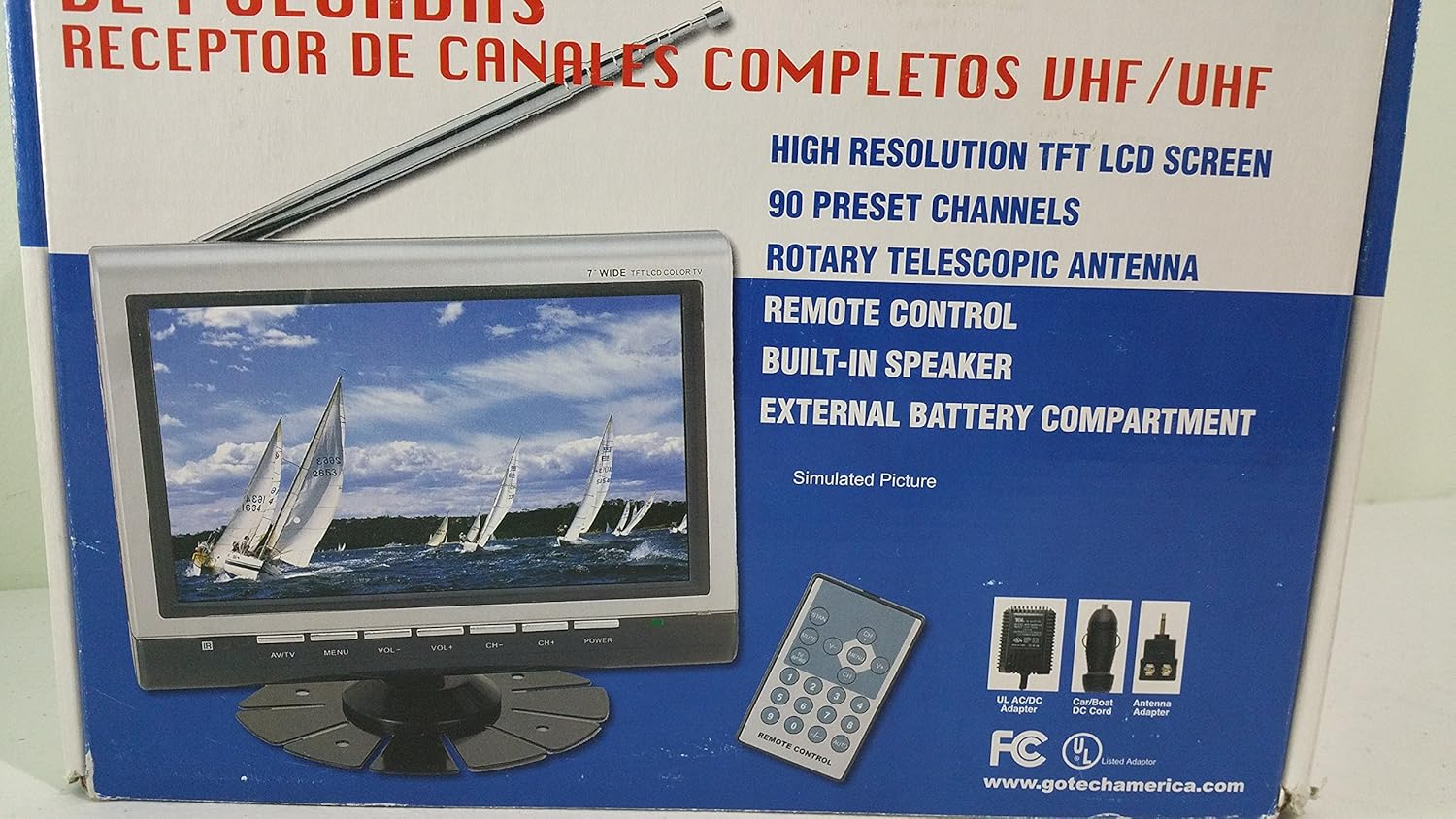
Slika 3.2: Zapiralo view of the Gotech GTV-7-TFT TV screen and the remote control, as depicted on the product packaging.
4. Izdelek je končanview
4.1 Ključne lastnosti
- 7-inch High Resolution TFT LCD Screen
- Full Channel VHF/UHF Receiver
- 90 prednastavljeni kanali
- Digital Up/Down Tuning
- Auto Channel Programming
- Rotacijska teleskopska antena
- On-Screen Display (OSD) for Picture and Volume Adjustment
- Vgrajen zvočnik
- External Battery Compartment (requires 10x AA batteries, not included)
- Remote Control with Button Cell
- New Detachable Stand with Battery

Image 4.1: Side panel of the Gotech GTV-7-TFT packaging, detailing the product's main features.
5. Nastavitev
5.1 Powering the TV
The GTV-7-TFT can be powered in several ways:
- AC/DC adapter: Connect the provided AC/DC adapter to the TV's power input and then to a standard wall outlet.
- Car Cord: For in-vehicle use, connect the car cord to the TV's power input and then to your vehicle's 12V power outlet.
- Zunanje baterije: Open the external battery compartment and insert 10x AA size batteries (UM3) according to the polarity indicators. Ensure the batteries are fresh and correctly oriented.
5.2 Priključitev antene
Extend the rotary telescopic antenna for optimal signal reception. For improved reception, you may connect an external antenna to the antenna jack using the provided antenna jack adapter.
5.3 Connecting External Devices (AV Input)
To connect external devices such as a DVD player or gaming console, use the provided AV cable. Connect one end to the TV's AV input port and the other end to the AV output ports of your external device. Select the AV input source on the TV to view vsebino iz povezane naprave.
6. Delovanje
6.1 Vklop/izklop
Pritisnite MOČ button on the TV unit or the remote control to turn the TV on or off.
6.2-kanalno uglaševanje
- Auto Channel Programming: It is recommended to perform an auto channel scan upon first use or when moving to a new location. Access the menu, navigate to the channel setup, and select 'Auto Scan' or 'Auto Program'. The TV will search and store available channels.
- Digital Up/Down Tuning: Uporabite CH+ in CH- buttons on the TV or remote control to navigate through the preset channels.
6.3 Volume and Picture Adjustment
Uporabite GLASNOST+ in ZV.- buttons on the TV or remote control to adjust the volume. Picture settings (brightness, contrast, color) can be adjusted via the on-screen display (OSD) menu. Press the MENI button to access these options.
6.4 Daljinski upravljalnik
The remote control allows convenient operation from a distance. Ensure the button cell battery is correctly inserted. Point the remote control directly at the TV's infrared sensor.
7. Vzdrževanje
7.1 Čiščenje
Wipe the TV screen and casing with a soft, dry, lint-free cloth. Do not use abrasive cleaners, waxes, or solvents as they may damage the finish or screen.
7.2 Shranjevanje
If the TV will not be used for an extended period, remove the external batteries to prevent leakage. Store the unit in a cool, dry place away from direct sunlight and extreme temperatures.
8. Odpravljanje težav
| Težava | Možen vzrok | rešitev |
|---|---|---|
| Brez moči | Napajalnik ni priključen; Baterije so prazne ali nepravilno vstavljene. | Check power connections; Replace or correctly insert batteries. |
| Ni slike/zvoka | Incorrect input source; Antenna not connected or extended; No channels scanned. | Select correct input (TV/AV); Extend antenna or connect external one; Perform auto channel scan. |
| Slab sprejem | Weak signal; Antenna position. | Adjust antenna position; Try an external antenna; Check for local signal strength. |
| Daljinski upravljalnik ne deluje | Battery depleted; Obstruction between remote and TV. | Replace remote control battery; Remove any obstructions. |
9. Specifikacije
| Funkcija | Podrobnost |
|---|---|
| Številka modela | gtv-7-tft |
| Velikost zaslona | 7 palcev (17.8 cm) |
| Vrsta zaslona | TFT LCD barvni zaslon |
| Vrsta sprejemnika | Full Channel VHF/UHF Receiver |
| Prednastavljeni kanali | 90 |
| Vrsta avdio izhoda | Vgrajen zvočnik |
| Nadzorna metoda | Daljinski upravljalnik |
| Združljive naprave | Televizija, zvočnik |
| Vir napajanja | AC/DC Adapter, Car Cord, External Battery Compartment (10x AA batteries, not included) |
10. Garancija in podpora
Specific warranty information and customer support details are not provided within this manual. Please refer to the product packaging or contact your retailer for warranty claims and technical assistance.