
Uvod
This manual provides detailed instructions for the Inateck Bluetooth 4.1 Sport Headset, Model P20 (BH1001). Please read this guide thoroughly before using the product to ensure proper operation and to maximize your listening experience. This headset is designed for active lifestyles, offering wireless audio with a secure fit and integrated microphone.
1. Nastavitev
1.1 Vsebina paketa
Preverite, ali so v paketu prisotni vsi elementi:
- Inateck Bluetooth Sport Headset (P20 / BH1001)
- USB polnilni kabel
- Več parov silikonskih ušesnih nastavkov (različnih velikosti)
- Torbica za nošenje
- Uporabniški priročnik (ta dokument)
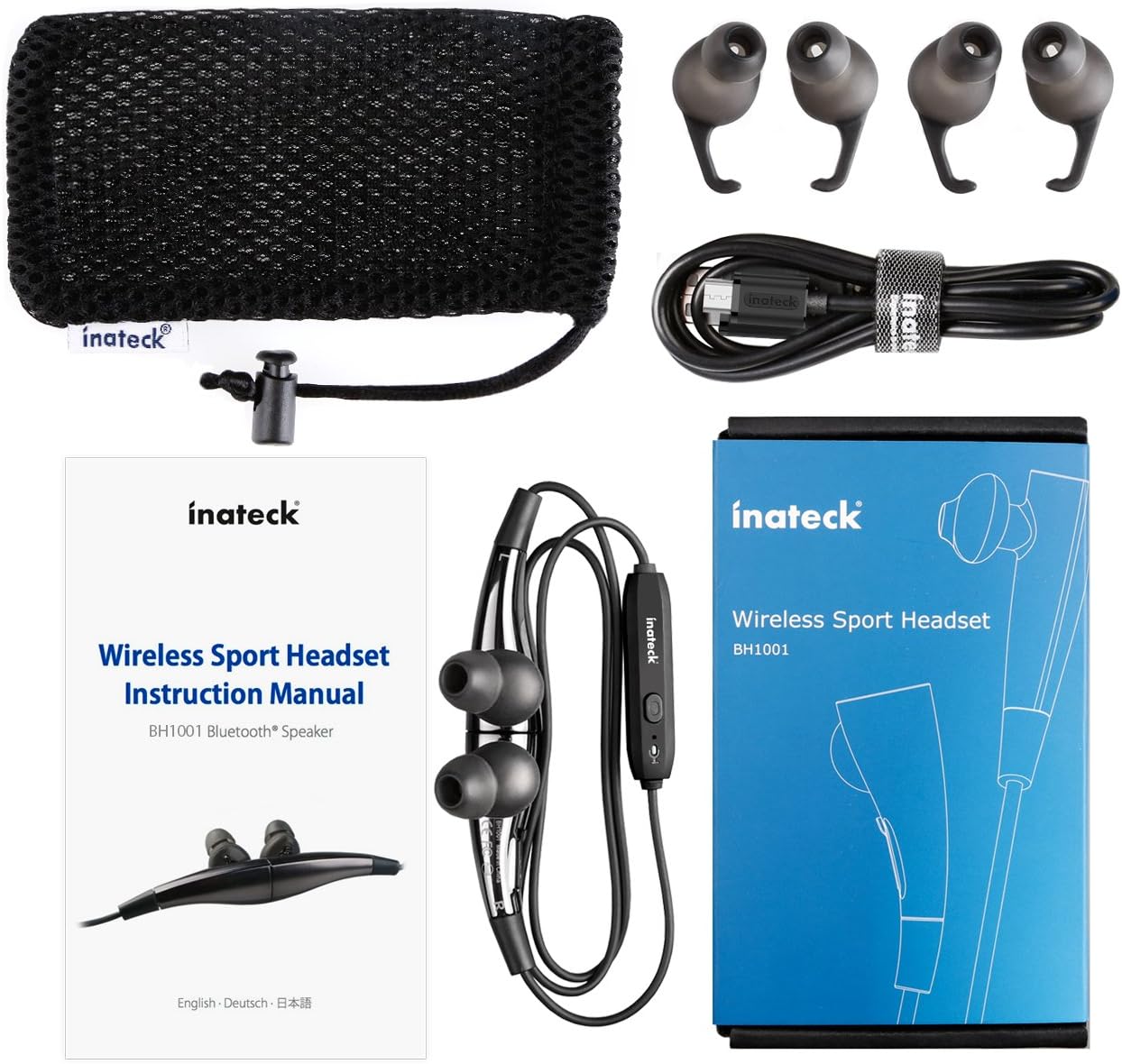
Slika 1.1: Contents of the Inateck Bluetooth Sport Headset package.
1.2 Polnjenje slušalk
Before first use, fully charge the headset. A full charge takes approximately 3 hours and provides at least 8 hours of music playback.
- Poiščite polnilni priključek Micro USB na slušalkah.
- Connect the small end of the provided USB charging cable to the headset's Micro USB port.
- Večji konec kabla USB priključite na vir napajanja USB (npr. vrata USB računalnika, stenski adapter USB).
- The status indicator light will illuminate during charging. It will change color or turn off once charging is complete.

Slika 1.2: Charging the Inateck Bluetooth Sport Headset via Micro USB.
1.3 Seznanjanje z napravo Bluetooth
To connect your headset to a smartphone or other Bluetooth-enabled device:
- Prepričajte se, da so slušalke izklopljene.
- Press and hold the Multifunction Key (MFB) on the inline control unit for approximately 5-7 seconds until the status indicator light flashes red and blue alternately. This indicates pairing mode.
- V napravi Bluetooth omogočite Bluetooth in poiščite nove naprave.
- Select "Inateck BH1001" or "Inateck P20" from the list of available devices.
- Once paired, the status indicator light on the headset will flash blue slowly, and you may hear an audible confirmation.
- The headset will automatically attempt to reconnect to the last paired device when turned on.

Slika 1.3: Inateck Headset paired with a mobile device for music playback.
2. Navodila za uporabo
2.1 Upravljanje slušalk
The inline control unit provides easy access to various functions:

Slika 2.1: konecview of the Inateck Headset control unit.
- Multifunction Key (MFB):
- Press and hold (5-7s): Power On/Off, Enter Pairing Mode
- Short press: Play/Pause music, Answer/End call
- Long press (during incoming call): Reject call
- Povečanje glasnosti (+) / Naslednja skladba:
- Kratek pritisk: poveča glasnost
- Dolg pritisk: Preskoči na naslednjo skladbo
- Zmanjšanje glasnosti (-) / Prejšnja skladba:
- Kratek pritisk: Zmanjšanje glasnosti
- Long press: Go to previous track
- Vrata za mikro USB: Za polnjenje slušalk.
- Indikator stanja: Prikazuje stanje napajanja, seznanjanja in polnjenja.
- Mikrofon: Za prostoročno telefoniranje.
2.2 Nošenje slušalk
Select the ear tips that provide the most comfortable and secure fit for your ears. The headset is designed to be worn with the cable behind your neck, ensuring stability during physical activity.

Slika 2.2: Proper wearing of the Inateck Sport Headset for active use.
2.3 Magnetic Earbuds Feature
The earbuds feature integrated magnets. When not in use, you can connect the two earbuds together, forming a necklace around your neck. This action automatically pauses music playback and prevents the headset from falling off.

Slika 2.3: Magnetic earbuds feature for secure wearing around the neck.

Slika 2.4: Headset worn as a necklace using the magnetic feature.
3. Vzdrževanje
- Čiščenje: Slušalke obrišite z mehko, suho krpo. Ne uporabljajte abrazivnih čistil ali topil.
- Namigi za ušesa: Silikonske ušesne nastavke redno odstranjujte in čistite z blagim milom in vodo. Preden jih ponovno namestite, se prepričajte, da so popolnoma suhi.
- Shranjevanje: When not in use, store the headset in the provided carrying pouch to protect it from dust and damage. Avoid extreme temperatures.
- Vodoodpornost: The headset is designed to be water-resistant for sports and exercise (e.g., sweat, light rain). Do not submerge it in water or expose it to heavy rain.
4. Odpravljanje težav
4.1 Ni mogoče vklopiti
Ensure the headset is fully charged. Connect it to a power source using the USB cable and allow it to charge for at least 30 minutes before attempting to power on again.
4.2 Seznanjanje z napravo ni mogoče
- Ensure the headset is in pairing mode (status indicator flashing red and blue alternately).
- Prepričajte se, da je Bluetooth v vaši napravi omogočen in da je v dosegu (običajno 10 metrov ali 33 čevljev).
- Izklopite in vklopite funkcijo Bluetooth na vaši napravi.
- If previously paired, try "forgetting" or "unpairing" the headset from your device's Bluetooth settings and then re-pair.
- Prepričajte se, da nobena druga naprava Bluetooth ne moti povezave.
4.3 Ni zvoka ali slaba kakovost zvoka
- Preverite glasnost tako na slušalkah kot na povezani napravi.
- Prepričajte se, da so slušalke pravilno seznanjene in povezane z vašo napravo.
- Move closer to your device to reduce potential interference or range issues.
- Ensure the ear tips are correctly seated in your ears for optimal sound delivery.
- Reboot both the headset and your connected device.
4.4 Prekinjena povezava
- Ensure there are no physical obstructions between the headset and your device.
- Avoid placing your device in areas where the signal might be blocked (e.g., deep pockets, behind thick walls).
- Zmanjšajte motnje drugih brezžičnih naprav (usmerjevalniki Wi-Fi, druge naprave Bluetooth).
- Keep the headset and your device within the recommended Bluetooth range.
5. Specifikacije
| Znamka | Inateck |
| Ime modela | P20 |
| Številka modela | BH1001 |
| Tehnologija povezljivosti | Bluetooth 4.1 |
| Faktor oblike | In-Ear |
| Namestitev ušesa | Intra-aural |
| Priključek za slušalke | USB (za polnjenje) |
| Stopnja vodoodpornosti | Waterproof (suitable for sweat/light rain) |
| Posebne lastnosti | Sports and exercise, integrated microphone, magnetic earbuds |
| Teža predmeta | 78 gramov |
| Vrsta nadzora | Volume Control, Multifunction Button |
| Material | Plastika |
6. Informacije o garanciji
Inateck products typically come with a limited warranty. For specific warranty terms and conditions applicable to your Inateck Bluetooth Sport Headset, please refer to the warranty card included in your product packaging or visit the official Inateck webspletnega mesta. Shranite dokazilo o nakupu za uveljavljanje garancije.
7. Podpora strankam
If you encounter any issues not covered in this manual or require further assistance, please contact Inateck customer support. You can usually find contact information, FAQs, and additional resources on the official Inateck webspletno mesto:
Webspletno mesto: www.inateck.com
Please have your product model (P20 / BH1001) and purchase details ready when contacting support.