
1. Uvod
The Edifier P180 is a stereo earbud headset designed for clear audio and convenient communication. Featuring an inline microphone and control, it offers a comfortable listening experience for various devices.

Figure 1: Edifier P180 Wired Earbud Headset
2. Kaj je v škatli
- Edifier P180 Earbud Headset
- Kabel
3. Ključne značilnosti
- Classic Comfort: Ergonomic design for comfortable wear without irritating the ear canal.
- Vrhunska kakovost zvoka: Equipped with 16mm neodymium magnetic monomers for high-fidelity audio playback.
- Integrated Microphone and Control: 3.5mm stereo earphones with a built-in microphone and remote button for mobile phone communication.
- Funkcionalnost: Single button control for picking up/hanging up calls and skipping songs (device dependent for iOS/Android).
- Trajna zasnova: Constructed with quality materials for longevity.

Figure 2: Ergonomic design for comfortable fit.
4. Nastavitev
- Razpakiraj: Carefully remove the Edifier P180 headset from its packaging.
- Preglejte: Check the earbuds and cable for any visible damage.
- Povežite se: Insert the 3.5mm audio jack into the headphone port of your compatible device (smartphone, tablet, computer, etc.). Ensure the jack is fully inserted for proper audio and microphone function.
- Položaj: Place the earbuds comfortably in your ears. The ergonomic design is intended to rest well without causing irritation.
5. Navodila za uporabo
The Edifier P180 features an inline control button for easy management of calls and music playback.
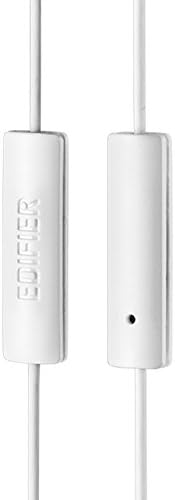
Figure 3: Inline microphone and control button.
- Sprejem / zaključevanje klicev: Za sprejem dohodnega klica enkrat pritisnite gumb za upravljanje. Ponovno ga pritisnite za končanje aktivnega klica.
- Predvajanje/začasna ustavitev glasbe: Press the control button once to play or pause audio playback.
- Preskakovanje skladb: Double-press the control button to skip to the next track. Triple-press to go to the previous track (functionality may vary by device and operating system).
- Glasovni asistent: Long-press the control button to activate your device's voice assistant (e.g., Siri, Google Assistant).
Video 1: Uradni izdelek je končanview of the Edifier P180 Classic Earbud Headsets, demonstrating features and usage.
6. Vzdrževanje
- Čiščenje: Slušalke in kabel nežno obrišite z mehko, suho krpo. Izogibajte se uporabi agresivnih kemikalij ali abrazivnih materialov.
- Shranjevanje: Ko slušalk ne uporabljate, jih shranjujte na čistem in suhem mestu, stran od ekstremnih temperatur in neposredne sončne svetlobe. Izogibajte se zapletanju kabla.
- Izogibajte se vlagi: Do not expose the headset to water or excessive moisture, as this can damage the internal components.
7. Odpravljanje težav
- Ni zvoka:
- Prepričajte se, da je 3.5 mm vtičnica popolnoma vstavljena v avdio vrata vaše naprave.
- Preverite nastavitve glasnosti v napravi.
- Slušalke preizkusite z drugo napravo, da izključite težavo, specifično za napravo.
- Mikrofon ne deluje:
- Prepričajte se, da je 3.5 mm vtičnica popolnoma vstavljena.
- Preverite nastavitve vhoda mikrofona v napravi.
- Preizkusite mikrofon z drugo napravo ali aplikacijo.
- Prekinjen zvok:
- Check the cable for any kinks or damage.
- Prepričajte se, da je avdio priključek čist in brez umazanije.
8. Specifikacije
| Funkcija | Specifikacija |
|---|---|
| Številka modela | P180 |
| Frekvenčni odziv | 20 Hz - 20,000 Hz |
| Priključek za slušalke | 3.5 mm Jack |
| Tehnologija povezljivosti | Žično |
| Teža predmeta | 1.76 unče (50 grama) |
| Dimenzije izdelka | 2.01 x 5.59 x 0.91 palcev |
| Material | Neodim |
| Vrsta nadzora | Inline Control Button |
| Impedanca | 32 Ohmov |
| Nadzor hrupa | Zvočna izolacija |
9. Garancija in podpora
The Edifier P180 headset is backed by a 1-letna garancija. For any support inquiries or warranty claims, please refer to the contact information provided with your purchase or visit the official Edifier webmesto.