
Supersonic IQ3710DJBT
Supersonic IQ Sound IQ-3710DJBT Portable DJ Speaker User Manual
Model: IQ-3710DJBT
Pomembna varnostna navodila
Please read all instructions carefully before operating this device. Keep this manual for future reference.
- Te naprave ne izpostavljajte dežju ali vlagi.
- Ne blokirajte prezračevalnih odprtin.
- Ne nameščajte v bližini virov toplote, kot so radiatorji, grelniki, peči ali druge naprave (vključno z amplifiers), ki proizvajajo toploto.
- Zaščitite napajalni kabel pred nagibanjem ali stiskanjem, zlasti na vtičih, ustreznih posodah in točki, kjer izstopajo iz naprave.
- Uporabljajte samo priključke/dodatke, ki jih je določil proizvajalec.
- Napravo izključite iz električnega omrežja med nevihtami ali ko je dlje časa ne uporabljate.
- Vsa servisna dela prepustite usposobljenemu servisnemu osebju. Servis je potreben, če je naprava kakor koli poškodovana.
Konec izdelkaview
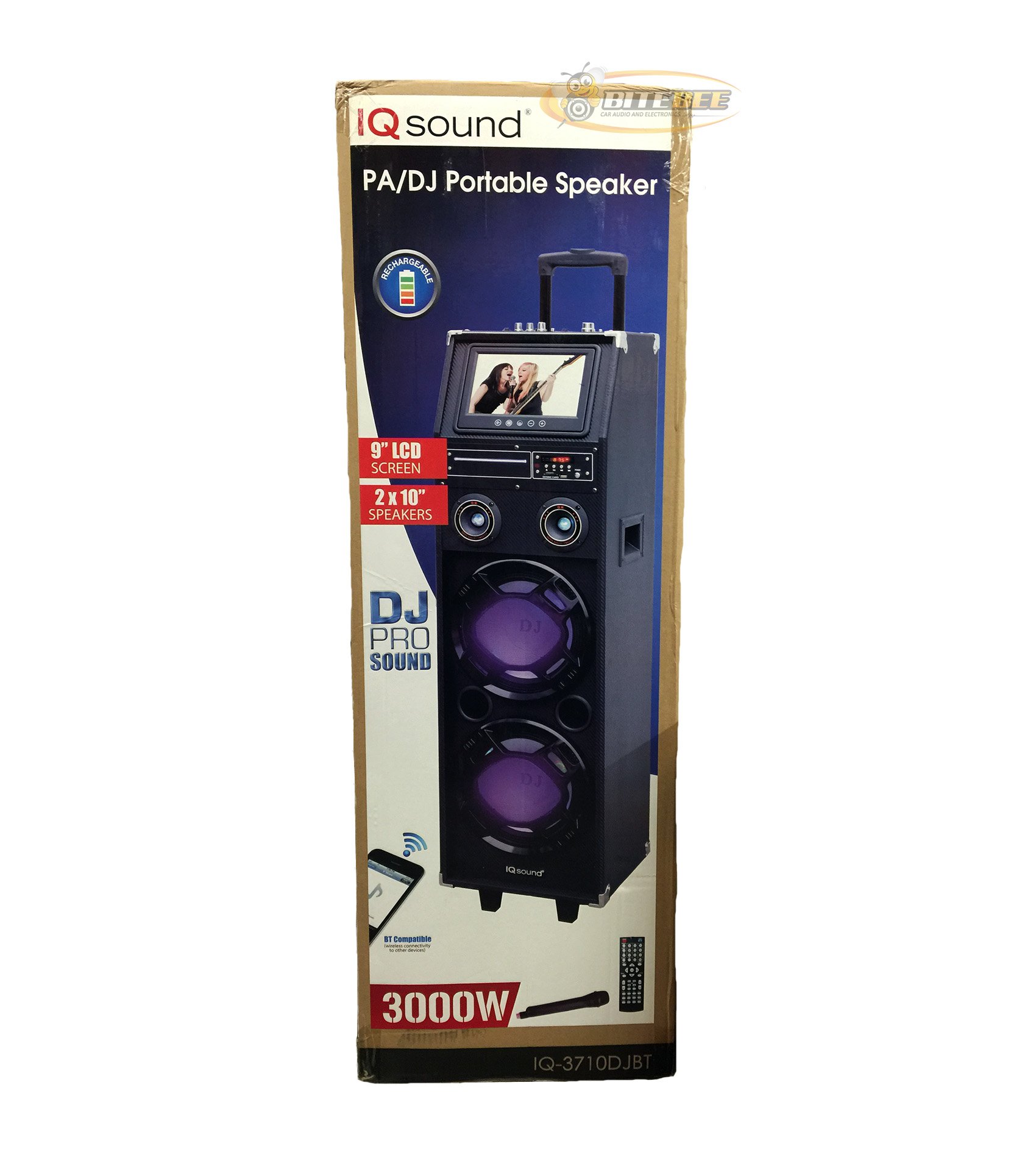
Slika: spredaj view of the Supersonic IQ Sound IQ-3710DJBT Portable DJ Speaker, showcasing its dual speakers, 9-inch LCD screen, and control panel.
Lastnosti
- Dual 10-inch Full Range Speakers
- Built-in Bluetooth for wireless audio streaming
- FM-sprejemnik
- 5-Band Equalizer for audio customization
- 9-inch LCD Display for video and menu navigation
- Built-in Rechargeable Battery for portability
- Integrated LED Lights for visual effects
- Multimedia Compatible (supports various video and music formats)
- USB Input for external audio devices
- SD Card Slot for media playback
- 1 Vhod za kitaro
- 1 Microphone Jack (includes 1 microphone)
- Priložen daljinski upravljalnik
- Built-in Handle and Wheels for easy transport
Vsebina paketa
- IQ-3710DJBT Portable DJ Speaker
- Napajalni adapter
- Mikrofon
- Daljinski upravljalnik
- Uporabniški priročnik (ta dokument)
Controls and Connections (General)
The main control panel is located on the top or rear of the speaker, featuring buttons for power, mode selection, playback controls (play/pause, skip), volume adjustment, EQ settings, and light controls. Input ports for USB, SD card, microphone, and guitar are also present. The 9-inch LCD display provides visual feedback for media playback, FM radio tuning, and menu navigation.
Nastavitev
1. Polnjenje baterije
- Connect the included power adapter to the speaker's DC input port.
- Plug the power adapter into a standard wall outlet (AC 100-240V, 50/60Hz).
- The charging indicator light (if present) will illuminate. Allow approximately 6-8 hours for a full charge before first use.
- The speaker can be used while charging.
2. Začetni vklop
- Ensure the speaker is fully charged or connected to a power source.
- Locate the Power button (usually on the control panel) and press it to turn on the speaker.
- The LCD display will illuminate, and the speaker will enter the default mode.
3. Povezovanje zunanjih naprav
Mikrofon: Insert the included microphone's cable into the Microphone Jack.
Kitara: Insert your guitar's cable into the Guitar Input.
Navodila za uporabo
Izbira načina
Pritisnite NAČIN button on the control panel or remote control to switch between available modes: Bluetooth, FM Radio, USB, SD, and AUX (if applicable). The current mode will be displayed on the LCD screen.
Bluetooth delovanje
- Turn on the speaker and switch to Način Bluetooth using the MODE button. The LCD will display "Bluetooth" or a similar indicator.
- V napravi, ki podpira Bluetooth (npr. pametni telefon, tablični računalnik), omogočite Bluetooth in poiščite razpoložljive naprave.
- Izberite "IQ-3710DJBT" s seznama naprav.
- Once paired, the speaker will emit a confirmation sound, and you can now play audio wirelessly from your device.
- Use your device or the speaker's controls for playback (play/pause, skip tracks, volume).
Delovanje radia FM
- Preklopi na Način FM radia using the MODE button.
- Pritisnite PREDVAJAJ/PAVZA button (or a dedicated scan button) to automatically scan and save available FM stations.
- Uporabite PREJŠNJI/NAPREJ gumbe za navigacijo po shranjenih postajah.
- Adjust the volume using the main volume knob or remote control.
Predvajanje s kartice USB/SD
- Vstavite bliskovni pogon USB v vrata USB ali SD kartico v Reža za kartico SD.
- The speaker should automatically switch to USB or SD mode and begin playing media. If not, press the NAČIN gumb za izbiro pravilnega vnosa.
- Use the playback controls (play/pause, previous/next) on the speaker or remote to manage your media.
- The 9-inch LCD display will show file information and video playback (if applicable).
Prilagoditev izenačevalnika (EQ).
The 5-band EQ allows you to fine-tune the audio output. Locate the EQ controls on the speaker's panel. Adjust the sliders or knobs for different frequency bands (e.g., bass, mid-range, treble) to achieve your desired sound profile.
Microphone and Guitar Use
Once connected, adjust the individual volume controls for the microphone and guitar (if available) on the speaker's control panel. The main volume knob controls the overall output.
Nadzor LED luči
Pritisnite LUČI button (or similar) on the control panel or remote to cycle through different light modes or to turn the lights on/off.
LCD zaslon
The 9-inch LCD display shows current mode, track information, FM frequency, and can play video files from USB or SD card. Navigate menus using the dedicated navigation buttons or remote control.
Vzdrževanje
- Čiščenje: Use a soft, dry cloth to clean the exterior of the speaker. Do not use abrasive cleaners or solvents. For the LCD screen, use a screen-specific cleaning solution and a microfiber cloth.
- Vzdrževanje baterije: To prolong battery life, fully charge the speaker before first use and recharge it regularly, even if not in frequent use. Avoid completely draining the battery. Store in a cool, dry place.
- Shranjevanje: When not in use for extended periods, store the speaker in a cool, dry environment, away from direct sunlight and extreme temperatures.
- Prevoz: Utilize the built-in handle and wheels for easy and safe transport of the speaker.
Odpravljanje težav
| Težava | Možen vzrok | rešitev |
|---|---|---|
| Zvočnik se ne vklopi. | Battery is drained or power adapter is not connected. | Connect the power adapter and charge the speaker. Ensure the power outlet is functional. |
| Ni zvoka. | Volume is too low, incorrect mode selected, or device not properly connected. | Increase volume. Verify correct mode (Bluetooth, USB, FM). Reconnect Bluetooth device or reinsert USB/SD card. Check microphone/guitar connections. |
| Bluetooth seznanjanje ne uspe. | Speaker not in Bluetooth mode, device too far, or interference. | Ensure speaker is in Bluetooth mode. Move device closer to speaker. Turn off and on Bluetooth on your device. Try pairing again. |
| Sprejem FM radia je slab. | Šibek signal ali motnje. | Relocate the speaker to an area with better reception. Perform an auto-scan again. |
| USB/SD media not playing. | Nepodprto file format, corrupted media, or improper insertion. | Ensure media is inserted correctly. Check file formats (refer to specifications for supported types). Try a different USB drive or SD card. |
Specifikacije
- Model: IQ-3710DJBT
- Znamka: Nadzvočno
- Vrsta zvočnika: Prenosni DJ zvočnik
- Govorci: 2 x 10-inch Full Range
- Zaslon: 9-palčni LCD
- Povezljivost: Bluetooth, USB
- Vhodi: USB, SD Card, Microphone (1), Guitar (1)
- Radio: FM sprejemnik
- Izenačevalnik: 5-pasovni EQ
- vir energije: Built-in Rechargeable Battery, AC Power Adapter
- Dimenzije (D x Š x V): 15 x 14 x 45 palcev (približno)
- Teža: 54 funta (približno)
- Priloženi dodatki: Microphone, Remote Control, Power Adapter
Garancija in podpora
This product comes with a standard manufacturer's warranty. For specific warranty terms and conditions, please refer to the warranty card included in your package or visit the official Supersonic webmesto.
For technical support, service inquiries, or to purchase replacement parts, please contact Supersonic customer service. Contact information can typically be found on the product packaging or the official brand webmesto.
Spletna podpora: www.supersonicinc.com (To je nadomestna povezava, preverite dejansko podporo URL.)
Ask a question about this manual
Ask about setup, troubleshooting, compatibility, parts, safety, or missing instructions. Manuals+ will review the question and use this page’s manual context to help answer it.