
Uvod
This manual provides instructions for the setup, operation, and maintenance of your TFA Dostmann 30.3208.02 wireless thermo-hygrometer sensor. This device is designed for the wireless transmission of outdoor temperature and humidity data to a compatible base station (sold separately). It features a display that shows current temperature and humidity readings and can be configured for channels 1-8.
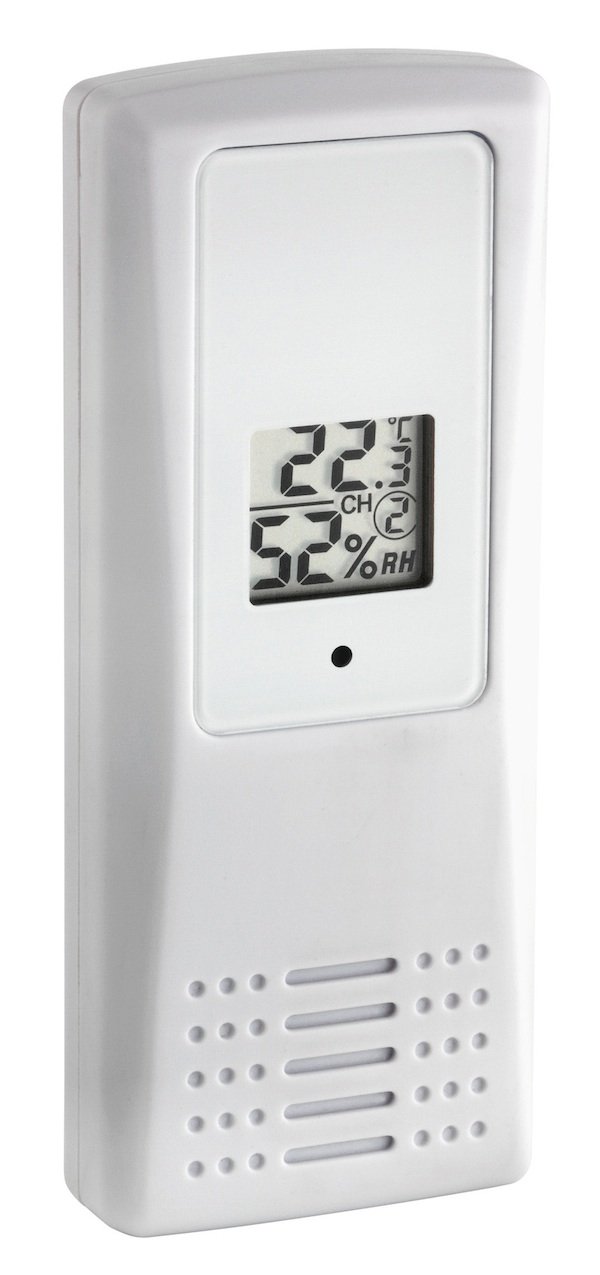
Image: TFA Dostmann 30.3208.02 Wireless Thermo-Hygrometer Sensor, showing its digital display with temperature and humidity readings.
Nastavitev
- Namestitev baterije: Open the battery compartment on the back of the sensor. Insert two (2) 1.5V AAA batteries, ensuring correct polarity (+/-). Close the battery compartment securely.
- Izbira kanala: Locate the channel selection switches (usually DIP switches) inside the battery compartment or on the back of the device. Set the desired channel (1-8) to match the channel configured on your compatible base station. This ensures proper communication between the sensor and the base station.
- Umestitev:
- The sensor can be hung using the integrated hanging hole or placed upright on a flat surface using its stand.
- For outdoor use, choose a location that is protected from direct sunlight and precipitation to ensure accurate readings and prolong the device's lifespan. Avoid placing it near heat sources or reflective surfaces.
- Ensure the sensor is within the wireless transmission range of your base station. Obstacles like thick walls can reduce range.
- Pairing with Base Station: Refer to your base station's manual for specific instructions on how to pair it with a new external sensor. Typically, this involves activating a search function on the base station after the sensor is powered on and its channel is set.
Navodila za uporabo
Once successfully paired with your base station, the TFA Dostmann 30.3208.02 sensor will automatically begin transmitting temperature and humidity data. The sensor's integrated display will show the current temperature and humidity readings directly.
- Prikaz temperature: The upper part of the display shows the current temperature in degrees Celsius (°C) or Fahrenheit (°F), depending on the unit setting of your base station or if the sensor has a unit switch (check device for specific switch).
- Prikaz vlažnosti: The lower part of the display shows the current relative humidity in percentage (% relativne vlažnosti).
- Kazalnik kanala: The display may also show the active channel number (e.g., "CH 1") to confirm its current setting.
The sensor continuously measures and transmits data at regular intervals. Consult your base station's manual for information on viewing historical data, setting alarms, or other advanced features.
Vzdrževanje
- Čiščenje: Clean the sensor's exterior regularly with a soft, damp krpo. Ne uporabljajte abrazivnih čistil ali topil, saj lahko poškodujejo plastično površino.asing ali zaslon.
- Zamenjava baterije: When the display becomes dim or the base station indicates a low battery, replace both AAA batteries. Always replace both batteries at the same time with new ones of the same type. Dispose of used batteries according to local regulations.
- Varstvo okolja: While designed for outdoor use, the sensor is not fully waterproof. It is recommended to protect it from direct rain and heavy moisture. Consider using a protective cover, such as the TFA Dostmann 98.1114.02 Weather Protection Housing, for enhanced durability in exposed outdoor conditions.

Image: Optional TFA Dostmann 98.1114.02 Weather Protection Housing, which can be used to protect the sensor from direct rain and harsh weather conditions.
Odpravljanje težav
- No Readings on Base Station:
- Prepričajte se, da so baterije pravilno vstavljene in niso izpraznjene. Po potrebi jih zamenjajte.
- Verify that the sensor's channel setting matches the channel selected on your base station.
- Check the distance between the sensor and the base station. Reduce obstacles and ensure they are within range.
- Re-initiate the pairing process on your base station as per its instruction manual.
- Confirm compatibility between your base station and the 30.3208.02 sensor.
- Netočni odčitki:
- Ensure the sensor is not exposed to direct sunlight, which can artificially inflate temperature readings.
- Verify the sensor is not near heat sources (e.g., vents, appliances) or sources of moisture (e.g., sprinklers).
- Clean the sensor's ventilation openings to ensure proper air circulation.
- Prekinjena povezava:
- Relocate the sensor or base station to improve signal strength.
- Preverite morebitne vire motenj (npr. druge brezžične naprave, veliki kovinski predmeti).
Specifikacije
| Model: | 30.3208.02 |
| Znamka: | TFA Dostmann |
| Funkcija: | Wireless Thermo-Hygrometer Sensor |
| Območje merjenja temperature: | -40 ° C do +60 ° C (-40 ° F do +140 ° F) |
| Temperaturna ločljivost: | 0.1 °C |
| Območje merjenja vlažnosti: | Not explicitly stated, but implied by "thermo-hygrometer" |
| Napajanje: | 2 x 1.5V AAA baterije |
| Povezljivost: | Brezžično, 433 MHz |
| Vrsta zaslona: | Digitalno |
| Dimenzije: | 45 x 20 x 110 mm |
| Teža: | 52 g |
| Material: | Plastika |
| Uporaba: | Na prostem |
Garancija in podpora
For warranty information or technical support, please contact TFA Dostmann directly or refer to their official webspletno mesto. Shranite račun kot dokazilo o nakupu.
Proizvajalec: TFA Dostmann
Webspletno mesto: www.tfa-dostmann.de (Please note: This link is for informational purposes and may not be the exact support page.)