
1. Uvod
This manual provides essential information for the safe and efficient operation of your InFocus IN112a SVGA DLP Projector. Please read it thoroughly before using the projector and retain it for future reference. The InFocus IN112a is designed to deliver clear and bright projections for various applications, featuring SVGA resolution, HDMI connectivity, and 3D support.
2. Varnostne informacije
Za preprečitev poškodb projektorja in zagotovitev varnosti uporabnika upoštevajte naslednje varnostne ukrepe:
- Do not look directly into the projector lens ko je lamp je vklopljena. Močna svetloba lahko povzroči poškodbe oči.
- Zagotovite ustrezno prezračevanje. Ne blokirajte prezračevalnih odprtin.
- Only qualified service personnel should open the projector casing. V notranjosti ni delov, ki bi jih lahko uporabnik servisiral.
- Uporabljajte samo napajalni kabel, ki je priložen projektorju.
- Projektor naj ne bo v bližini vode ali vlažnih okolij.
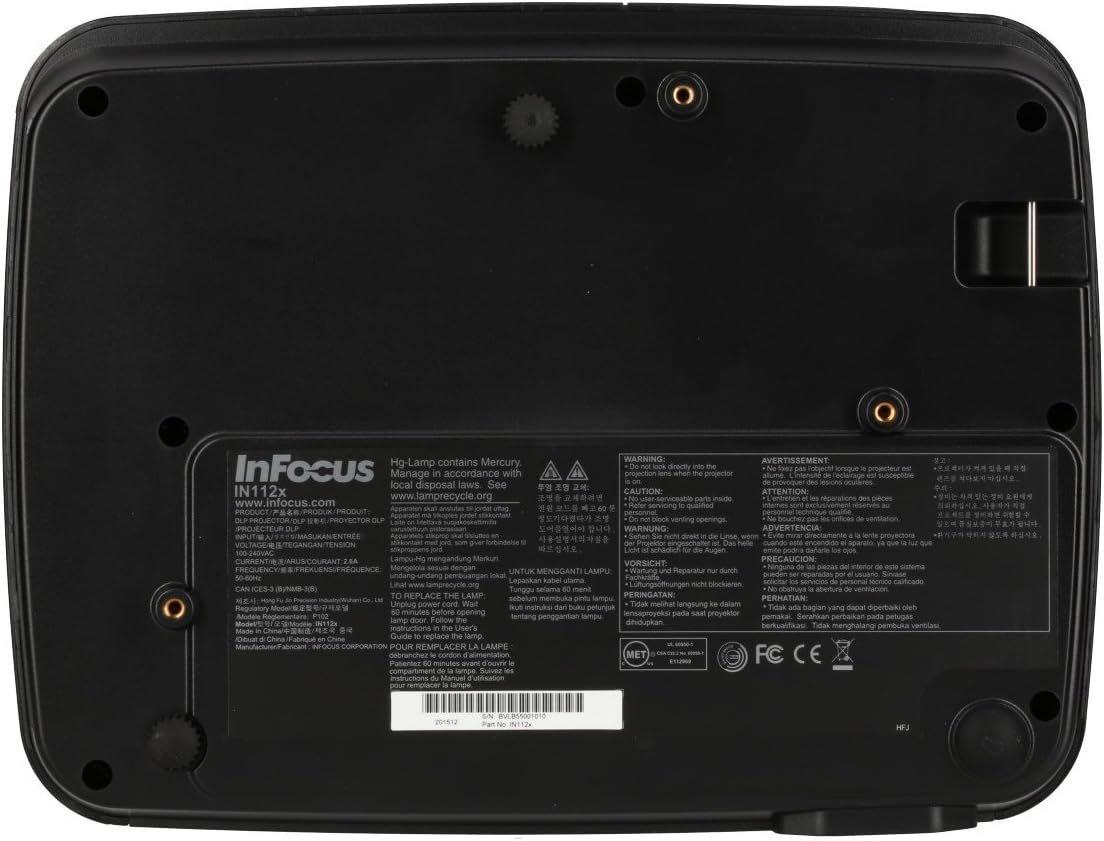
- Projektor lamp contains mercury. Dispose of lamps according to local regulations. Visit www.lamprecycle.org za več informacij.

Slika: Spodaj view of the InFocus IN112a projector, displaying various warning labels, regulatory compliance marks (like CE, FCC), and information regarding the mercury content in the lamp in navodila za recikliranje.
3. Izdelek je končanview
3.1. Projector Dimensions

Slika: spredaj view of the InFocus IN112a projector, illustrating its physical dimensions. The projector measures approximately 292 mm in width, 220 mm in depth, and 108 mm in height.
3.2. Kontrolniki na zgornji plošči
Slika: Zgoraj view of the InFocus IN112a projector, highlighting the control panel. This panel includes buttons for power, menu access, source selection, and directional navigation for menu adjustments.
The top panel features buttons for power on/off, menu access, input source selection, and navigation arrows for adjusting settings within the on-screen display (OSD) menu. The focus and zoom rings are located near the lens.
3.3. Priključki na zadnji plošči

Slika: Zadaj view of the InFocus IN112a projector, displaying its comprehensive array of connectivity ports. These include HDMI 1.4, two VGA inputs (Computer 1, Computer 2), a VGA monitor output, S-Video, Composite video, two 3.5mm stereo audio inputs, one 3.5mm stereo audio output, an RS232C control port, and a USB-B port.
The rear panel provides a variety of connection options:
- HDMI 1.4: Za digitalni video in avdio vhod.
- VGA (Computer 1, Computer 2): Two inputs for analog computer signals.
- VGA Monitor Out: Za priklop zunanjega monitorja.
- Kompozitni video: For standard definition video input.
- S-Video: For enhanced standard definition video input.
- Audio In (3.5mm x 2): For stereo audio input.
- Zvočni izhod (3.5 mm): For stereo audio output to external speakers.
- RS232C: Za upravljanje projektorja prek računalnika ali krmilnega sistema.
- USB-B: Za servis ali posodobitve vdelane programske opreme.
4. Nastavitev
4.1. Umestitev
Position the projector on a stable, flat surface or mount it securely to a ceiling. Ensure there is adequate space around the projector for ventilation. The distance from the screen will determine the image size. Refer to the specifications section for throw ratio details.
4.2. Priključitev napajanja
Connect the supplied power cord to the projector's power inlet and then to a grounded electrical outlet. The power LED will illuminate, indicating standby mode.
4.3. Povezovanje video virov
Connect your video source (e.g., computer, Blu-ray player, cable box) to the appropriate input port on the projector's rear panel using a compatible cable. For best quality, use the HDMI input.
- HDMI: Connect an HDMI cable from your source to the projector's HDMI port.
- VGA: Connect a VGA cable from your computer to either the Computer 1 or Computer 2 port.
- Composite/S-Video: Connect the respective cable for older video sources.
4.4. Priključitev zvoka
If using VGA, Composite, or S-Video inputs, connect an audio cable from your source's audio output to one of the projector's 3.5mm Audio In ports. HDMI carries both video and audio, so a separate audio connection is not typically needed for HDMI sources.
4.5. Adjusting Focus and Zoom
After powering on the projector and displaying an image, rotate the Fokusni obroč around the lens until the image is sharp and clear. Use the Obroč za povečavo da prilagodite velikost slike velikosti zaslona.
5. Delovanje
5.1. Vklop/izklop
- Za vklop: Press the Power button on the projector's top panel or the remote control. The power indicator will turn green.
- Za izklop: Press the Power button twice. The projector will enter a cooling cycle, and the power indicator will turn red (standby) once complete.
5.2. Izbira vhodnega vira
Press the "Source" button on the projector or remote control repeatedly to cycle through available input sources (HDMI, VGA1, VGA2, S-Video, Video). The projector will automatically detect an active signal if "Auto Source" is enabled in the menu.
5.3. Navigacija po meniju
Press the "Menu" button to access the On-Screen Display (OSD) menu. Use the directional arrows to navigate through menu options and the "Enter" button to select. Press "Menu" again to exit.
5.4. 3D Content Playback
The IN112a supports 3D content from Blu-ray players, cable boxes, dish services (over HDMI), and PC-based 3D content at 120Hz. To view 3D content, you will need 144 Hz DLP Link 3D glasses (sold separately).
- Ensure your 3D source is connected via HDMI.
- Play 3D content from your source.
- Turn on your 144 Hz DLP Link 3D glasses. The projector should automatically detect the 3D signal.
6. Vzdrževanje
6.1. Cleaning the Projector Lens
Lečo nežno obrišite z mehko krpo, ki ne pušča vlaken in je posebej zasnovana za optične površine. Ne uporabljajte abrazivnih čistil ali prekomerne sile, saj lahko lečo opraskate.
6.2. Lamp Zamenjava
Projektor lamp has a lifespan of up to 10,000 hours. When the lamp life is nearing its end, a warning message may appear, or the lamp indicator LED may illuminate. Refer to the full service manual for detailed lamp navodila za zamenjavo. Opozorilo: lamp vsebuje živo srebro. Rabljeno lamps according to local environmental regulations.
6.3. Cleaning Air Filters
Regularly clean the air filters to ensure proper ventilation and prevent overheating. Dust and debris can accumulate, reducing cooling efficiency. Gently remove the filter cover and clean the filter with a soft brush or vacuum cleaner. Replace the filter cover securely.
7. Odpravljanje težav
| Težava | Možen vzrok | rešitev |
|---|---|---|
| Nobena slika ni prikazana |
|
|
| Slika je zamegljena |
|
|
| Brez zvoka |
|
|
| Projektor se pregreje in izklopi |
|
|
8. Specifikacije
| Funkcija | Podrobnost |
|---|---|
| Številka modela | IN112X |
| Tehnologija zaslona | DLP |
| Izvorna ločljivost | SVGA (800 x 600) |
| Svetlost | Do 3200 Lumens |
| Kontrastno razmerje | 15,000:1 |
| Lamp življenje | Do 10,000 ur |
| Povezljivost | HDMI 1.4, VGA x 2, Composite video, S-Video, 3.5 mm stereo in x 2, 3.5mm stereo out, VGA monitor out, RS232C, USB-B |
| 3D podpora | Yes (requires 144 Hz DLP Link 3D glasses) |
| Izmetno razmerje | 1.9 - 2.09 |
| Dimenzije izdelka | 14.25 x 12 x 7.75 palca (približno 36.2 x 30.5 x 19.7 cm) |
| Teža predmeta | 5.4 funta (približno 2.45 kg) |
| Priporočena uporaba | Notranji/zunanji |
| Posebna funkcija | Vgrajeni zvočniki |
9. Garancija in podpora
For warranty information and technical support, please refer to the documentation included with your purchase or visit the official InFocus webspletnega mesta. Shranite dokazilo o nakupu za uveljavljanje garancije.