
Uvod
This manual provides detailed instructions for the EMOS E0042 Wireless Digital Thermometer. This device is designed to accurately measure and display both indoor and outdoor temperatures using a main unit and a remote wireless sensor. Please read this manual thoroughly before use to ensure proper operation and longevity of your device.

Image showing the EMOS E0042 Wireless Digital Thermometer in its retail packaging.
Vsebina paketa
The EMOS E0042 package includes the following components:
- 1x EMOS E0042 Main Display Unit
- 1x EMOS Wireless Outdoor Sensor

Image showing the EMOS E0042 main display unit and the wireless outdoor sensor.
Lastnosti izdelka
The EMOS E0042 Wireless Digital Thermometer offers a range of features for convenient temperature monitoring:
- Clear and easy-to-read LCD display with large digits.
- Simultaneous display of indoor and outdoor temperatures.
- Wireless outdoor sensor with a transmission range of up to 100 meters (open area).
- Temperature measurement range: Indoor 0 °C to 60 °C, Outdoor -40 °C to +60 °C.
- Temperature resolution: 0.1 °C.
- Main unit suitable for tabletop placement or wall mounting.
- Sensor designed for outdoor use.
- Powered by AAA batteries (not included).
Icon indicating indoor and outdoor temperature measurement capabilities.
Nastavitev
1. Namestitev baterije
The main unit and the wireless sensor each require 2x AAA 1.5V batteries (not included).
Glavna prikazovalna enota:
- Locate the battery compartment on the back of the main display unit.
- Odprite pokrov prostora za baterije.
- Vstavite 2 bateriji AAA in pazite na pravilno polarnost (+/-).
- Trdno zaprite pokrov prostora za baterije.
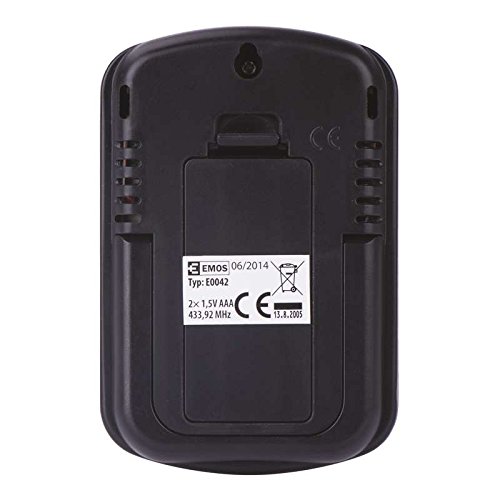
Zadaj view of the EMOS E0042 main display unit, showing the battery compartment and wall-mount hole.
Brezžični zunanji senzor:
- Locate the battery compartment on the back of the wireless outdoor sensor.
- Odprite pokrov prostora za baterije.
- Vstavite 2 bateriji AAA in pazite na pravilno polarnost (+/-).
- Trdno zaprite pokrov prostora za baterije.
- The sensor will automatically begin transmitting data.
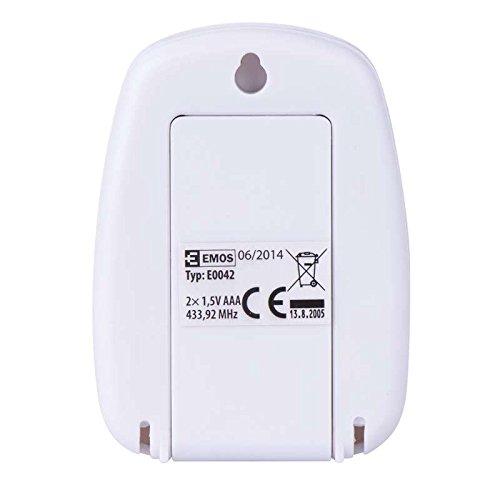
Zadaj view of the EMOS wireless outdoor sensor, showing the battery compartment.
2. Združevanje senzorjev
The main unit and sensor should automatically pair once batteries are installed. If the outdoor temperature is not displayed, ensure both units are within range and try re-inserting the batteries in both units.
3. Umestitev
Glavna prikazovalna enota:
Place the main unit indoors on a flat surface using its integrated stand, or mount it on a wall using the hanging hole on the back. Ensure it is in a location where the display is easily visible and not exposed to direct sunlight or extreme temperature fluctuations.
Stran view of the EMOS E0042 main display unit, showing its integrated stand for tabletop placement.
Brezžični zunanji senzor:
Position the wireless sensor outdoors in a shaded area, protected from direct rain and sunlight, to ensure accurate temperature readings. The maximum effective range between the sensor and the main unit is 100 meters in an open area. Walls, obstacles, and electronic interference can reduce this range.
Navodila za uporabo
Odčitavanje temperatur
Once powered on and paired, the main display unit will show two temperature readings:
- IZHOD: This indicates the outdoor temperature measured by the wireless sensor.
- IN: This indicates the indoor temperature measured by the main display unit itself.
The temperature is displayed in degrees Celsius (°C).
Zaslon
The large LCD screen provides clear, simultaneous readings of both indoor and outdoor temperatures.
Vzdrževanje
Čiščenje
Za čiščenje naprave jo obrišite z mehko, damp krpo. Ne uporabljajte abrazivnih čistil ali topil, saj lahko poškodujejo zaslon aliasing.
Zamenjava baterije
When the display becomes dim or readings are inconsistent, it is time to replace the batteries in both the main unit and the wireless sensor. Follow the battery installation steps outlined in the "Setup" section.
Odpravljanje težav
| Težava | Možen vzrok | rešitev |
|---|---|---|
| Na glavni enoti ni prikaza. | Baterije so prazne ali nepravilno vstavljene. | Preverite polarnost baterij in jih zamenjajte z novimi baterijami AAA. |
| Outdoor temperature not displayed or shows "--". | Sensor out of range, batteries dead, or interference. | Move sensor closer to the main unit. Replace sensor batteries. Ensure no strong electronic interference sources are nearby. Re-pair by removing and re-inserting batteries in both units. |
| Netočni odčitki temperature. | Senzor je izpostavljen neposredni sončni svetlobi, dežju ali virom toplote. | Relocate the sensor to a shaded, protected area. Ensure proper ventilation around both units. |
Specifikacije
| Funkcija | Podrobnost |
|---|---|
| Številka modela | E0042 |
| Znamka | EMOS |
| Notranji temperaturni razpon | 0 °C do 60 °C |
| Območje zunanje temperature | -40 °C do +60 °C |
| Temperaturna ločljivost | 0.1 °C |
| Brezžično Domet | Do 100 metrov (odprto območje) |
| Pogostost | 433 MHz |
| Napajanje glavne enote | 2x AAA 1.5V baterije (niso priložene) |
| Senzorski napajalnik | 2x AAA 1.5V baterije (niso priložene) |
| Dimenzije glavne enote (D x Š x V) | 8.5 x 5.6 x 1.8 cm |
| Mere senzorja (D x Š x V) | 6.8 x 4.9 x 2.0 cm |
| Vrsta zaslona | Digitalni LCD |
| Tehnologija povezljivosti | RF (radijska frekvenca) |
| Material | Plastika |
| Certifikati | CE |
Varnostne informacije
For detailed safety guidelines and important warnings, please refer to the official Safety Information PDF document provided by the manufacturer. Prenesi varnostne informacije (PDF)
Garancija in podpora
EMOS products are manufactured to high-quality standards. For warranty information or technical support, please contact your retailer or the official EMOS customer service. Keep your purchase receipt as proof of purchase.