
COTEK SP-1000-224
Cotek SP-1000-224 Pure Sine Wave Inverter User Manual
Model: SP-1000-224 | Brand: COTEK
1. Uvod
This manual provides detailed instructions for the installation, operation, and maintenance of the Cotek SP-1000-224 Pure Sine Wave Inverter. This inverter is designed to convert 24VDC power to 230VAC, providing a stable and reliable power source for various applications.
Ključne značilnosti:
- Čisti sinusni izhod za občutljivo elektroniko.
- Power ON / OFF remote control capability (Green Terminal).
- Input & output fully isolated for enhanced safety.
- Temperature & load controlled cooling fan for optimal performance.
- Uporabniku prijazen vmesnik.
- Output frequency (50/60 Hz) selectable via DIP switch.
- Izhodna voltage selectable via DIP switch.
- Power saving mode adjustable via variable resistor.
- 3-color LED status indicators for easy monitoring.
- Comprehensive input protection: Reverse Polarity (Fuse), Under Voltage, Več lettage.
- Robust output protection: Short Circuit, Overload, Over Temperature.
- Type 1 Indoor Aluminum Enclosure.
- E13 / UL / CE / FCC approved.
2. Varnostne informacije
WARNING: Please read and understand all safety instructions before installing or operating this inverter. Failure to follow these instructions may result in electric shock, fire, serious injury, or death.
- Električna nevarnost: This unit produces high voltage. Do not open the inverter casing. Vsa servisna dela prepustite usposobljenemu osebju.
- Varnost baterije: Work in a well-ventilated area. Batteries can produce explosive gases. Do not smoke or allow sparks or flames near the battery.
- Pravilno prezračevanje: Ensure adequate airflow around the inverter. Do not block ventilation openings.
- Okoljski pogoji: Do not expose the inverter to rain, moisture, or excessive dust. Operate in a dry, cool environment.
- Ozemljitev: The inverter must be properly grounded. Follow all local and national electrical codes.
- Nosilnost: Do not exceed the inverter's rated power output. Overloading can cause damage to the inverter and connected devices.
- Opozorilo kalifornijskega predloga 65: Ta izdelek lahko vsebuje materiale, ki jih opozarja kalifornijski predlog 65.
3. Izdelek je končanview in komponente
Familiarize yourself with the various parts of your Cotek SP-1000-224 Pure Sine Wave Inverter.

Slika 3.1: Pod kotom view of the Cotek SP-1000-224 Pure Sine Wave Inverter, showing its blue aluminum casing and grey end caps with ventilation and connection ports.

Slika 3.2: Front panel of the inverter, featuring the AC output socket (Schuko type), a power switch, LED indicators, and DIP switches for configuration.

Slika 3.3: Rear panel of the inverter, showing the DC input terminals for battery connection, a remote control port (RJ45), and a green terminal block for remote ON/OFF control.

Slika 3.4: Stran view of the inverter, highlighting its robust blue aluminum heat sink casing designed for efficient heat dissipation.
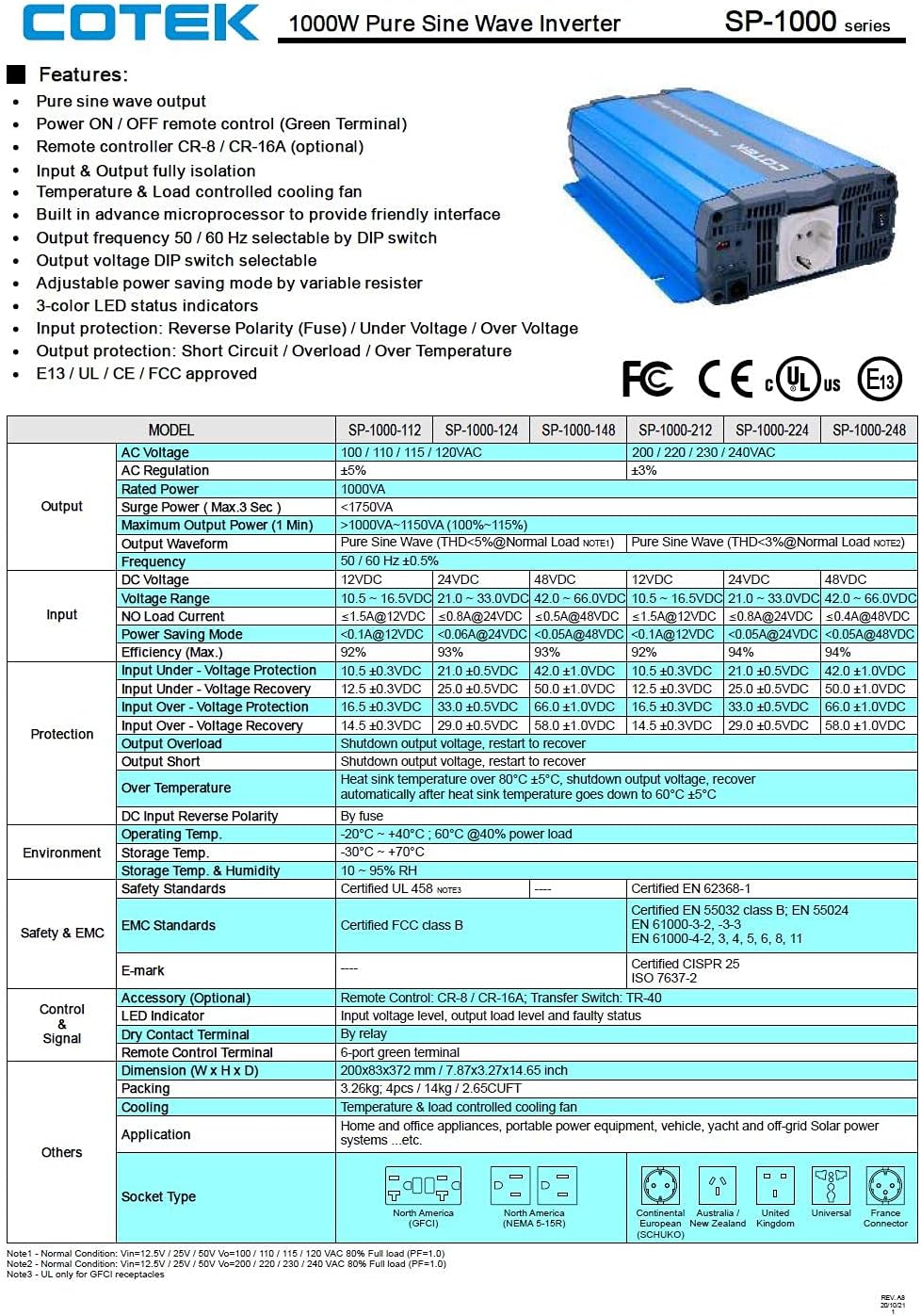
Slika 3.5: A detailed table outlining the features and technical specifications of the Cotek SP-1000 series inverters, including input/output parameters, protections, and certifications.

Slika 3.6: Mechanical drawings providing dimensions of the inverter, along with power voltage and power temperature curves illustrating performance characteristics.
4. Nastavitev in namestitev
4.1 Izbira lokacije:
- Install the inverter in a dry, cool, and well-ventilated area.
- Izogibajte se neposredni sončni svetlobi, virom toplote in vlagi.
- Ensure sufficient clearance around the inverter for proper airflow, especially around the cooling fan and ventilation openings.
- Mount the inverter securely on a stable, non-combustible surface.
4.2 DC Input Connection:
- Prepričajte se, da je stikalo za vklop pretvornika v položaju IZKLOP.
- Connect the positive (+) terminal of the 24VDC battery bank to the positive (+) DC input terminal on the inverter.
- Connect the negative (-) terminal of the 24VDC battery bank to the negative (-) DC input terminal on the inverter.
- Use appropriately sized cables to minimize voltage drop and ensure safe operation. Refer to electrical standards for cable sizing.
- Prepričajte se, da so vse povezave tesne in varne.
4.3 AC Output Connection:
- Plug your AC appliances directly into the AC output socket on the inverter.
- Ensure the total power consumption of all connected appliances does not exceed the inverter's 1000W continuous output rating.
4.4 Ozemljitev:
Proper grounding is essential for safety. Connect the inverter's chassis ground terminal to a reliable earth ground using a suitable grounding wire. Consult local electrical codes for specific grounding requirements.
4.5 Remote Control (Optional):
The inverter supports remote ON/OFF control via the green terminal block or an optional RJ45 remote control unit. Refer to the accessory manual for detailed instructions on connecting and using the remote control.
4.6 DIP Switch Configuration:
The inverter features DIP switches on the front panel to select output frequency (50/60 Hz) and output voltage. Refer to the table below for common settings. Ensure the inverter is OFF before changing DIP switch settings.
| Nastavitev | Položaj DIP stikala |
|---|---|
| Izhodna frekvenca 50Hz | Switch 1: OFF, Switch 2: OFF (Example, refer to actual product manual/Figure 3.5) |
| Izhodna frekvenca 60Hz | Switch 1: ON, Switch 2: OFF (Example, refer to actual product manual/Figure 3.5) |
| Izhodna voltage 230VAC | Switch 3: ON, Switch 4: OFF (Example, refer to actual product manual/Figure 3.5) |
Note: The exact DIP switch configurations for specific voltage and frequency settings are detailed in the product's full technical specifications (refer to Figure 3.5). Always verify settings before operation.
5. Delovanje
5.1 Powering On the Inverter:
- Ensure all DC and AC connections are secure and correct.
- If using the remote control, ensure it is connected and in the ON position.
- Flip the main power switch on the inverter's front panel to the "ON" position.
- Observe the 3-color LED status indicators. A green light indicates normal operation.
5.2 LED Status Indicators:
- zelena: Normalno delovanje.
- Rumena/jantarna: Warning (e.g., input voltage slightly low/high, minor overload). The inverter may continue to operate but requires attention.
- Rdeča: Fault condition (e.g., severe overload, short circuit, over-temperature, critical input voltage). The inverter will shut down to protect itself and connected devices.
5.3 Power Saving Mode:
The inverter features a power saving mode, adjustable via a variable resistor. This mode reduces power consumption when no load or a very light load is detected. Adjust the resistor to set the sensitivity for entering/exiting power saving mode.
5.4 Powering Off the Inverter:
- Turn off all connected AC appliances.
- Flip the main power switch on the inverter's front panel to the "OFF" position.
- If using a remote control, turn it off as well.
6. Vzdrževanje
Redno vzdrževanje zagotavlja dolgo življenjsko dobo in zanesljivo delovanje vašega inverterja.
- Čiščenje: Zunanjost pretvornika redno čistite s suho, mehko krpo. Ne uporabljajte tekočih čistil ali topil. Prepričajte se, da so prezračevalne odprtine brez prahu in umazanije.
- Povezave: Periodically check all DC and AC connections to ensure they are tight and free from corrosion. Loose connections can cause overheating and poor performance.
- Prezračevanje: Ensure the cooling fan and ventilation grilles are not obstructed. The fan operates based on temperature and load, so ensure it can draw and expel air freely.
- Zdravje baterije: Monitor the health of your battery bank. A weak or failing battery can negatively impact inverter performance and lifespan.
WARNING: Do not attempt to service the inverter yourself. There are no user-serviceable parts inside. Refer all servicing to qualified personnel.
7. Odpravljanje težav
This section provides solutions to common issues you might encounter with your inverter. If the problem persists after following these steps, contact customer support.
| Težava | Možen vzrok | rešitev |
|---|---|---|
| Inverter does not turn on (No LED indication) |
|
|
| Red LED is on, inverter shuts down |
|
|
| Yellow/Amber LED is on |
|
|
| Ni AC izhoda |
|
|
8. Tehnične specifikacije
The following table provides detailed technical specifications for the Cotek SP-1000-224 Pure Sine Wave Inverter. For a comprehensive overview, refer to Figure 3.5.
| Parameter | Value (SP-1000-224) |
|---|---|
| Model | SP-1000-224 |
| AC izhod Voltage | 230VAC (selectable) |
| DC vhod Voltage | 24 VDC |
| Neprekinjeno napajanje | 1000 W |
| Surge Power (3 sec) | 1750 VA |
| Izhodna valovna oblika | Čisti sinusni val (THD <3%) |
| Izhodna frekvenca | 50/60 Hz (izbirno) |
| Učinkovitost (maks.) | 92 % |
| Vnos pod Voltage Zaščita | 21.0 ± 0.5 VDC |
| Vnos nad voltage Zaščita | 33.0 ± 0.5 VDC |
| Delovna temperatura | -20°C ~ +40°C (60% power load) |
| Dimenzije (D x Š x V) | 17 x 10 x 6 palcev (približno) |
| Teža | 8.94 funtov |
| Certifikati | Odobreno E13 / UL / CE / FCC |
Note: Specifications are subject to change without notice. Always refer to the product label or manufacturer's official documentation for the most accurate and up-to-date information.
9. Informacije o garanciji
COTEK products are manufactured to high quality standards. For specific warranty terms and conditions, including duration and coverage, please refer to the warranty card included with your product or visit the official COTEK webspletnega mesta. Shranite dokazilo o nakupu za uveljavljanje garancije.
Typical warranties cover defects in materials and workmanship under normal use. Damage caused by improper installation, misuse, abuse, or unauthorized modifications is generally not covered.
10. Podpora strankam
If you have any questions, require technical assistance, or need to report an issue with your Cotek SP-1000-224 Pure Sine Wave Inverter, please contact COTEK customer support or your authorized dealer.
Ko se obrnete na podporo, imejte pripravljene naslednje podatke:
- Product Model: SP-1000-224
- Serial Number (if applicable, usually found on the product label)
- Datum nakupa
- Podroben opis težave, s katero se srečujete.
For the most up-to-date contact information, please visit the official COTEK webspletno mesto: www.cotek.com.tw (To je nadomestno besedilo URL, please verify the actual manufacturer webspletnem mestu).
Ask a question about this manual
Ask about setup, troubleshooting, compatibility, parts, safety, or missing instructions. Manuals+ will review the question and use this page’s manual context to help answer it.