
1. Uvod
This manual provides essential instructions for the setup, operation, maintenance, and troubleshooting of your IBM Lenovo Preferred Pro USB Wired Keyboard and Mouse Set. Please read this manual thoroughly before using the product to ensure proper functionality and longevity.
2. Izdelek je končanview
The IBM Lenovo Preferred Pro USB Wired Keyboard and Mouse Set offers a reliable input solution for your computer. The keyboard features a standard layout with a numeric keypad, while the mouse is a 2-button optical mouse with a scroll wheel. Both devices connect via a standard USB interface, providing plug-and-play compatibility with most operating systems.

Slika 2.1: Zgornji del view of the IBM Lenovo Preferred Pro USB Wired Keyboard.
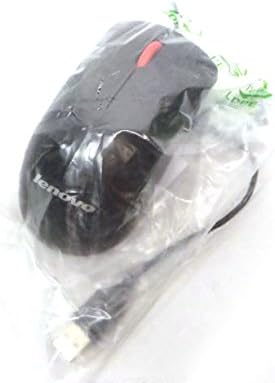
Slika 2.2: Zgornji del view of the Lenovo USB 2-Button Optical Mouse.
Ključne značilnosti:
- USB Wired Connectivity: Ensures a stable and reliable connection.
- Plug-and-Play: No additional drivers typically required for basic functionality.
- Standard Keyboard Layout: Full-size keyboard with numeric keypad.
- Optical Mouse: Precise tracking with a scroll wheel for easy navigation.
3. Nastavitev
Follow these steps to connect your keyboard and mouse to your computer.
- Razpakirajte naprave: Previdno vzemite tipkovnico in miško iz embalaže.
- Identify USB Connectors: Locate the USB connectors at the end of the keyboard and mouse cables.
- Povežite se z računalnikom: Insert the USB connector of the keyboard into an available USB port on your computer. Repeat this step for the mouse.
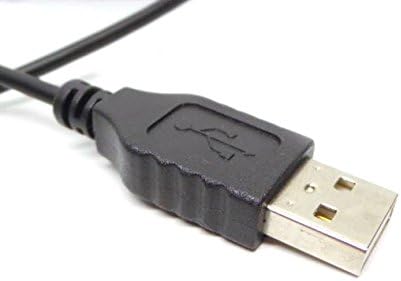
Figure 3.1: Close-up of a standard USB Type-A connector, used for connecting the keyboard and mouse.
Your computer should automatically detect and install the necessary drivers for the keyboard and mouse. No additional software installation is typically required for basic functionality.
4. Navodila za uporabo
4.1 Uporaba tipkovnice
- Tipkanje: Za vnos besedila uporabite alfanumerične tipke.
- Funkcijske tipke (F1–F12): These keys perform various functions depending on the application or operating system.
- Numerična tipkovnica: Use the dedicated numeric keypad for efficient data entry. Ensure the "Num Lock" indicator light is on.
- Posebne tipke: Utilize keys like "Print Screen", "Scroll Lock", "Pause/Break", "Insert", "Home", "Page Up", "Delete", "End", and "Page Down" for their respective functions.
4.2 Uporaba miške
- Gibanje: Move the mouse across a flat surface to control the cursor on the screen.
- Levi klik: Pritisnite levi gumb za izbiro elementov, odpiranje povezav ali aktiviranje funkcij.
- Desni klik: Press the right button to open context menus.
- Kolesce za pomikanje: Za navigacijo po dokumentih ali web strani. Drsno kolesce lahko deluje tudi kot srednji klik.
5. Vzdrževanje
Proper care and maintenance will extend the life of your keyboard and mouse.
- Čiščenje:
- Disconnect devices from the computer before cleaning.
- Uporabite mehko, damp cloth with a mild cleaning solution (e.g., water or isopropyl alcohol) to wipe surfaces.
- Avoid excessive moisture, especially near keycaps and optical sensors.
- Use compressed air to remove dust and debris from between keyboard keys.
- Shranjevanje: Store the devices in a clean, dry environment away from extreme temperatures and direct sunlight.
- Izogibajte se razlitjem: Keep liquids away from the keyboard and mouse to prevent damage.
6. Odpravljanje težav
If you encounter issues with your keyboard or mouse, refer to the following common problems and solutions:
| Težava | Možen vzrok | rešitev |
|---|---|---|
| Tipkovnica/miška se ne odziva | Ohlapna povezava USB, okvarjena vrata USB, težava z gonilnikom. |
|
| Keys not working or typing incorrectly | Debris under keys, software conflict, keyboard settings. |
|
| Kazalec miške se premika nepravilno ali se ne premika | Dirty optical sensor, unsuitable surface, software issue. |
|
If the problem persists after trying these solutions, contact customer support or your reseller for further assistance.
7. Specifikacije
| Funkcija | Podrobnost |
|---|---|
| Keyboard Model Numbers | 54Y9400, 41A5289, SK-8825, KB1021 |
| Mouse Model Numbers | 45J4888, 25011476, 45J4889, M-U0025-O |
| Znamka | IBM / Lenovo |
| barva | Črna |
| Tehnologija povezljivosti | USB žično |
| Vrsta tipkovnice | Preferred Pro USB Wired Keyboard |
| Vrsta miške | 2-Button Black Red Scroll Wheel Optical Mouse |
| Dimenzije paketa | 22 x 10.2 x 4.7 palcev (približno) |
| Teža predmeta | 1 funt (približno) |
| Proizvajalec | Lenovo |
8. Garancija in podpora
For warranty information, please refer to the documentation provided at the time of purchase or contact your reseller. IBM and Lenovo products typically come with a standard manufacturer's warranty.
For technical support or further inquiries, please contact the product's manufacturer or the authorized reseller from whom you purchased the item. Keep your purchase receipt and product model numbers handy for faster service.