
1. Uvod
This manual provides essential information for the proper installation, operation, and maintenance of your Master-Bilt MBCB60 Fusion Chef Stand. Please read these instructions thoroughly before operating the unit to ensure safe and efficient performance. Retain this manual for future reference.
2. Varnostne informacije
Observe all safety precautions to prevent injury and damage to the unit. This appliance is intended for commercial use only.
- Električna varnost: Ensure the unit is connected to a grounded 115 Volt electrical supply. Do not use extension cords. Disconnect power before any service or cleaning.
- Prezračevanje: Maintain adequate clearance around the refrigeration unit for proper airflow. Blocking vents can lead to overheating and reduced efficiency.
- Zmogljivost teže: Do not exceed the maximum weight capacity of the chef stand top surface. Refer to specifications for details.
- Vnetljivi materiali: Do not store flammable or explosive materials inside or near the unit.
- Premikanje enote: Use caution when moving the unit, especially on uneven surfaces. Ensure casters are locked once in position.
3. Izdelek je končanview
The Master-Bilt MBCB60 Fusion Chef Stand is a robust, stainless steel refrigerated base designed for commercial kitchens. It features two spacious drawers for cold storage and a durable top surface suitable for supporting cooking equipment.
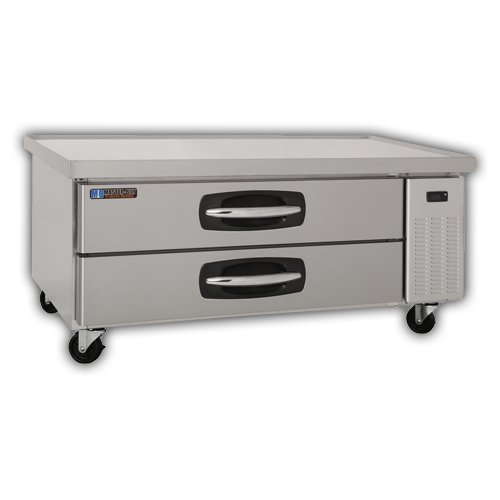
Ključne komponente:
- Zunanjost iz nerjavečega jekla: Vzdržljiv in enostaven za čiščenje.
- Refrigerated Drawers: Two pull-out drawers for organized cold storage.
- Kolesca: Four heavy-duty casters for mobility, with locking mechanisms.
- Nadzorna plošča: (Typically located near the refrigeration unit) For temperature adjustment and display.
- Condenser Unit: Located on the right side, responsible for cooling.
4. Nastavitev in namestitev
4.1 Razpakiranje
- Carefully remove all packaging materials, including any protective films or tapes.
- Inspect the unit for any shipping damage. Report any damage immediately to your supplier.
4.2 Namestitev
- Position the chef stand on a level, sturdy surface capable of supporting its weight plus the weight of any equipment placed on top.
- Ensure adequate ventilation. Maintain a minimum of 4 inches (10 cm) clearance from walls or other equipment on all sides, especially around the condenser unit.
- Avoid direct sunlight or proximity to heat-generating appliances (ovens, fryers) to optimize performance.
- Lock the casters once the unit is in its final position.
4.3 Električna povezava
- Connect the unit to a dedicated 115 Volt, 60 Hz, single-phase grounded electrical outlet.
- Ne uporabljajte adapterskih vtičev ali podaljškov.
- Verify that the power supply matches the requirements listed on the unit's data plate.
4.4 Začetno čiščenje
- Pred prvo uporabo očistite notranje in zunanje površine z blago milnico in vodo. Temeljito sperite in posušite.
5. Navodila za uporabo
5.1 Vklop
- After connecting to power, the unit will typically power on automatically or require a press of the power button on the control panel.
- Allow the unit to run for several hours empty to reach the desired temperature before loading with food products.
5.2 Nadzor temperature
- The digital control panel allows for precise temperature adjustment. Refer to the specific controller's instructions for detailed programming.
- Recommended operating temperature for food safety is typically between 33°F and 41°F (0.5°C and 5°C).
5.3 Loading Drawers
- Load drawers evenly to ensure proper airflow and temperature distribution.
- Do not block internal air vents.
- Ensure drawers are fully closed after each use to maintain temperature and energy efficiency.
6. Vzdrževanje in čiščenje
Regular maintenance ensures optimal performance and extends the lifespan of your chef stand.
6.1 Dnevno čiščenje
- Wipe down interior and exterior stainless steel surfaces with a soft cloth and mild, non-abrasive cleaner.
- Clean drawer gaskets to ensure a tight seal.
6.2 Monthly Cleaning (or as needed)
- Kondenzatorska tuljava: Disconnect power. Carefully clean the condenser coil using a brush or vacuum cleaner to remove dust and debris. A dirty coil reduces efficiency and can lead to compressor failure.
- Odtočna posoda: Inspect and clean the drain pan to prevent blockages and odors.
7. Odpravljanje težav
Preden se obrnete na servis, ponovnoview te pogoste težave in rešitve.
| Težava | Možen vzrok | rešitev |
|---|---|---|
| Enota se ne hladi | Težava z napajanjem Umazana tuljava kondenzatorja Door/drawer not sealed Nastavitev termostata | Preverite priključek za napajanje in odklopnik Očistite tuljavo kondenzatorja Ensure drawers are fully closed; check gaskets Adjust thermostat to lower setting |
| Prevelik hrup | Ohlapne komponente Oviranje ventilatorja Enota ni na nivoju | Preverite, ali so deli ohlapni, in jih privijte Check fan for obstructions Level the unit using caster adjustments |
| Voda na tleh | Zamašena odtočna cev Prekomerna vlažnost | Očistite odtočno cev Ensure drawers are closed; reduce ambient humidity if possible |
8. Specifikacije
| Funkcija | Podrobnost |
|---|---|
| Model | MBCB60 (02-72539) |
| Znamka | Master-Bilt |
| Dimenzije izdelka (Š x D x V) | 60 x 31 x 25.5 palcev |
| Teža predmeta | 250 funta |
| Zmogljivost | 9.8 kubičnih čevljev |
| Električne zahteve | 115 volta |
| Material | Nerjaveče jeklo |
| Vrsta namestitve | Samostoječ |
9. Garancija in podpora
For warranty information, technical support, or service inquiries, please contact Master-Bilt customer service or your authorized dealer. Keep your purchase receipt and model number (MBCB60) readily available when contacting support.
Master-Bilt Contact Information: Refer to the official Master-Bilt webNajnovejše kontaktne podatke najdete v dokumentaciji spletnega mesta ali izdelka.