
1. Uvod
Hvala za nakupasing the Mastech MS8230B Digital Multimeter. This device is a compact, battery-operated, handheld digital multimeter designed for measuring DC and AC voltage, DC current, resistance, diode, and transistor (hFE) tests. It features a large LCD display for easy reading and is built to international safety standards.
Please read this instruction manual thoroughly before using the multimeter to ensure safe and proper operation. Keep this manual for future reference.
2. Varnostne informacije
This multimeter is designed according to IEC 1010-1 international safety standards for electronic measuring instruments. It complies with CAT III 600V and CAT II 1000V overvoltage categories. Always adhere to the following safety precautions:
- Never exceed the maximum input limits for any function.
- Do not use the meter if the case is damaged or open.
- Ensure the test leads are in good condition, without any damaged insulation.
- Vedno izklopite napajanje tokokroga in izpraznite vse visokonapetostne baterijetage capacitors before measuring resistance, diodes, or hFE.
- Bodite izjemno previdni pri delu z voltagnad 60 V enosmernega toka ali 30 V izmeničnega toka (RMS), saj predstavljajo nevarnost električnega udara.
- Remove test leads from the circuit before changing functions or ranges.
- Baterijo takoj zamenjajte, ko se prikaže indikator nizke napolnjenosti baterije, da zagotovite natančne odčitke.
- Merilnika ne uporabljajte v okolju z eksplozivnimi plini, hlapi ali prahom.
3. Vsebina paketa
Verify that all items listed below are present and undamaged:
- Mastech MS8230B Digital Multimeter
- Merilni kabli (en par)
- 9V baterija (vnaprej nameščena ali priložena posebej)
- Uporabniški priročnik
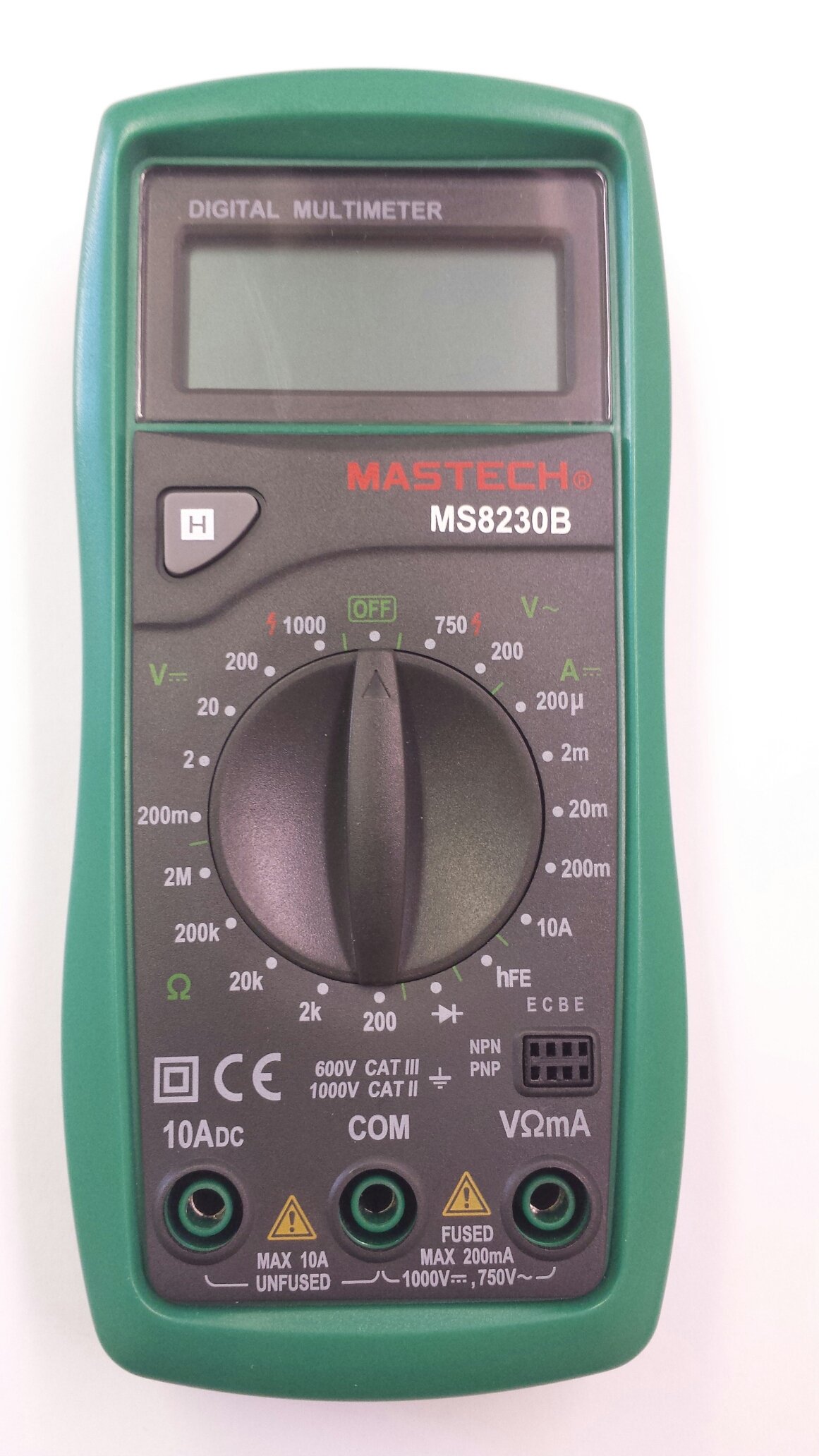
Image 1: Contents of the Mastech MS8230B package, including the multimeter, test leads, batteries, and user manual.
4. Nastavitev
4.1 Namestitev baterije
The MS8230B multimeter requires one 9V battery for operation. If the battery is not pre-installed or needs replacement:
- Prepričajte se, da je multimeter izklopljen in odklopite vse merilne kable.
- Poiščite pokrov predalčka za baterije na zadnji strani enote.
- Loosen the screw(s) on the battery cover and remove the cover.
- Connect the 9V battery to the battery connector, observing correct polarity.
- Vstavite baterijo v predal in namestite pokrov, ki ga pritrdite z vijakom(-i).
4.2 Priključitev merilnih vodnikov
Vedno pravilno priključite merilne kable za želeno meritev:
- Insert the red test lead into the "VΩmA" jack for voltage, resistance, and low current measurements.
- Insert the red test lead into the "10ADC" jack for high DC current measurements (up to 10A).
- Always insert the black test lead into the "COM" (common) jack.
5. Navodila za uporabo
Before taking any measurement, ensure the test leads are correctly connected and the function switch is set to the appropriate range.
5.1 DC zvtage Merjenje (DCV)
- Rdeči merilni kabel priključite na vtičnico "VΩmA", črnega pa na vtičnico "COM".
- Set the rotary switch to the desired DCV range (e.g., 200mV, 2V, 20V, 200V, 1000V). If the voltagČe je e neznano, začnite z najvišjim razponom in ga po potrebi zmanjšajte.
- Merilne kable priključite na komponento ali vezje, ki ga želite izmeriti.
- Preberite zvtage value on the LCD display. Observe the polarity indication.
5.2 AC Voltage Merjenje (ACV)
- Rdeči merilni kabel priključite na vtičnico "VΩmA", črnega pa na vtičnico "COM".
- Set the rotary switch to the desired ACV range (e.g., 200V, 750V). Start with the highest range if the voltage ni znan.
- Merilne kable priključite na komponento ali vezje, ki ga želite izmeriti.
- Preberite zvtage vrednost na LCD zaslonu.
5.3 DC Current Measurement (DCA)
Pozor: Never attempt to measure current on a circuit with voltage present by connecting the meter in parallel. Always connect the meter in series with the load.
- Determine the expected current. For currents up to 200mA, connect the red lead to "VΩmA". For currents up to 10A, connect the red lead to "10ADC". The black lead always goes to "COM".
- Set the rotary switch to the appropriate DCA range (e.g., 200µA, 2mA, 20mA, 200mA, 10A).
- Izklopite napajanje vezja. Odprite vezje, kjer želite izmeriti tok.
- Multimeter priključite zaporedno na vezje.
- Priklopite napajanje na vezje in odčitajte trenutno vrednost na LCD zaslonu.
5.4 Merjenje upora
Pozor: Ensure the circuit under test is completely de-energized and all capacitors are discharged before measuring resistance.
- Rdeči merilni kabel priključite na vtičnico "VΩmA", črnega pa na vtičnico "COM".
- Set the rotary switch to the desired Resistance (Ω) range (e.g., 200Ω, 2kΩ, 20kΩ, 200kΩ, 2MΩ).
- Merilne kable priključite na komponento, ki jo želite izmeriti.
- Odčitajte vrednost upora na LCD-zaslonu.
5.5 Preskus diode
Pozor: Ensure the circuit under test is completely de-energized and all capacitors are discharged before performing a diode test.
- Rdeči merilni kabel priključite na vtičnico "VΩmA", črnega pa na vtičnico "COM".
- Set the rotary switch to the Diode symbol (→|).
- Rdeči merilni kabel priključite na anodo, črni pa na katodo diode. Na zaslonu se bo prikazala napetost v smeri naprej.tagpadec napetosti (običajno od 0.5 V do 0.8 V za silicijeve diode).
- Reverse the test leads. The display should show "OL" (Open Loop) for a good diode. A reading in both directions or "0" indicates a shorted diode.
5.6 Transistor hFE Test
Pozor: Ensure the transistor is not connected to a live circuit.
- Vrtljivo stikalo nastavite v položaj "hFE".
- Ugotovite, ali je tranzistor NPN ali PNP.
- Insert the transistor's emitter, base, and collector leads into the corresponding holes in the hFE socket on the multimeter.
- Read the hFE (DC current gain) value on the LCD display.
5.7 Funkcija zadrževanja podatkov
Press the "H" button to hold the current reading on the display. Press it again to release the hold function and resume live readings.
6. Vzdrževanje
6.1 Čiščenje
Obrišite ohišje z oglasomamp cloth and mild detergent. Do not use abrasives or solvents. Keep the jacks free of dust and debris.
6.2 Zamenjava baterije
When the battery symbol appears on the LCD, the 9V battery needs to be replaced. Refer to section 4.1 for battery installation instructions.
6.3 Zamenjava varovalke
The multimeter is protected by a fuse. If the current measurement function stops working, the fuse may need replacement. This should only be performed by qualified personnel. The fuse specifications are typically printed near the fuse holder or in the specifications section.
7. Odpravljanje težav
If the multimeter does not function correctly, check the following:
- Ni prikaza ali pa je prikaz bled: Preverite baterijo. Po potrebi jo zamenjajte.
- Napačne odčitke: Ensure the test leads are properly connected, the function switch is on the correct range, and the battery is not low.
- Prikazano je "OL" (preobremenitev): Izmerjena vrednost presega izbrano območje. Preklopite na višje območje.
- Merjenje toka ne deluje: Preverite varovalko.
Če se težave nadaljujejo, se obrnite na podporo strankam.
8. Specifikacije
The Mastech MS8230B Digital Multimeter offers the following technical specifications:

Image 2: Detailed specifications for the Mastech MS8230B Multimeter, including display, range, and accuracy.
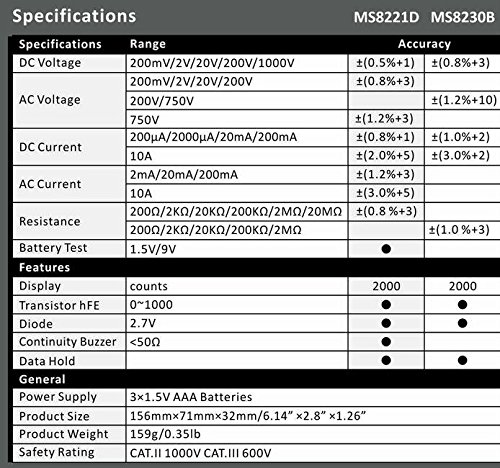
Image 3: Comparison table of specifications for Mastech MS8230B and MS8221D multimeters.
| Specifikacija | Vrednost |
|---|---|
| Zaslon | 1999 counts, 15mm digit height |
| DC Voltage (DCV) | 200mV, 2V, 20V, 200V, 1000V (Accuracy: 0.5% to 0.8%) |
| AC Voltage (ACV) | 200V, 750V (Accuracy: 1.2%) |
| enosmerni tok (DCA) | 200µA, 2mA, 20mA, 200mA, 10A (Accuracy: 1.0% to 2.0%) |
| Upor (Ω) | 200Ω, 2kΩ, 20kΩ, 200kΩ, 2MΩ (Accuracy: 0.8% to 1.0%) |
| Diodni test | Naprej voltage padec |
| Test tranzistorja hFE | 1 do 1000 |
| Zadrževanje podatkov | ja |
| Indikacija prazne baterije | ja |
| Zaščita pred preobremenitvijo | ja |
| Vir napajanja | 1 x 9V baterija |
| Dimenzije (D x Š x V) | 15.2 x 7.6 x 2.5 cm (približno 6 x 3 x 1 palca) |
| Teža | Pribl. 158.76 g (5.6 unče) |
| Ocena varnosti | IEC 1010-1 CAT III 600V, CAT II 1000V |
| Delovna temperatura | 0 °C do 40 °C (32 °F do 104 °F) |
| Temperatura shranjevanja | -10 °C do 50 °C (14 °F do 122 °F) |
9. Garancija in podpora
Mastech products are designed for reliability and performance. For specific warranty details, please refer to the warranty card included with your product or contact your local Mastech distributor.
For technical support or service inquiries, please contact Mastech customer service through their official webspletnega mesta ali kontaktnih podatkov, navedenih v dokumentaciji o nakupu.