
1. Uvod
The Cellet Portable Bluetooth Wireless Keyboard BKP200 offers a convenient and functional solution for typing on the go. Its foldable design and QWERTY layout with low-profile keys provide an efficient typing experience. The built-in rechargeable lithium battery ensures extended use, making it ideal for smartphones, tablets, laptops, and other Bluetooth-enabled devices.
Kaj je v škatli
- Wireless foldable keyboard
- Keyboard case (doubles as a phone holder stand)
- Micro USB kabel za polnjenje
- Uporabniški priročnik

Image: The Cellet Portable Bluetooth Wireless Keyboard, shown unfolded, alongside its protective case which functions as a phone/tablet stand, and a micro USB charging cable.
2. Pomembna varnostna navodila
Before using this product, please read all instructions carefully and retain them for future reference. Adherence to these guidelines ensures safe operation and prevents damage.
- This product may be used by children and individuals with physical, sensory, or mental disabilities, or those lacking experience and knowledge, provided they receive proper supervision or instruction regarding safe use and understanding of associated hazards.
- Otroci ne smejo izvajati čiščenja in vzdrževanja brez nadzora.
- Otroke je treba nadzorovati, da se zagotovi, da se ne igrajo z napravo.
- Izdelek uporabljajte samo za predvideni namen.
- For indoor use only. Do not expose the product to water, excessive moisture, or snow.
- Do not place the product in or near flammable, explosive, or hazardous objects.
- Ne uporabljajte izdelka s poškodovanim kablom ali vtičem.
- Izdelka ne uporabljajte, če je bil kakor koli poškodovan.
- Izdelka ne razstavljajte. Razstavljanje lahko ogrozi varnost.
- Avoid throwing or shaking the product.
3. Nastavitev
Začetno polnjenje
Before first use, fully charge the keyboard for approximately 1.5 to 2 hours using the provided Micro USB charging cable. The charging indicator light will glow red during charging and turn off once fully charged. If the battery is low, the Bluetooth status light will flash.
Koraki za seznanjanje Bluetooth
- 1. korak: Unfold the keyboard. The Bluetooth status indicator light will illuminate for 3 seconds and then turn off.
- 2. korak: Pritisnite Fn+C buttons simultaneously. The Bluetooth indicator light will begin blinking, indicating it is in pairing mode.
- 3. korak: On your device (smartphone, tablet, etc.), activate Bluetooth and search for available devices. Select "Cellet BKP200 Keyboard" from the list to connect.
- 4. korak: Once successfully connected, the Bluetooth indicator light on the keyboard will turn off.

Image: The Cellet foldable keyboard displayed with a tablet and smartphone, illustrating its universal compatibility.
4. Navodila za uporabo
Izbira operacijskega sistema
To optimize keyboard functionality for your device, select the correct operating system:
- For Android devices: Press and hold Fn + Q.
- For Windows devices: Press and hold Fn + W.
- For iOS devices: Press and hold Fn + E.
Funkcije bližnjičnih tipk
To use the shortcut keys, press and hold the Fn key while simultaneously pressing the desired shortcut key.
| funkcija | Kombinacija tipk | Opombe |
|---|---|---|
| Prejšnja skladba | fn+1 | |
| Zmanjšanje glasnosti | fn+2 | |
| Glasnost | fn+3 | |
| Predvajaj/Premor | fn+4 | |
| Preklop jezika | fn+5 | |
| Iskalnik | fn+6 | |
| Kopiraj | fn+7 | |
| Cut | fn+8 | |
| Izberite Vse | fn+9 |
System-Specific Functions:
| Sistemi Android | funkcija |
|---|---|
| PgUp | Zadnja stran |
| PgDn | Naslednja stran |
| iOS Systems | funkcija |
|---|---|
| domov | domov |
| PgUp | Cursor to the top |
| PgDn | Cursor to the bottom |
| Windows sistemi | funkcija |
|---|---|
| Web brskalnik | Odpri web brskalnik |
| ESC | Pobegniti |
| PgUp | Zadnja stran |
| PgDn | Naslednja stran |

Image: The keyboard case is shown transforming into a stand, holding both a smartphone and a tablet in landscape orientation for convenient viewmed tipkanjem.
5. Vzdrževanje
Proper care and maintenance will extend the life of your Cellet keyboard.
- Očistite tipkovnico z mehko krpo dampz vodo ali alkoholom.
- Tipkovnico hranite stran od ostrih predmetov.
- Na tipkovnico ne postavljajte težkih predmetov.
- Do not microwave the keyboard.
- Tipkovnice ne silite in ne popačite.
- Keep away from any oil, chemicals, or other organic liquids.
6. Odpravljanje težav
If you encounter issues with your keyboard, consider the following:
- Tipkovnica se ne more združiti: Ensure the keyboard is fully charged and in pairing mode (Bluetooth indicator blinking). Check your device's Bluetooth settings to ensure it's discoverable and try re-scanning for devices.
- Tipke se ne odzivajo: Verify the keyboard is connected to your device. If connected, try restarting both the keyboard and your device. Ensure no debris is lodged under the keys.
- Prekinjena povezava: Ensure the keyboard is within the 10-meter operating range of your device and there are no significant obstructions. Other wireless devices might cause interference.
- Napačno vneseni znaki: Confirm that you have selected the correct operating system for your device (Fn + Q for Android, Fn + W for Windows, Fn + E for iOS).
- Baterija se ne polni: Check the Micro USB cable and charging port for damage. Try using a different charging cable or power source.
If problems persist, refer to the Cellet support webspletno mesto ali se za dodatno pomoč obrnite na službo za stranke.
7. Specifikacije
Detailed technical specifications for the Cellet BKP200 Portable Bluetooth Wireless Keyboard:
| Funkcija | Specifikacija |
|---|---|
| Različica Bluetooth | 5.1 |
| Vmesnik | USB-C (za polnjenje) |
| Delovna razdalja | Do 10 metre |
| Modulacijski sistem | GFSK |
| Delovna zvezatage | 3.0-4.2V |
| Delovni tok | <3.0mA |
| Tok v stanju pripravljenosti | <0.3mA |
| Sleep Tok | <0.1mA |
| Polnilni tok | <200mA |
| Čas pripravljenosti | Približno 100 dni |
| Čas polnjenja | <2 ur |
| Kapaciteta litijeve baterije | 110 mAh |
| Neprekinjen delovni čas | > 40 ur |
| Življenjska doba litijeve baterije | 3 leti |
| Lithium Battery Dimensions | 30 x 15 x 23 mm |
| Ključna sila | 50-80g |
| Ključno življenje | 3 milijonov udarcev |
| Delovna temperatura | -10 do +55 ℃ |
| Teža predmeta | 7.5 unč |
| Dimenzije izdelka (zložen) | 5.75 x 3.5 x 0.75 palcev |
| Dimenzije izdelka (razloženo) | 11.5 x 3.3 x 0.27 inches (approximate, derived from image) |
| barva | Črna |
| Združljivi operacijski sistemi | Android, iOS, Windows |
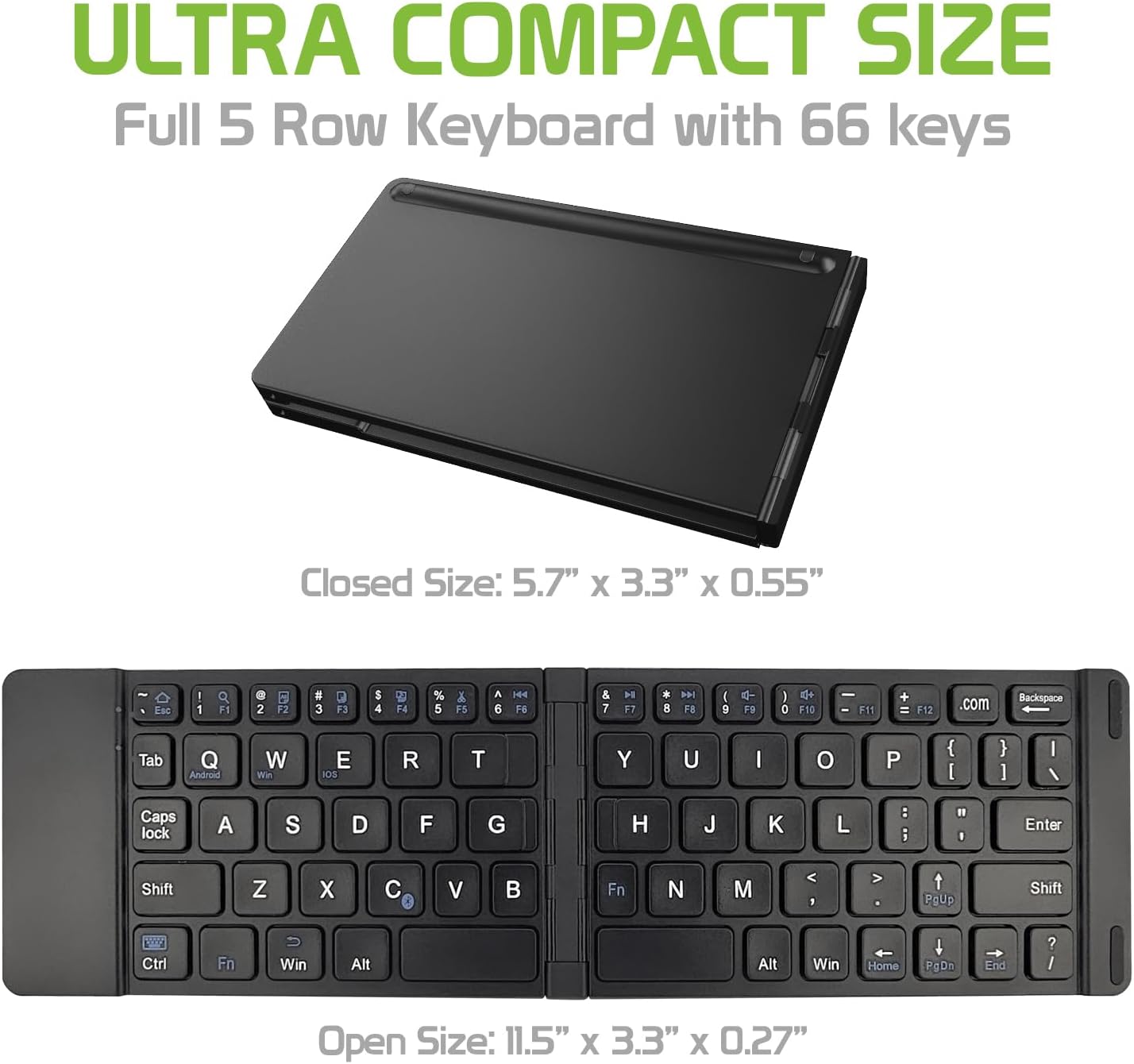
Image: The Cellet keyboard in both its closed, compact state and its unfolded, full-size state, with dimensions indicating its portability and functional size.
8. Garancija in podpora
For warranty information or technical support, please visit the official Cellet webspletno mesto ali se obrnite na njihovo službo za pomoč strankam. Za uveljavljanje garancije shranite račun.
Okolju prijazno odstranjevanje
To dispose of the product responsibly, follow these guidelines:
- Carefully pry up the plastic top to remove it completely. This action will likely render the keyboard unusable.
- Turn the top over and remove any tape securing the battery.
- Separate the battery from the circuit board.
- Dispose of the battery according to local regulations and laws. Recycle remaining keyboard parts where possible.