
Uvod
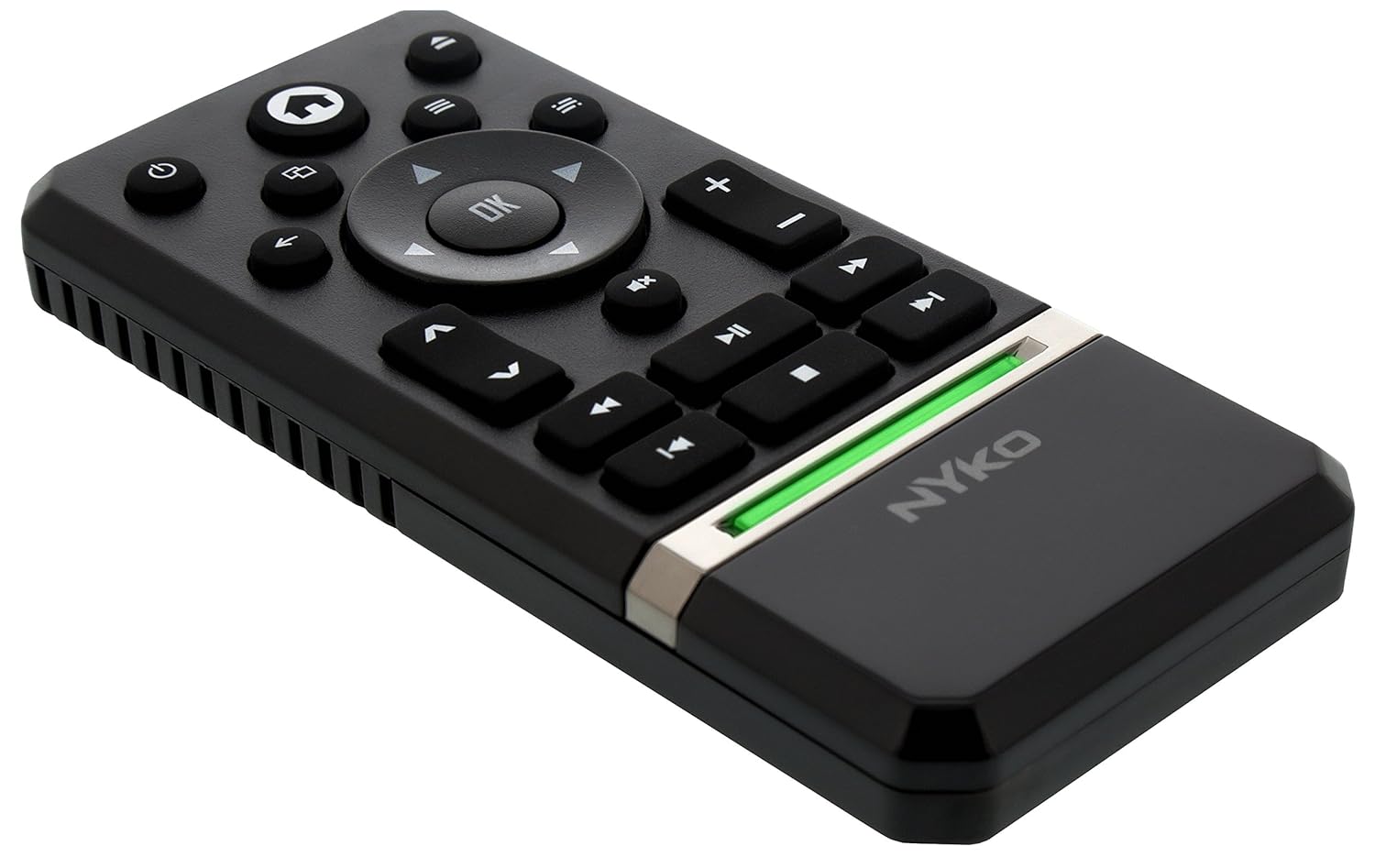
The Nyko Media Remote for Xbox One provides convenient control over your Xbox One console and various media applications. This remote simplifies navigation and playback of streaming content and physical media, offering dedicated buttons for common functions. It also features the ability to power your Xbox One on and off, and control basic functions of your television.

Image: Nyko Media Remote for Xbox One, front view.
Vsebina paketa
- Nyko Media Remote for Xbox One (Model: 86116)
- Opomba: Baterije AAA niso priložene in jih je treba kupiti posebej.

Image: Nyko Media Remote for Xbox One in its retail packaging.
Nastavitev
1. Namestitev baterije
- Poiščite predal za baterije na zadnji strani daljinskega upravljalnika.
- Pokrov baterije potisnite navzdol, da ga odprete.
- Vstavite dve (2) bateriji AAA in pri tem pazite na pravilno polarnost (+/-), kot je označeno v notranjosti predala.
- Pokrov baterije namestite nazaj tako, da ga potisnete navzgor, dokler se ne zaskoči.
Slika: Zadaj view of the remote with the battery cover removed, illustrating the AAA battery placement.
2. Začetna povezava
The Nyko Media Remote uses infrared (IR) technology. No manual pairing is required for the Xbox One. Simply ensure a clear line of sight between the remote's IR emitter and the Xbox One's IR receiver.
For TV control functions (volume, channels, power), your TV must be configured to respond to the Xbox One's IR signals, typically through the Xbox One's OneGuide settings. The remote sends commands to the Xbox One, which then relays them to your TV via its IR blaster (if configured) or Kinect sensor.
Navodila za uporabo
The Nyko Media Remote provides comprehensive control for your Xbox One and various media applications. Refer to the diagram below for button identification and their primary functions.

Slika: spredaj view of the Nyko Media Remote, displaying all control buttons.
Funkcije gumbov:
| Gumb | funkcija |
|---|---|
| Gumb za vklop (⏻) | Powers the Xbox One console on or off. |
| Gumb Domov (⌂) | Returns to the Xbox One Home screen. |
| View Gumb (🗀) | Accesses additional information or options within an app or game. |
| Gumb za meni (☰) | Odpre kontekstno občutljive menije ali možnosti. |
| Usmerjevalna ploščica (D-pad) | Navigacija po menijih in vsebini. |
| Gumb OK | Confirms selections. Can also function as Play/Pause in some apps. |
| Gumb za nazaj (←) | Vrne se na prejšnji zaslon ali meni. |
| OneGuide Button (📱) | Launches the Xbox OneGuide for live TV and media. |
| Povečanje/zmanjšanje glasnosti (⏸ / ⏷) | Adjusts the television volume (requires TV setup via Xbox One). |
| Gumb za izklop zvoka (🔇) | Mutes or unmutes television audio. |
| Kanal gor/dol (▲ / ▼) | Changes television channels (requires TV setup via Xbox One). |
| Hitro previjanje nazaj (⏪) | Rewinds media playback. |
| Predvajaj/Premor (⏯) | Predvaja ali začasno ustavi predvajanje medijev. |
| Hitro naprej (⏩) | Fast forwards media playback. |
| Prejšnja skladba (⏮) | Preskoči na začetek trenutne ali prejšnje skladbe. |
| Stop (⏹) | Ustavi predvajanje medijev. |
| Naslednja skladba (⏭) | Skips to the next track or chapter. |
Media and App Control:
The remote is designed for seamless control of various Xbox One applications, including:
- OneGuide
- Netflix
- Hulu Plus
- Amazon Instant Video
- Other streaming services and Blu-ray/DVD playback
Dedicated playback buttons (Play, Pause, Fast Forward, Rewind, Stop, Skip) provide intuitive control for movies, music, and other media.
Vzdrževanje
Zamenjava baterije:
When the remote's performance diminishes or it stops responding, it is likely time to replace the batteries. Follow the "Battery Installation" steps in the Setup section to replace the two AAA batteries.
Čiščenje:
To clean the remote, gently wipe it with a soft, dry cloth. Avoid using harsh chemicals, abrasive cleaners, or excessive moisture, as these can damage the remote's finish or internal components.
Odpravljanje težav
- Daljinski upravljalnik se ne odziva:
- Prepričajte se, da so nove baterije AAA pravilno vstavljene.
- Verify there is a clear line of sight between the remote and the Xbox One console. Obstructions can block the infrared signal.
- Move closer to the Xbox One console. The remote has a maximum effective range of approximately 9 meters (25 feet).
- TV Control (Volume, Channel, Power) Not Working:
- Confirm that your Xbox One's OneGuide settings are properly configured for your television. The remote sends commands to the Xbox One, which then controls the TV.
- Ensure any necessary IR blasters or Kinect sensors are correctly set up and positioned.
- Intermittent Response:
- This can sometimes occur due to weak batteries or environmental interference. Replace batteries and ensure a clear line of sight.
Specifikacije
| Funkcija | Podrobnost |
|---|---|
| Znamka | Nyko |
| Ime modela | Media Remote |
| Številka modela | 86116 |
| Tehnologija povezljivosti | Infrardeči (IR) |
| Združljive naprave | Xbox One, Television (via Xbox One IR blaster/Kinect) |
| Vrsta baterije | 2 x AAA baterije (niso priložene) |
| Največji doseg | Do 9 metrov (25 čevljev) |
| Teža predmeta | 0.1 funta (približno 45 gramov) |
| barva | Temno siva |
| Dodatne funkcije | Ergonomic design, dedicated media playback controls. |
Garancija in podpora
Nyko products are designed for quality and reliability. For specific warranty details, please refer to the documentation included with your purchase or visit the official Nyko website. The product includes warranty information in multiple languages.
Podpora strankam:
- E-pošta: customer.support@nyko.com
- telefon: +1-888-400-6956
- Spletna registracija: www.nyko.com
- Dodatne informacije: http://uqr.me/nykotechnologies/qr/83215

Slika: Zadaj view of the product packaging, detailing features and customer support contact information.