
1. Uvod
This manual provides comprehensive instructions for the Adesso AKB-132UY Luminous Large Print Multimedia Desktop USB Keyboard. This keyboard is designed with large, high-contrast keys to enhance readability, particularly for users with visual impairments. It also integrates multimedia controls for convenience.

Figure 1: Adesso AKB-132UY Luminous Large Print Multimedia Desktop USB Keyboard. This image displays the full keyboard with its black frame and bright yellow keys, featuring large black characters.
2. Vsebina paketa
Preverite, ali so v paketu prisotni vsi elementi:
- Adesso EasyTouch 132 - Florescent Yellow Multimedia Desktop Keyboard
- Vodnik za hiter začetek
3. Navodila za nastavitev
3.1 Priključitev tipkovnice
- Poiščite razpoložljiva vrata USB na vašem računalniku.
- Plug the USB connector of the Adesso AKB-132UY keyboard into the USB port.
- The operating system will automatically detect and install the necessary drivers. No additional software installation is typically required.
The keyboard is powered via the USB connection.
4. Upravljanje tipkovnice
4.1 Ključne lastnosti
- Fluorescent 4X Large Print Keys: The keyboard features black characters printed in a large 4X size on bright fluorescent yellow keys. This design provides high contrast for improved visibility and readability, particularly beneficial for users with visual impairments.

Slika 2: Bližnji posnetek view of the keyboard's QWERTY section, highlighting the large black characters on fluorescent yellow keys.
- Večpredstavnostne kontrole: Dedicated hotkeys allow for one-touch control of media functions. These include:
- Medijski predvajalnik
- Zmanjšanje glasnosti
- Glasnost
- Mute
- Predvajaj/Premor
- Prejšnja skladba
- Naslednja skladba
- Stop

Slika 3: Bližnji posnetek view of the numeric keypad and dedicated multimedia control keys located on the upper right side of the keyboard.
- Windows One-Touch Controls: Access common Windows applications directly with dedicated hotkeys:
- Moj računalnik
- Iskalnik
- Kalkulator
- Pošta
- Domov (Brskalnik)
- Favorites (Browser)
- Quiet Membrane Key Switches: The keyboard utilizes membrane key switches designed to provide a responsive and quiet typing experience. These switches are rated for a lifespan of up to five million keystrokes.
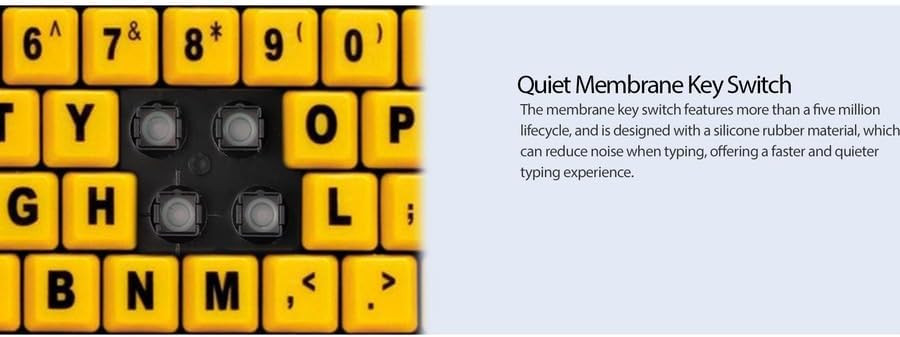
Slika 4: Podrobno view showing the internal membrane key switch mechanism beneath a keycap.
- 104-Key US Layout: The keyboard features a standard 104-key US layout, providing a familiar typing experience.
5. Vzdrževanje
5.1 Čiščenje tipkovnice
Za ohranitev videza in funkcionalnosti tipkovnice:
- Pred čiščenjem tipkovnico odklopite iz računalnika.
- Uporabite mehak, rahlo damp cloth to wipe the surface of the keys and the keyboard body.
- For stubborn dirt or debris between keys, use compressed air or a soft brush.
- Izogibajte se uporabi agresivnih kemikalij, abrazivnih čistil ali prekomerne vlage, saj lahko te poškodujejo površino tipkovnice ali notranje komponente.
6. Odpravljanje težav
If you encounter issues with your Adesso AKB-132UY keyboard, refer to the following troubleshooting steps:
6.1 Tipkovnica se ne odziva
- Preverite povezavo USB: Ensure the keyboard's USB cable is securely plugged into a functioning USB port on your computer. Try unplugging and re-plugging the cable.
- Poskusite z drugim USB-vhodom: Connect the keyboard to another USB port on your computer to rule out a faulty port.
- Znova zaženite računalnik: Včasih lahko težave s povezljivostjo odpravi že preprost ponovni zagon sistema.
- Test na drugem računalniku: If possible, test the keyboard on a different computer to determine if the issue is with the keyboard or your computer's setup.
6.2 Keys Sticking or Not Registering
- Clean Under Keys: Dust, crumbs, or debris can get lodged under keys. Use compressed air to clear any obstructions.
- Izogibajte se razlitjem: Liquid spills can cause keys to stick or malfunction. If a spill occurs, disconnect the keyboard immediately and allow it to dry completely before reconnecting.
7. Specifikacije
| Funkcija | Opis |
|---|---|
| Znamka | Adesso |
| Številka modela | AKB-132UY |
| Ime modela | EasyTouch 132 |
| Tehnologija povezljivosti | USB |
| Opis tipkovnice | Membrana |
| Posebna funkcija | Large Print Keys |
| barva | Črna Rumena |
| Material | Plastika |
| Število ključev | 104 |
| Razporeditev tipkovnice | QWERTY (ameriška razporeditev) |
| Vir napajanja | USB napajanje |
| Teža predmeta | 1.5 funta |
| Združljive naprave | PC |
8. Informacije o garanciji
The Adesso AKB-132UY keyboard comes with a 1-letna omejena garancija from the date of purchase. This warranty covers defects in materials and workmanship under normal use. For specific terms and conditions, please refer to the warranty card included in your package or visit the official Adesso webmesto.
9. Podpora
For technical support, product registration, or additional information, please visit the official Adesso webspletno mesto na www.adesso.com. You may also find FAQs and driver downloads on their support pages.


