
Uvod
The EDUP EP-B3511 is a compact wireless Bluetooth music receiver designed to add Bluetooth audio streaming capabilities to any device with a 3.5mm audio input. This device allows you to wirelessly connect your smartphone, laptop, or other Bluetooth-enabled devices to car stereos, home audio systems, headphones, and more. It also features an integrated microphone for hands-free calling.
Varnostne informacije
- Do not expose the device to extreme temperatures, moisture, or direct sunlight.
- Izogibajte se padcem ali izpostavljanju naprave močnim udarcem.
- Hraniti izven dosega otrok.
- Uporabljajte samo priloženi polnilni kabel ali certificiran ekvivalent.
- Naprave ne poskušajte razstavljati ali spreminjati. S tem boste razveljavili garancijo.
Vsebina paketa
Prosimo, preverite paket za naslednje artikle:
- EDUP EP-B3511 Wireless Bluetooth Music Receiver
- Polnilni kabel USB v Mini-USB
- 3.5mm Male-to-Male Audio Connector
- Uporabniški priročnik (ta dokument)
Konec izdelkaview
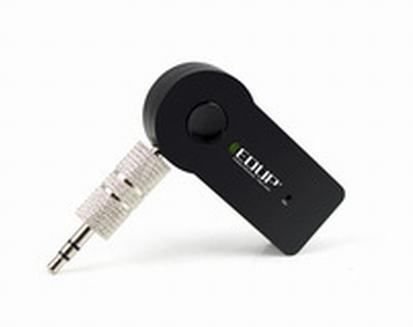
Image: The EDUP EP-B3511 Wireless Bluetooth Music Receiver, a small black rectangular device with a 3.5mm audio jack on one side and a mini-USB charging port on the other. It features a central multi-function button and an indicator light.
The EDUP EP-B3511 is designed for ease of use. It typically features:
- Večnamenski gumb: For power on/off, pairing, play/pause, and call management.
- 3.5mm Audio Output Jack: Connects to your audio system's AUX input.
- Mini-USB Charging Port: Za polnjenje notranje baterije.
- LED indikatorska lučka: Prikazuje stanje napajanja, seznanjanja in polnjenja.
- Integriran mikrofon: Za prostoročno komunikacijo.
Nastavitev
1. Polnjenje naprave
- Connect the Mini-USB end of the charging cable to the receiver's charging port.
- Connect the USB end of the cable to a USB power source (e.g., car charger, computer USB port, USB wall adapter).
- The LED indicator will typically glow red during charging and turn off or change color when fully charged.
- Popolno polnjenje običajno traja 1-2 ure.
2. Connecting to an Audio System
- Ensure your audio system (car stereo, home theater, headphones) has a 3.5mm AUX input.
- Insert the 3.5mm male-to-male audio connector into the receiver's 3.5mm audio output jack.
- Connect the other end of the 3.5mm connector to the AUX input of your audio system.
- Set your audio system's input source to AUX.
3. Seznanjanje z napravo Bluetooth
- Vklop: Press and hold the multi-function button on the receiver until the LED indicator flashes blue rapidly (or red and blue alternately), indicating it is in pairing mode.
- Omogoči Bluetooth: On your smartphone, tablet, or laptop, enable Bluetooth and search for new devices.
- Izberite napravo: Look for "EP-B3511" or a similar name in the list of available Bluetooth devices and select it to pair.
- Potrditev: Once successfully paired, the LED indicator will typically flash blue slowly or remain solid blue. A voice prompt might also confirm the connection.
- The device will automatically attempt to reconnect to the last paired device when powered on.
Navodila za uporabo
Vklop/izklop
- Vklop: Press and hold the multi-function button for approximately 3 seconds until the LED indicator flashes blue.
- Ugasniti: Pritisnite in držite večfunkcijski gumb približno 5 sekunde, dokler se LED indikator ne izklopi.
Predvajanje glasbe
- Once paired, open your music player on your Bluetooth device.
- Music will stream wirelessly to your connected audio system.
- Use the controls on your Bluetooth device to play, pause, skip tracks, and adjust volume. The receiver's multi-function button may also act as a play/pause control (single press).
Prostoročno telefoniranje
- Sprejmi klic: When a call comes in, press the multi-function button once to answer.
- Končaj klic: Med klicem enkrat pritisnite večfunkcijski gumb, da končate klic.
- Zavrni klic: Za zavrnitev dohodnega klica pritisnite in približno 2 sekundi držite večfunkcijski gumb.
- Ponovno klicanje zadnje številke: Dvakrat pritisnite večfunkcijski gumb, da ponovno pokličete zadnjo številko.
- The integrated microphone will pick up your voice for communication. Ensure you are within reasonable proximity to the receiver for clear audio.
Vzdrževanje
- Čiščenje: Za čiščenje naprave uporabite mehko, suho krpo. Ne uporabljajte tekočih čistil ali topil.
- Shranjevanje: Napravo shranjujte na hladnem in suhem mestu, stran od neposredne sončne svetlobe in ekstremnih temperatur, ko je dalj časa ne uporabljate.
- Vzdrževanje baterije: Da podaljšate življenjsko dobo baterije, se izogibajte pogostemu popolnemu praznjenju baterije. Napravo redno polnite, tudi če je ne uporabljate nenehno.
Odpravljanje težav
| Težava | rešitev |
|---|---|
| Naprava se ne vklopi. | Ensure the device is charged. Connect it to a power source using the USB cable. |
| Ni mogoče seznaniti z napravo Bluetooth. |
|
| Ni zvoka ali slaba kakovost zvoka. |
|
| Mikrofon ne deluje med klici. |
|
| Naprava se samodejno izklopi. | The device may have an auto-off feature if not connected or active for a period (e.g., 5 minutes). Recharge the battery if it's low. |
Specifikacije
- Model: EP-B3511
- Tehnologija povezljivosti: Bluetooth
- Standard brezžične komunikacije: Bluetooth V4.1 (supports all Bluetooth versions of mobile/tablet)
- vir energije: Battery Powered (inbuilt rechargeable battery)
- Združljive naprave: Headphone, Laptop, Smartphone, Car Audio Systems, Home Audio Systems
- Teža artikla: Približno 60 g
- Dimenzije paketa: Približno 13.6 x 11.4 x 2.6 cm
- Lastnosti: Integrated Microphone for calls
Garancija in podpora
This product comes with a standard manufacturer's warranty. For specific warranty terms, duration, and support inquiries, please refer to the documentation provided at the time of purchase or contact your retailer or the manufacturer directly. Keep your proof of purchase for warranty claims.