
Eurotime 23708-00
Eurotime LCD Digital Alarm Clock Model 23708-00 User Manual
Model: 23708-00
Uvod
This manual provides instructions for the setup, operation, and maintenance of your Eurotime LCD Digital Alarm Clock, Model 23708-00. Please read this manual thoroughly before using the product to ensure proper function and longevity.
The Eurotime LCD Digital Alarm Clock features an LCD display, 7-color changing LED lighting, multiple natural alarm tones, and displays time, date, day of the week, and indoor temperature. It also includes a snooze function and a countdown feature.
Varnostne informacije
- Napravo hranite stran od vode in visoke vlažnosti.
- Naprave ne izpostavljajte neposredni sončni svetlobi ali ekstremnim temperaturam.
- Use only the specified battery type (3 x 1.5V AAA batteries).
- Ne mešajte starih in novih baterij ali različnih vrst baterij.
- Izrabljene baterije zavrzite odgovorno v skladu z lokalnimi predpisi.
- Naprave ne poskušajte razstavljati ali popravljati sami. Za servis se obrnite na usposobljeno osebje.
Vsebina paketa
- Eurotime LCD Digital Alarm Clock (Model 23708-00)
- 3 x 1.5 V AAA baterije
- Uporabniški priročnik (ta dokument)
Konec izdelkaview
Familiarize yourself with the components and controls of your alarm clock.
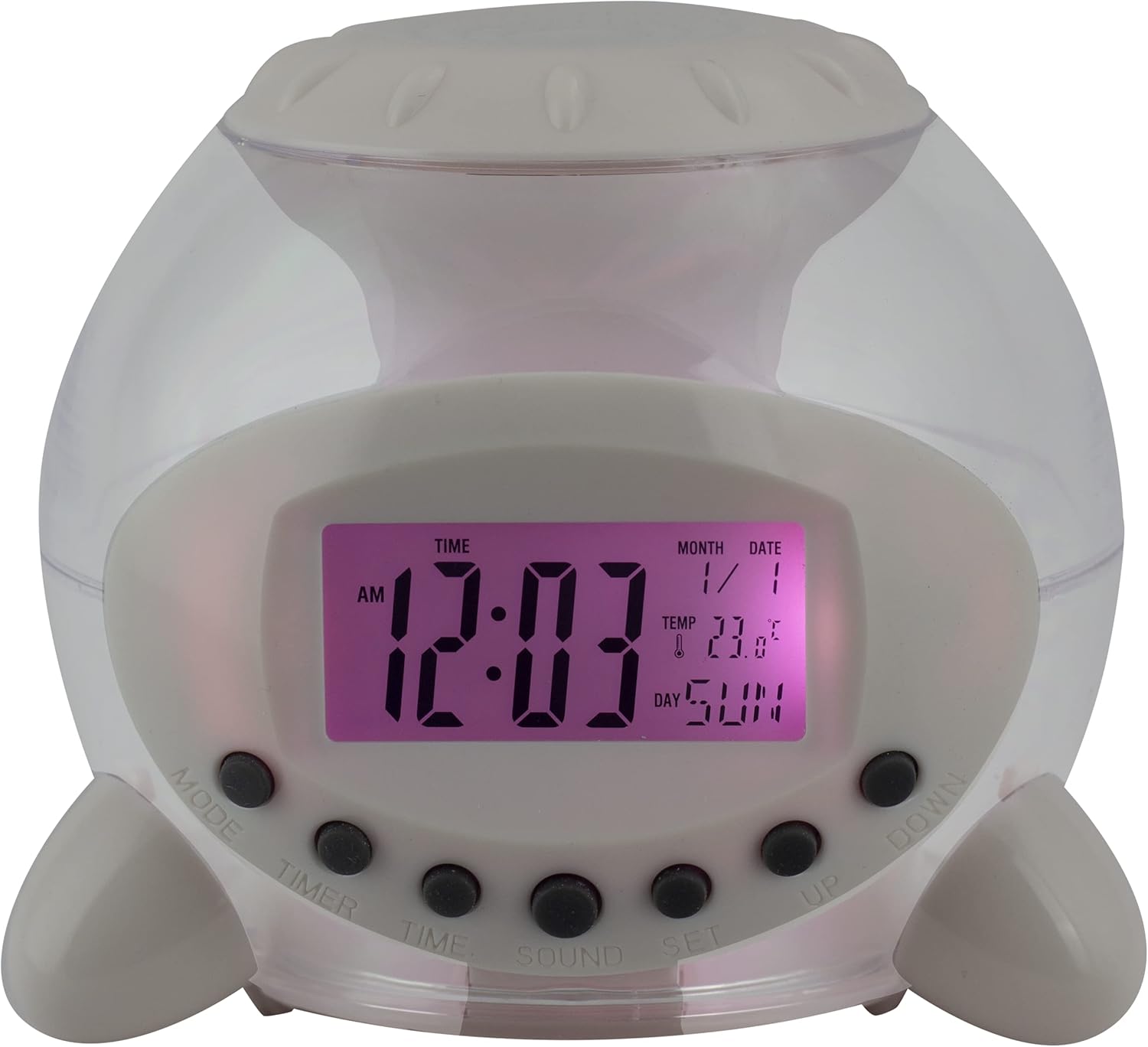
Slika 1: Spredaj View of the Alarm Clock. This image displays the front of the Eurotime LCD Digital Alarm Clock, highlighting its transparent plastic housing and the central LCD screen. The screen shows the time (12:03 AM), month (1), date (1), temperature (23.8°C), and day (SUN). Below the screen are control buttons labeled MODE, TIMER, TIME, SOUND, and SET, along with UP and DOWN buttons.

Slika 2: stran View z gumbi za upravljanje. This image shows a side perspective of the alarm clock, emphasizing the array of control buttons located on the front-bottom edge. The transparent housing allows a glimpse of the internal structure and the LED lighting effect. The buttons are clearly visible for user interaction.

Slika 3: stran View with Internal Lighting. Ta slika ponuja drugo plat view, illustrating the transparent housing and the internal LED lighting. The light emanates from the base, creating a soft glow within the clock's structure, demonstrating its color-changing feature.
Gumbi za upravljanje:
- NAVODILA: Switches between time display, alarm setting, and countdown timer.
- ČASOVNIK: Aktivira in nastavi odštevalnik časa.
- ČAS: Uporablja se za nastavitev trenutnega časa in datuma.
- ZVOK: Selects alarm tones or natural sounds.
- NASTAVITEV: Confirms settings or enters setting mode.
- GOR, DOL: Adjusts values during setting modes.
Nastavitev
1. Namestitev baterije
- Locate the battery compartment on the bottom of the alarm clock.
- Odprite pokrov prostora za baterije.
- Vstavite tri (3) 1.5 V AAA baterije in pazite na pravilno polarnost (+/-).
- Trdno zaprite pokrov prostora za baterije.
Opomba: The clock will automatically power on after battery installation. The display may flash, indicating it's ready for time setting.
Navodila za uporabo
1. Nastavitev časa in datuma
- V običajnem načinu prikaza časa pritisnite ČAS enkrat pritisnite gumb. Številke za ure bodo utripale.
- Uporabite UP or DOL gumbi za nastavitev ure.
- Pritisnite ČAS again to move to minute setting. Adjust with UP or DOL.
- Nadaljujte s pritiskom ČAS za preklapljanje med nastavitvami leta, meseca in datuma ter prilagajanje vsake od njih z UP or DOL.
- Po nastavitvi datuma pritisnite ČAS one last time or wait a few seconds for the settings to be saved and return to normal display.
2. Nastavitev alarma
- Pritisnite NAČIN button until "ALARM" appears on the display (or an alarm icon).
- Pritisnite NASTAVI gumb. Številke ure alarma bodo utripale.
- Uporabite UP or DOL gumbe za nastavitev ure budilke.
- Pritisnite NASTAVI again to move to minute setting. Adjust with UP or DOL.
- Pritisnite NASTAVI one last time to confirm the alarm time.
- Za vklop/izklop alarma pritisnite UP button in alarm display mode. An alarm icon will appear/disappear.
3. Funkcija dremeža
Ko se oglasi alarm, pritisnite kateri koli gumb (razen NASTAVI or NAČIN) to activate the snooze function. The alarm will pause and sound again after a few minutes (duration is adjustable, refer to advanced settings if available).
Če želite alarm popolnoma izklopiti, pritisnite NASTAVI gumb, ko se oglasi zvok.
4. Color Changing LED Lighting
The alarm clock features a 7-color changing LED light. This function typically activates automatically when the alarm sounds or can be manually toggled. Refer to the NAČIN or NASTAVI button for specific controls related to the lighting, if available.
5. Natural Alarm Tones
To select an alarm tone:
- In alarm setting mode (after pressing NAČIN to display alarm time), press the ZVOK gumb.
- Uporabite UP or DOL buttons to cycle through the available natural alarm tones.
- Pritisnite NASTAVI da potrdite svojo izbiro.
6. Countdown Feature
Za uporabo odštevalnika časa:
- Pritisnite NAČIN button until "TIMER" appears on the display.
- Pritisnite ČASOVNIK gumb. Številke ure bodo utripale.
- Uporaba UP or DOL to set the desired countdown hour.
- Pritisnite ČASOVNIK again to set minutes, then seconds.
- Pritisnite NASTAVI za začetek odštevanja.
- To pause or resume, press NASTAVI. Za ponastavitev pritisnite NAČIN.
Vzdrževanje
Čiščenje
- Uro obrišite z mehko, suho krpo.
- Do not use abrasive cleaners or solvents, as they may damage the plastic housing or display.
Zamenjava baterije
When the display dims or functions become erratic, it is time to replace the batteries. Follow the "Battery Installation" steps in the Setup section.
Odpravljanje težav
| Težava | Možen vzrok | rešitev |
|---|---|---|
| Zaslon je prazen ali temen. | Prazne ali izpraznjene baterije. Nepravilna namestitev baterij. | Replace batteries with new 1.5V AAA batteries. Ensure correct polarity. |
| Alarm se ne oglasi. | Alarm is not activated. Alarm volume is too low (if adjustable). | Prepričajte se, da je prikazana ikona alarma. Preverite nastavitve alarma. |
| Ura/datum ni pravilen. | Not set correctly after battery installation or power interruption. | Follow "Setting Time and Date" instructions to reset. |
| Color changing light not working. | Feature not activated or malfunction. | Check operating instructions for light activation. If problem persists, contact support. |
Specifikacije
- Znamka: Eurotime
- Številka modela: 23708-00
- Dimenzije izdelka: 8.99 x 8.99 x 8 cm
- Teža: 120 g
- Material: Plastika
- Vrsta zaslona: Digitalni LCD
- Posebne lastnosti: Calendar display, Snooze, Alarm, 7-Color Changing LED, Natural Alarm Tones, Countdown Feature, Indoor Temperature Display
- vir energije: 3 x 1.5 V AAA bateriji (priloženi)
Garancija in podpora
For warranty information or technical support, please refer to the retailer where the product was purchased or visit the official Eurotime webspletno mesto. Shranite račun kot dokazilo o nakupu.
Ask a question about this manual
Ask about setup, troubleshooting, compatibility, parts, safety, or missing instructions. Manuals+ will review the question and use this page’s manual context to help answer it.