
Sagemcom Sixty
Sagemcom Sixty Cordless Telephone and Answer Machine
Model: Sixty
Znamka: Sagemcom
Konec izdelkaview
The Sagemcom Sixty Cordless Telephone and Answer Machine combines modern technology with a classic design. Its unique aesthetic, smooth finish, and touchscreen functionality make it a distinctive addition to any environment. Designed for user comfort, the Sixty offers a range of features including hands-free mode, extended battery life, and an intuitive interface for easy communication.
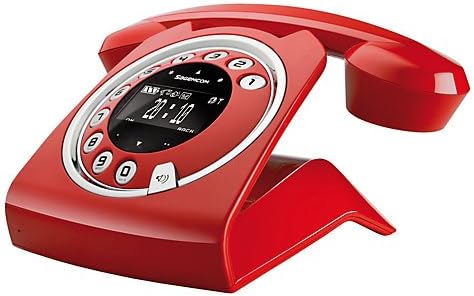
Image: The Sagemcom Sixty Cordless Telephone and Answer Machine in red, showcasing its unique retro-modern design with a circular dial and digital display.

Slika: Stran view of the Sagemcom Sixty Cordless Telephone, highlighting its sleek profile and the cradle design.
Vodnik za namestitev
1. Razpakiranje
Carefully remove all components from the packaging. Ensure you have the base unit, handset, power adapter, and telephone line cord.
2. Priključitev osnovne enote
- Connect the power adapter to the 'DC IN' port on the back of the base unit and plug the other end into a wall outlet.
- Connect one end of the telephone line cord to the 'LINE' port on the base unit and the other end to your telephone wall jack.
3. Namestitev in polnjenje baterije
- Odprite prostor za baterije na slušalki.
- Vstavite priložene polnilne baterije in pri tem upoštevajte pravilno polarnost (+ in -).
- Zaprite predal za baterije.
- Place the handset on the base unit. The display will indicate charging. Allow the handset to charge for at least 16 hours before first use to ensure optimal battery performance.
Navodila za uporabo
Klicanje in sprejemanje klicev
- Za klic: Dvignite slušalko ali pritisnite Pokliči button. Dial the number using the touchscreen keypad.
- Če želite prejeti klic: Dvignite slušalko ali pritisnite Pokliči gumb, ko telefon zazvoni.
- Če želite končati klic: Slušalko postavite nazaj na bazno enoto ali pritisnite Končaj klic gumb.
Uporaba zaslona na dotik
The Sixty features a responsive touchscreen for navigation and input. Tap icons or numbers to select functions or dial. Swipe to scroll through lists or menus.
Prostoročni način
Med klicem pritisnite tipko Zvočnik gumb za vklop prostoročnega načina. Ponovno ga pritisnite, da se vrnete v način s slušalko.
Upravljanje imenika
- Dodajanje stika: Navigate to the Phonebook menu, select 'Add New Contact', enter the name and number using the touchscreen, and save. The phonebook can store up to 150 names.
- Iskanje stika: Access the Phonebook and use the search function or scroll through the list.
- Urejanje/brisanje stika: Select the desired contact from the Phonebook and choose the 'Edit' or 'Delete' option.
Funkcije telefonskega odzivnika
The integrated answering machine has a recording capacity of 10 minutes.
- Aktiviranje/Deaktiviranje: Access the Answering Machine menu to turn it on or off.
- Predvajanje sporočil: Select 'Play Messages' from the Answering Machine menu.
- Snemanje odhodnega sporočila: Follow the prompts in the Answering Machine menu to record a personalized outgoing message.
Vzdrževanje
Čiščenje telefona
To clean the phone, wipe it with a soft, damp cloth. Do not use abrasive cleaners or solvents, as these can damage the surface. Ensure the phone is disconnected from power before cleaning.
Skrb za baterijo
- Vedno uporabljajte priložene polnilne baterije.
- Če telefona ne boste uporabljali dlje časa, odstranite baterije, da preprečite puščanje.
- Stare baterije zavrzite odgovorno v skladu z lokalnimi predpisi.
Odpravljanje težav
| Težava | Možna rešitev |
|---|---|
| Ni znaka centrale | Check if the telephone line cord is securely connected to both the base unit and the wall jack. Ensure the power adapter is plugged in. |
| Slušalka se ne polni | Ensure the handset is correctly placed on the base unit. Clean the charging contacts on both the handset and base unit with a dry cloth. Verify the power adapter is working. |
| Slaba kakovost zvoka | Premaknite se bližje bazni enoti. Preverite, ali obstajajo motnje zaradi drugih elektronskih naprav. Prepričajte se, da telefonski kabel ni poškodovan. |
| Zaslon je prazen | Check if the handset battery is charged. If not, place it on the base unit to charge. Ensure the power adapter is connected to the base unit. |
| Ne morem klicati ali sprejemati klicev | Verify that the telephone line is active. Check all cable connections. Restart the base unit by unplugging and replugging the power adapter. |
Tehnične specifikacije
| Funkcija | Specifikacija |
|---|---|
| Znamka | Sagemcom |
| Model | Šestdeset |
| barva | Rdeča |
| Vrsta telefona | Brezžično |
| Čas pogovora po telefonu | Do 10 uri |
| Čas pripravljenosti | Do 120 uri |
| Recording Capacity (Answering Machine) | 10 minute |
| Kapaciteta imenika | 150 Imena |
| ASIN | B00DX64LPI |
| Prvi razpoložljivi datum | 15. april 2014 |
Garancija in podpora
For warranty information and customer support, please refer to the documentation included with your purchase or visit the official Sagemcom webspletnega mesta. Shranite dokazilo o nakupu za morebitne garancijske zahtevke.
Ask a question about this manual
Ask about setup, troubleshooting, compatibility, parts, safety, or missing instructions. Manuals+ will review the question and use this page’s manual context to help answer it.