
Nadzvočni SC-25
SuperSonic SC-25 2.0 Channel DVD Player with USB Input User Manual
Model: SC-25
Uvod
Hvala za nakupasing the SuperSonic SC-25 2.0 Channel DVD Player with USB Input. This manual provides essential information for the safe and efficient operation of your new device. Please read it thoroughly before use and retain it for future reference.
Varnostni ukrepi
- Naprave ne izpostavljajte dežju ali vlagi, da preprečite požar ali električni udar.
- Ne odpirajte casing. Vsa servisna dela prepustite usposobljenemu osebju.
- Zagotovite ustrezno prezračevanje okoli enote.
- Izogibajte se postavljanju enote na nestabilne površine.
- Med nevihtami ali če naprave dalj časa ne uporabljate, izključite napajalni kabel.
Vsebina paketa
Before setup, please verify that all items are present:
- 1 SuperSonic SC-25 DVD Player Unit
- 1 Daljinski upravljalnik
- 1 Uporabniški priročnik (ta dokument)
- Napajalni kabel
- Audio/Video (AV) Cable
Navodila za namestitev
1. Priključitev na televizor
- Prepričajte se, da sta tako DVD-predvajalnik kot televizor izklopljena.
- Connect one end of the AV cable (red, white, yellow connectors) to the corresponding output jacks on the back of the DVD player.
- Connect the other end of the AV cable to the corresponding input jacks on your television.
- For optimal video quality, ensure the television input is set to the correct AV channel (e.g., Video 1, AV1). The player supports NTSC video format.
2. Napajalni priključek
- Plug the power cable into the AC IN port on the back of the DVD player.
- Drugi konec napajalnega kabla priključite v standardno električno vtičnico.
3. Začetni vklop
- Press the Power button on the front panel of the DVD player or on the remote control.
- Turn on your television and select the correct input source (e.g., AV1, Video 1) to see the DVD player's display.
Navodila za uporabo
1. Predvajanje diska
- Pritisnite gumb ODPRTO/ZAPRTO na sprednji plošči ali daljinskem upravljalniku, da odprete pladenj za diske.
- Place a compatible disc (DVD, CD, VCD, SVCD, MP3, Picture CD, CD-R, CD-RW) onto the disc tray with the label side facing up.
- Press the OPEN/CLOSE button again to close the disc tray. The player will automatically begin reading the disc.
- Za upravljanje predvajanja uporabite gumbe PREDVAJAJ, PREMOR, STOP, PREVIJAJ NAPREJ in PREVIJAJ NAZAJ na daljinskem upravljalniku.
- The player supports multi-level fast forward and backward scan functionalities.
2. USB predvajanje
- Insert a USB flash drive into the USB input port on the front of the DVD player.
- The player should automatically detect the USB device and display its contents. If not, use the SOURCE or USB button on the remote to switch to USB mode.
- Krmarite po svojem files using the arrow keys and SELECT/ENTER button on the remote.
- The player supports MP3 file format for audio playback.
3. Language and Subtitle Settings
- During DVD playback, press the AUDIO button on the remote to cycle through available audio languages (up to 8 languages supported).
- Press the SUBTITLE button on the remote to cycle through available subtitle languages (up to 32 subtitles supported).
Vzdrževanje
1. Čiščenje enote
- Wipe the exterior of the DVD player with a soft, dry cloth.
- Do not use liquid cleaners or aerosol sprays, as they may damage the finish or internal components.
2. Čiščenje diskov
- Diske prijemajte za robove, da se izognete prstnim odtisom.
- Če je disk umazan, ga nežno obrišite od sredine navzven z mehko krpo, ki ne pušča vlaken.
- Na diskih ne uporabljajte abrazivnih čistil ali topil.
3. Shranjevanje
- DVD predvajalnik shranjujte na hladnem in suhem mestu, stran od neposredne sončne svetlobe in ekstremnih temperatur.
- When not in use, store discs in their cases to protect them from dust and scratches.
Odpravljanje težav
| Težava | Možen vzrok | rešitev |
|---|---|---|
| Brez moči | Napajalni kabel ni priključen; vtičnica ni aktivna. | Prepričajte se, da je napajalni kabel varno priključen. Preizkusite vtičnico z drugo napravo. |
| Ni slike ali zvoka | AV cables incorrectly connected; Incorrect TV input selected. | Check AV cable connections. Select the correct input source on your TV. |
| Disk se ne predvaja | Disc is dirty or scratched; Disc is incompatible; Disc inserted incorrectly. | Clean the disc. Ensure the disc type is supported. Insert disc with label side up. |
| Naprava USB ni prepoznana | USB device not properly inserted; Unsupported file formatirati na USB-ju. | Re-insert the USB device. Ensure fileso v formatu MP3. |
Specifikacije
- Znamka: Nadzvočno
- Številka modela: SC-25
- Vrsta medija: CD, DVD (Compatible with DVD/CD/VCD/SVCD/MP3/Picture/CD-R/CD-RW)
- Tehnologija povezljivosti: Powerline (Implies standard AC power connection)
- barva: Črna
- Teža artikla: 1.9 funta
- Združljive naprave: televizija
- Združljivost vhodnega videa: NTSC
- Število kanalov: 2
- Analogni video format: NTSC
- Vrsta regulatorja: Daljinski upravljalnik
- File Format (USB): MP3
- UPC: 639131000254
- Proizvajalec: SUPERSONIC INC.
- Dimenzije paketa: 7.874 V x 24.13 D x 24.13 Š (centimetri)
- Teža paketa: 2.160 funtov
- Država izvora: Kitajska
Garancija in podpora
This SuperSonic SC-25 DVD Player is covered by a Garancija proizvajalca. For specific details regarding warranty terms and conditions, please refer to the documentation included with your purchase or contact SuperSonic customer support.
For technical assistance or customer service inquiries, please visit the official SuperSonic website or contact their support channels. Keep your purchase receipt for warranty claims.
Konec izdelkaview
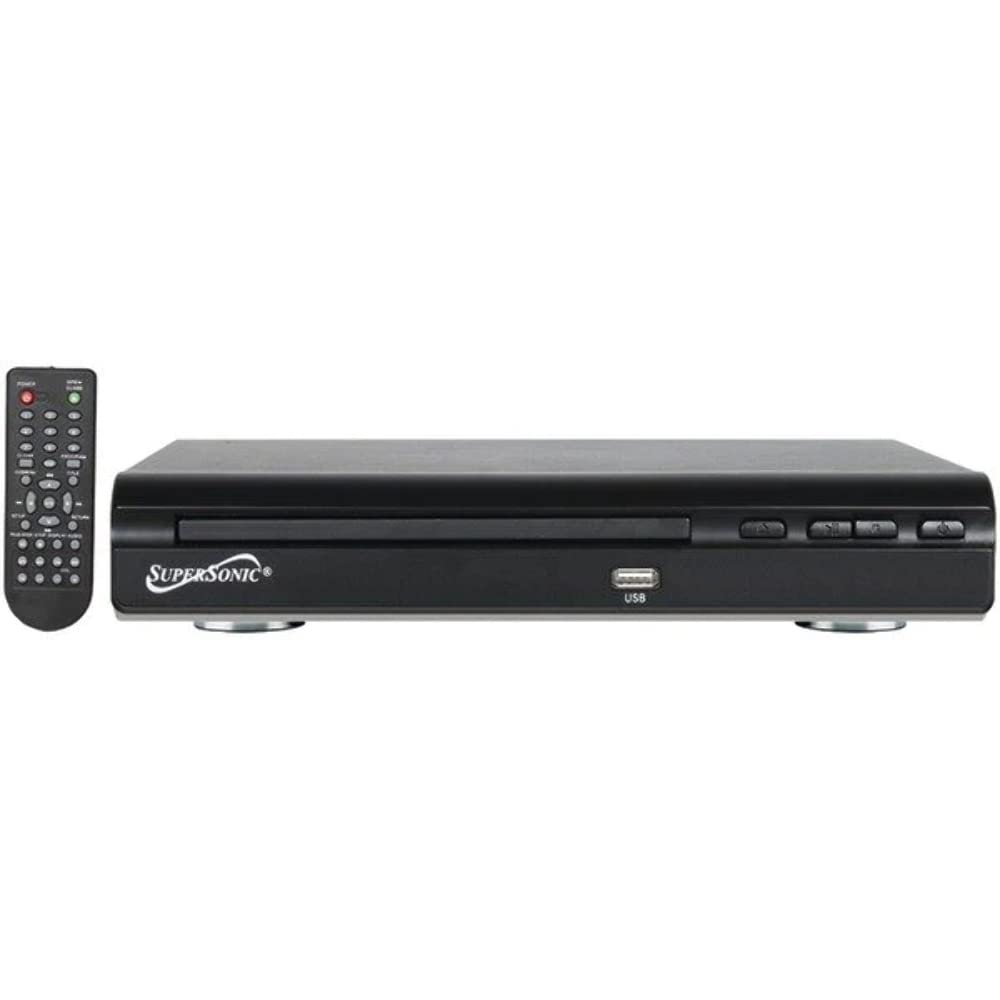
Spredaj view of the SuperSonic SC-25 DVD player, showing the disc tray, USB port, and control buttons.
Ask a question about this manual
Ask about setup, troubleshooting, compatibility, parts, safety, or missing instructions. Manuals+ will review the question and use this page’s manual context to help answer it.