
Konec izdelkaview
The Master Lock Portable Outdoor Key Lock Box is designed to keep your keys safe and secure. This black, weather-resistant lock box features a convenient push-button resettable combination lock, allowing you to easily set and change your personalized code. Ideal for outdoor use, it includes a protective weather cover to prevent freezing and jamming, and a vinyl-coated shackle to prevent scratching surfaces. It provides a secure solution for hiding spare keys for tenants, guests, clients, or for use in various listings.

Spredaj view of the Master Lock 5422E Portable Key Lock Box with push button keypad and shackle.
Lastnosti izdelka
- Large capacity key lock box enables secure storage of up to five keys; Fits most ball biscuit, and tulip door knob styles.
- Set your own alpha/numeric combination lock box; Reset the combination for multiple personalized combination code options.
- For indoor and outdoor use; Key safe is constructed with a metal body for durability, vinyl coated shackle to prevent scratching, and weather cover to protect combination buttons.
- SPECIFIKACIJE: External Dimensions: 6.84 in (173.75mm) H X 3.18 in (80.77 mm) W X 2.067 in (52.507 mm) D Internal Dimensions: 3.50 in (88.9 mm) H x 2.25 in (57mm) W x 1in (25mm) D Shackle Dimensions: Length: 1.833 in (47mm) Shackle Width: 1.406 in (36mm) Shackle Diameter: .406 in (10mm).

Diagram showing key features: Vinyl-Coated Shackle, Push Button Keypad, Storage Compartment for Keys & Key Fobs, and Weather Protection Cover.
Nastavitev in namestitev
Attaching to a Door Knob or Handle
The Master Lock 5422EC is designed for portable application and can be easily attached to most standard door knobs and handles. It is not recommended for lever-style door handles.
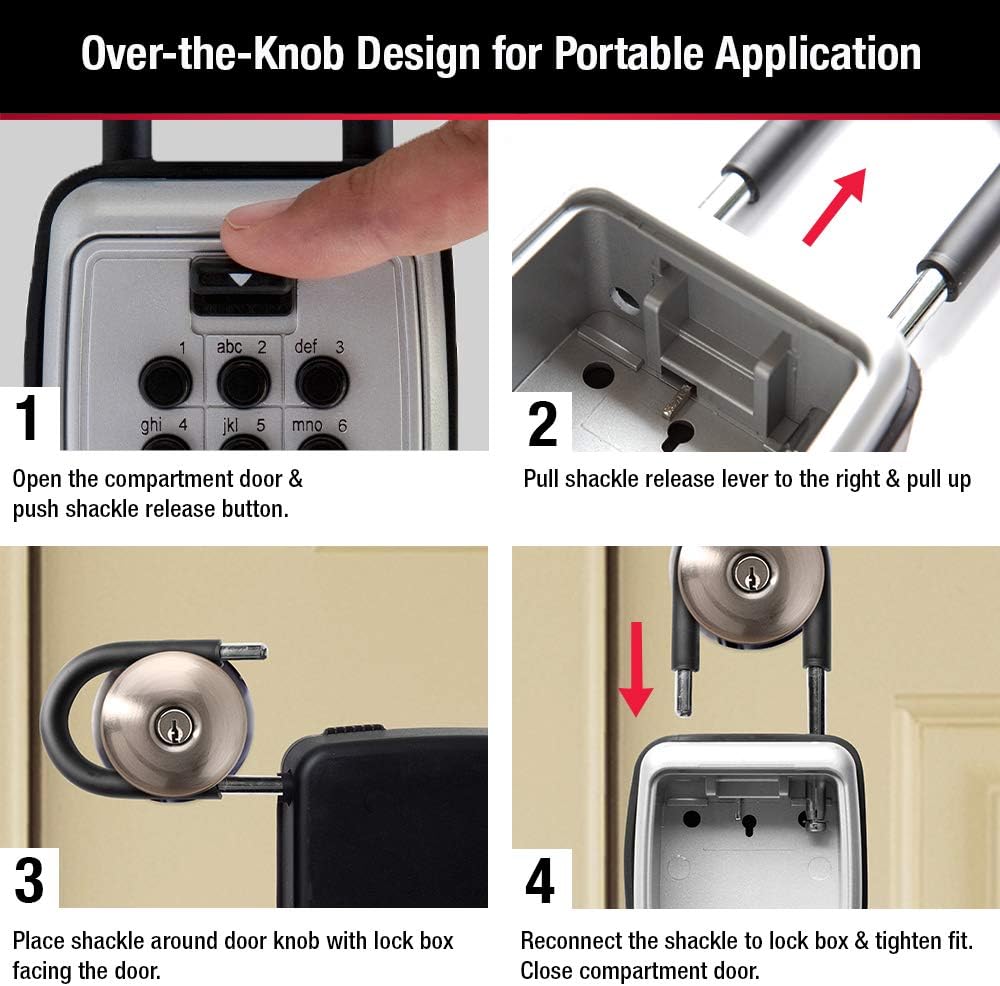
Step-by-step guide: 1. Open compartment door & push shackle release button. 2. Pull shackle release lever to the right & pull up. 3. Place shackle around door knob with lock box facing the door. 4. Reconnect shackle to lock box & tighten fit.

Illustrates compatibility: The lock box fits most standard door knobs and handles, but is not suitable for lever-style door handles.
Nastavitev vaše kombinacije
The lock box features a resettable combination. Follow these steps to set your personalized code:
- Open the lock box and locate the yellow Recode Tool.
- With the compartment door open, locate the 12 yellow plastic slotted buttons behind the door (numbered from 0 to 9 and symbols # and *). All arrows on buttons should be set to the "SET OFF" position.
- Using the yellow Recode Tool or a small flathead screwdriver, PUSH and TURN the desired number/symbol buttons 180° (1/2 turn) to the "SET ON" position.
- A button is properly set when it pops up. It should not remain pushed in.
Pomembno: Combination can be 1-12 characters long but cannot use the same character more than once.

Guide to setting the combination: 1. Open lock box and locate yellow Recode Tool. 2. Locate buttons behind door, set arrows to 'SET OFF'. 3. Use Recode Tool to PUSH and TURN desired buttons 180° to 'SET ON' position. 4. Button is properly set when it pops up and should not remain pushed in.
Navodila za uporabo
Odpiranje ključavnice
To open the lock box, press down the "CLEAR" (C) button, then enter your combination, and finally press down the "OPEN" button. Guide the compartment door down to fully open.
Storing Keys
The large capacity compartment can securely store multiple house keys, key fobs, and access cards. An anti-jam hook is included to hang keys and prevent loose keys from jamming the door when closed.

The lock box securely stores house keys, key fobs, and access cards. It is shown attached to a door knob, contrasting with insecure methods like hiding keys under a mat or flowerpot.
Vzdrževanje
Always keep the protective weather cover closed to withstand extreme weather conditions and protect the combination buttons from freezing or jamming. Regularly inspect the shackle and body for any signs of wear or damage.
Odpravljanje težav
If the lock box does not open after entering the combination, ensure all buttons for your code are properly set to the "SET ON" position. Note that the order of entering the combination buttons does not matter for this model; only that the correct buttons are pressed. If you make a mistake while entering the combination, press the "CLEAR" (C) button to reset and re-enter your code.
Specifikacije
| Atribut | Vrednost |
|---|---|
| Znamka | Glavna ključavnica |
| Vrsta ključavnice | Kombinirana ključavnica |
| barva | Črna |
| Zmogljivost | 5 obremenitev |
| Material | Kovina |
| Posebna funkcija | Portable,Resettable |
| Vrsta namestitve | Wall Mount, Portable |
| Vključene komponente | lock box |
| Teža predmeta | 1.9 funta |
| Globina komore | 1 palcev |
| UPC | 071649370526 |
| Proizvajalec | Glavna ključavnica |
| Številka dela | 5422EC |
| Dimenzije izdelka | 2.06 x 3.18 x 6.84 palcev |
| Država izvora | Kitajska |
| Številka modela artikla | 5422EC |
| Velikost | 3-1/2 In. H. x 2-1/4 In. W. x 1 In. D. |
| Slog | 1 paketov |
| Končaj | Polirano |
| Vzorec | Škatla za ključavnico |
| voltage | 120 volta |
| Količina paketa artikla | 1 |
| Število kosov | 1 |
| Ali so baterije vključene? | št |
| Ali so potrebne baterije? | št |

Detailed measurements of the lock box, including external and internal dimensions, and shackle dimensions. It shows space for house keys, access cards, and key fobs.
Garancija in podpora
This Master Lock product comes with a Omejena doživljenjska garancija. For detailed warranty information and support, please refer to the official user manual.
Lahko tudi prenesete Uporabniški priročnik (PDF) for comprehensive instructions and troubleshooting.