
1. Uvod in konecview
This manual provides comprehensive instructions for the setup, operation, maintenance, and troubleshooting of your InFocus IN3124 Projector. Designed for clarity and ease of use, this guide will help you maximize your projector's performance and longevity.
The InFocus IN3124 is a high-performance projector featuring XGA (1024 x 868) native resolution, 4800 lumens of brightness, and a 3000:1 contrast ratio, making it suitable for various presentation environments. Its portable design allows for flexible placement and usage.
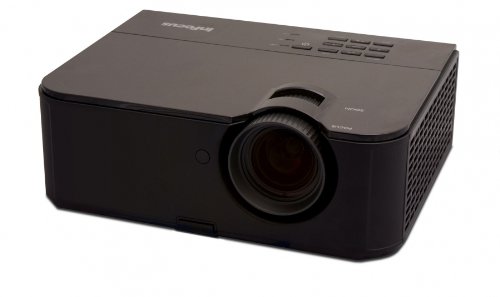
Slika 1: Sprednja stran view of the InFocus IN3124 Projector, highlighting the main lens and the top-mounted control panel.
2. Nastavitev
2.1 Razpakiranje
Projektor in vso dodatno opremo previdno vzemite iz embalaže. Preverite, ali so prisotne vse komponente, navedene na embalažnem seznamu. Originalno embalažo shranite za kasnejši transport ali shranjevanje.
2.2 Namestitev
Position the projector on a stable, level surface. Ensure adequate ventilation around the unit to prevent overheating. Maintain a clear path between the projector lens and the projection screen or surface. The optimal projection distance will vary based on the desired screen size.
2.3 Priključitev napajanja
- Priključite napajalni kabel na vhod za napajanje projektorja.
- Drugi konec napajalnega kabla priključite v ozemljeno električno vtičnico.
2.4 Priključitev vhodnih virov
The IN3124 projector supports various input sources. Connect your video source (e.g., computer, DVD player) to the appropriate input port on the projector. Common ports include VGA and HDMI (if available on your specific model).
- VGA: Use a VGA cable to connect to a computer's video output.
- HDMI: Use an HDMI cable for digital video and audio (check projector for HDMI port availability).
3. Navodila za uporabo
3.1 Vklop/izklop
- Za vklop: Pritisnite gumb za vklop na nadzorni plošči projektorja ali daljinskem upravljalniku. Lučka indikatorja napajanja bo zasvetila.
- Za izklop: Press the power button twice. The projector will enter a cooling cycle before shutting down completely. Do not unplug the projector during the cooling cycle.
3.2 Prilagajanje ostrenja in povečave
Rotate the focus ring on the projector lens until the image appears sharp and clear. Use the zoom ring (if present) to adjust the image size to fit your screen.
3.3 Izbira vhodnih virov
Press the "Source" or "Input" button on the projector's control panel or remote control to cycle through available input sources (e.g., VGA, HDMI). Select the input corresponding to your connected device.
3.4 Menu Navigation and Keystone Correction
Use the menu buttons on the projector or remote to access the On-Screen Display (OSD). Navigate through the menu options to adjust settings such as brightness, contrast, color, and keystone correction. Keystone correction helps to square the image if the projector is not perfectly perpendicular to the screen.
4. Vzdrževanje
4.1 Čiščenje leče
Lečo projektorja nežno obrišite z mehko krpo, ki ne pušča vlaken in je posebej zasnovana za optične površine. Ne uporabljajte abrazivnih čistil ali prekomerne sile, saj lahko s tem opraskate lečo.
4.2 Čiščenje zračnih filtrov
Regularly check and clean the projector's air filters to ensure proper airflow and prevent overheating. Refer to the projector's specific filter access instructions. Use a soft brush or vacuum cleaner to remove dust accumulation.
4.3 Lamp Zamenjava
Projektor lamp ima omejeno življenjsko dobo. Ko lamp life indicator appears or the image becomes dim, the lamp may need replacement. Consult the full service manual or manufacturer's webspletno mesto za podrobne informacijeamp postopki zamenjave in združljivi lamp models. Always allow the projector to cool down completely before attempting lamp zamenjava.
4.4 Shranjevanje
Ko projektorja dalj časa ne uporabljate, ga shranite na hladnem in suhem mestu, stran od neposredne sončne svetlobe in ekstremnih temperatur. Za preprečevanje prahu in poškodb uporabite originalno embalažo ali zaščitno ohišje.
5. Odpravljanje težav
This section addresses common issues you might encounter with your InFocus IN3124 Projector. For more complex problems, contact customer support.
- Ni prikazane slike:
- Prepričajte se, da je projektor vklopljen in da indikator napajanja sveti neprekinjeno.
- Verify that the input source cable (VGA, HDMI) is securely connected to both the projector and the source device.
- Z gumbom »Vir« izberite pravilen vhodni vir.
- Check if the source device is outputting a signal.
- Dim or Faded Image:
- Prilagodite nastavitve svetlosti in kontrasta v zaslonskem meniju.
- Zagotovite lamp is not nearing the end of its lifespan.
- Clean the projector lens and air filters.
- Check the projection mode (e.g., Eco mode might reduce brightness).
- Slika je zamegljena:
- Prilagodite obroč za ostrenje na objektivu projektorja.
- Prepričajte se, da je projekcijska površina ravna in da je projektor stabilen.
- Check the resolution settings of your source device to match the projector's native resolution.
- Daljinski upravljalnik ne deluje:
- Zamenjajte baterije v daljinskem upravljalniku.
- Prepričajte se, da med daljinskim upravljalnikom in IR-sprejemnikom projektorja ni ovir.
- Daljinski upravljalnik usmerite neposredno v projektor.
6. Specifikacije
The following table outlines the key technical specifications for the InFocus IN3124 Projector:
| Funkcija | Specifikacija |
|---|---|
| Številka modela | IN3124 |
| Ločljivost zaslona (izvorna) | XGA (1024 x 868) |
| Svetlost | 4800 lumnov |
| Kontrastno razmerje | 3000:1 |
| Vrsta zaslona | LCD, LCoS |
| Teža predmeta | 8.16 funtov (3.7 kg) |
| Mere izdelka (D x Š x V) | 12.83 x 10.43 x 4.8 palcev (32.59 x 26.49 x 12.19 cm) |
| Posebna funkcija | Prenosni |
7. Garancija in podpora
For detailed warranty information, please refer to the warranty card included with your product packaging or visit the official InFocus webGarancija običajno krije proizvodne napake za določeno obdobje od datuma nakupa.
If you encounter issues that cannot be resolved using the troubleshooting guide, or require technical assistance, please contact InFocus customer support. Contact details can usually be found on the manufacturer's webspletnem mestu ali v dokumentaciji izdelka.