
1. Uvod
This manual provides instructions for the OEM RMT-B119A remote control, designed as a replacement or secondary remote for various Sony Blu-ray player models. This remote offers full functionality for controlling your Blu-ray player's features.
Compatible Sony Blu-ray Player Models:
- BDP-BX59
- BDP-S390
- BDP-S590
- BDP-BX110
- BDP-S1100
- BDP-S3100
- BDP-BX310
2. Nastavitev
2.1 Namestitev baterije
Daljinski upravljalnik potrebuje dve (2) bateriji AAA (nista priloženi). Za namestitev baterij sledite tem korakom:
- Poiščite pokrov prostora za baterije na zadnji strani daljinskega upravljalnika.
- Pritisnite jeziček in potisnite pokrov navzdol, da odprete predal.
- Vstavite dve bateriji AAA in pazite, da se pozitivni (+) in negativni (-) pol pravilno poravnata z oznakami v predalu.
- Pokrov predalčka za baterije potisnite nazaj na svoje mesto, dokler se ne zaskoči.
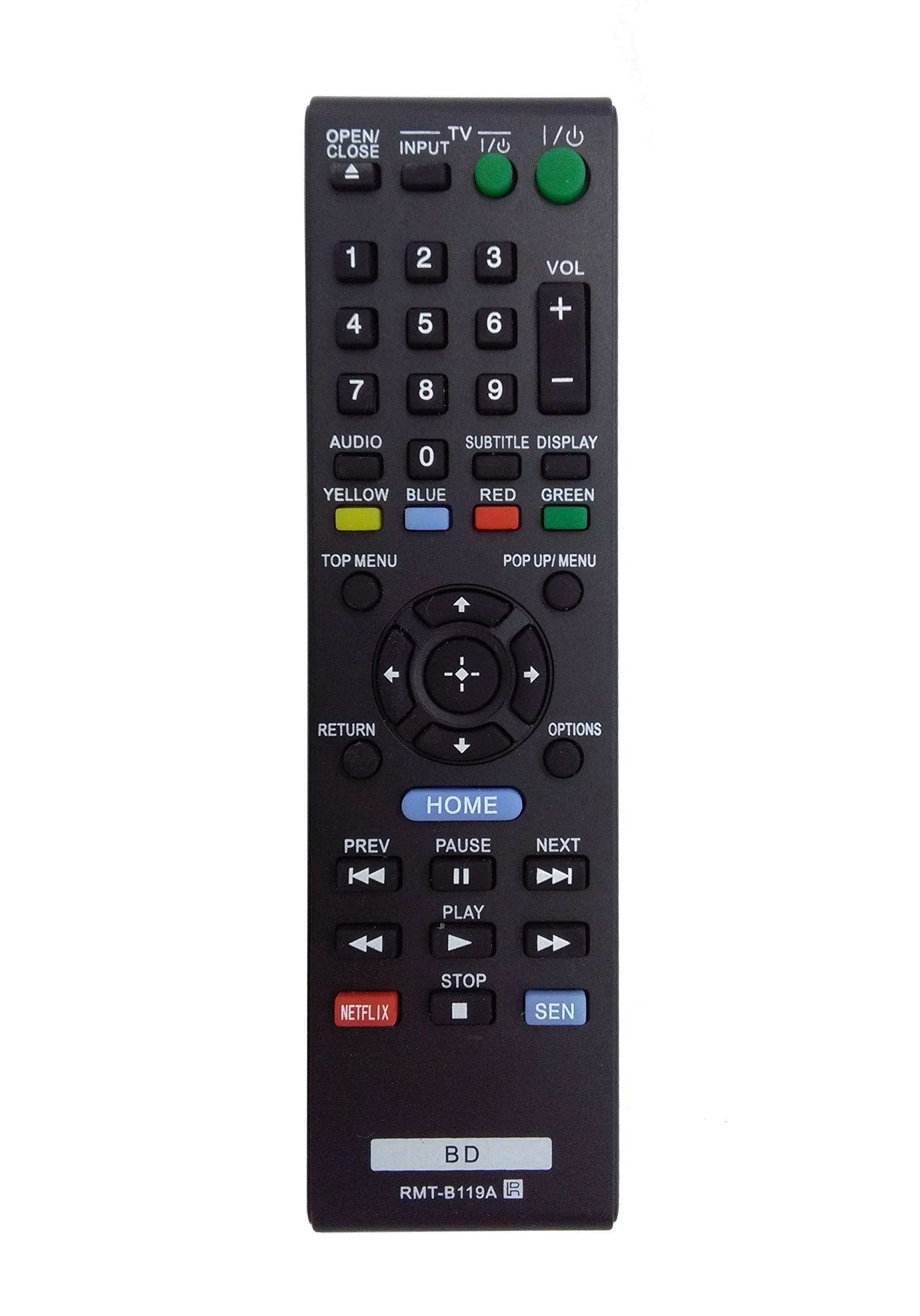
Image: The OEM RMT-B119A remote control, showing the full button layout on the front and a partial view of the open battery compartment on the back, revealing the battery terminals.
3. Navodila za uporabo
3.1 Remote Control Layout and Button Functions
Familiarize yourself with the buttons on your RMT-B119A remote control. Below is a description of each button's primary function.
Image: The OEM RMT-B119A remote control, displaying all buttons and their labels.
- Napajanje (V/I): Turns the Blu-ray player on or off.
- OPEN/CLOSE (▲): Odpre ali zapre pladenj za disk.
- VHOD: Switches the input source on the connected TV (if programmed).
- TV: Switches the remote to TV control mode (if programmed).
- Številska tipkovnica (0–9): Used for direct track selection, chapter selection, or entering numerical data.
- GLASNOST (+/-): Adjusts the volume level (typically for the connected TV, if programmed).
- AVDIO: Changes the audio track or language during playback.
- SUBTITLE DISPLAY: Toggles subtitle display on or off, or cycles through available subtitle languages.
- YELLOW, BLUE, RED, GREEN: Color-coded function buttons, typically used for specific features within menus or interactive content. Their function varies depending on the disc or menu.
- ZGORNJI MENI: Accesses the main menu of the Blu-ray disc.
- POP UP/MENU: Displays the pop-up menu during disc playback.
- Directional Pad (↑↓←→): Krmari po menijih in možnostih.
- Center Button (Enter/Select): Potrdi izbiro ali odpre element menija.
- VRNITEV: Vrne se na prejšnji zaslon ali meni.
- MOŽNOSTI: Displays context-sensitive options or settings.
- DOMOV: Accesses the Blu-ray player's home menu.
- PREV (◀◀): Skips to the beginning of the current track/chapter or the previous track/chapter.
- PAUSE (▌▌): Zaustavi predvajanje.
- NEXT (▶▶): Skips to the next track or chapter.
- PLAY (▶): Začne ali nadaljuje predvajanje.
- STOP (■): Ustavi predvajanje.
- NETFLIX: Direct access button for the Netflix streaming service.
- SEN: Direct access button for the Sony Entertainment Network (now PlayStation Video/Music).
- BD: Likely a dedicated button for Blu-ray Disc functions or to switch to Blu-ray mode.
4. Vzdrževanje
Za zagotovitev dolge življenjske dobe in pravilnega delovanja daljinskega upravljalnika upoštevajte naslednja navodila za vzdrževanje:
- Čiščenje: Daljinski upravljalnik obrišite z mehko, suho krpo. Za trdovratno umazanijo rahloampKrpo sperite z vodo ali blagim, neabrazivnim čistilom. Izogibajte se uporabi agresivnih kemikalij ali topil.
- Zamenjava baterije: Baterije zamenjajte, ko daljinski upravljalnik postane počasen ali preneha delovati. Vedno zamenjajte obe bateriji hkrati z novima iste vrste.
- Shranjevanje: Store the remote in a cool, dry place away from direct sunlight, extreme temperatures, and high humidity. If the remote will not be used for an extended period, remove the batteries to prevent leakage.
- Izogibajte se kapljicam: Daljinski upravljalnik zaščitite pred fizičnimi udarci, saj lahko padci poškodujejo notranje komponente.
5. Odpravljanje težav
If you experience issues with your remote control, refer to the following table for common problems and solutions:
| Težava | Možen vzrok | rešitev |
|---|---|---|
| Daljinec ne deluje. | Prazne ali nepravilno vstavljene baterije. | Baterije zamenjajte z novimi in pri tem pazite na pravilno polarnost (+/-). |
| Daljinski upravljalnik deluje občasno. | Low battery power or obstruction. | Replace batteries. Ensure no objects are blocking the remote's signal path to the Blu-ray player. |
| Remote does not control the TV. | Remote not programmed for TV or TV mode not selected. | This remote is primarily for Blu-ray players. TV control functionality may require specific programming not covered by this manual, or may not be supported by this OEM model. |
| Gumbi se ne odzivajo ali so zalepljeni. | Umazanija ali ostanki pod gumbi. | Clean the remote control surface. Avoid spilling liquids on the remote. |
6. Specifikacije
- Znamka: OEM
- Številka modela: RMT-B119A
- Tehnologija povezljivosti: Infrardeči (IR)
- Združljive naprave: Sony Blu-ray Players (specific models listed in Introduction)
- vir energije: 2 x AAA baterije (niso vključene)
- Največji obseg: Približno 10 metrov (33 čevljev)
- Posebna lastnost: Ergonomska oblika
7. Garancija in podpora
This OEM RMT-B119A remote control comes with a 30-dnevna garancija od datuma nakupa, ki krije proizvodne napake. Prosimo, shranite dokazilo o nakupu za uveljavljanje garancije.
For technical support or warranty inquiries, please contact the retailer or manufacturer directly. Refer to your purchase documentation for specific contact information.