
Uvod
This manual provides essential instructions for the safe and efficient operation of your VisionTek Pitbull RockDoc Power Portable MP3 Speaker. Please read this manual thoroughly before using the device and retain it for future reference.
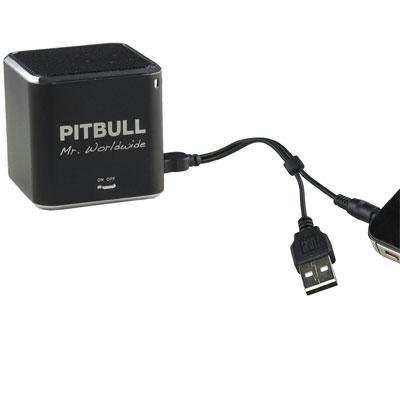
This image displays the compact, black cube-shaped Pitbull RockDoc Power Portable MP3 Speaker. The front face features the 'PITBULL Mr. Worldwide' logo and an 'ON OFF' switch. An integrated cable with a USB connector and a 3.5mm audio jack is shown connected to the speaker, ready for charging or audio input.
Lastnosti izdelka
- Prenosna zasnova: Kompakten in lahek za enostaven transport.
- Vgrajen MP3 predvajalnik: Features 4GB of internal memory for direct music playback.
- Brezžična povezljivost: Supports Bluetooth for audio streaming from compatible devices.
- Wired Audio Input: Includes a 3.5 mm audio jack for connecting non-Bluetooth devices.
- Baterija: Operates on an internal battery for cordless use.
- 1-sistemski zvočniški sistem: Delivers clear audio output.
Nastavitev
Polnjenje zvočnika
- Locate the integrated USB cable attached to the speaker.
- Priključite konec kabla USB-A na vrata USB z napajanjem (npr. računalnik, stenski adapter USB).
- The speaker's indicator light will illuminate to show charging status. Refer to the device for specific light indications.
- Ko je popolnoma napolnjen, odklopite kabel USB.
Vklop/izklop
- To power on, slide the 'ON OFF' switch to the 'ON' position.
- To power off, slide the 'ON OFF' switch to the 'OFF' position.
Povezovanje zvočnih virov
Your speaker supports three primary methods for audio input:
1. Using Internal 4GB Memory (MP3 Playback)
- To load music onto the internal 4GB memory, connect the speaker to a computer using the USB cable. The speaker should appear as a removable storage device.
- Povlecite in spustite zvok MP3 files into the speaker's storage.
- Enkrat files are transferred, safely eject the speaker from your computer.
- The speaker will automatically play files from its internal memory when powered on and no other audio source is connected.
2. Bluetooth povezava
- Prepričajte se, da je zvočnik vklopljen.
- Aktivirajte Bluetooth na pametnem telefonu, tabličnem računalniku ali drugi združljivi napravi.
- Iskanje available Bluetooth devices. The speaker should appear as "Pitbull RockDoc" or similar.
- Select the speaker from the list to pair. A confirmation sound or light indication may occur upon successful pairing.
3. 3.5 mm Audio Jack Connection
- Locate the integrated 3.5 mm audio jack on the speaker's cable.
- Connect this jack to the headphone output or audio-out port of your external audio device (e.g., MP3 player, phone, laptop).
- Ensure the speaker is powered on. Audio will be routed through this connection.
Navodila za uporabo
Osnovne kontrole predvajanja
The speaker features basic controls for media playback. These controls typically include:
- Predvajanje/pavza: Press to start or pause audio playback.
- Naslednja skladba: Press to skip to the next audio file.
- Prejšnja skladba: Press to go back to the beginning of the current track or to the previous track.
- Nadzor glasnosti: Adjust the volume level. (Specific button layout not provided, assume standard controls).
Note: When connected via Bluetooth or 3.5mm audio jack, playback controls on the speaker may control the connected device, or you may need to control playback directly from the source device.
Vzdrževanje
Čiščenje
- Zunanjost zvočnika obrišite z mehko, suho krpo, ki ne pušča vlaken.
- Ne uporabljajte abrazivnih čistil, topil ali močnih kemikalij.
- Izogibajte se vdoru vlage v morebitne odprtine.
Shranjevanje
- Zvočnik shranjujte na hladnem in suhem mestu, stran od neposredne sončne svetlobe in ekstremnih temperatur.
- Če baterijo shranjujete dlje časa, jo delno napolnite (približno 50 %), da podaljšate njeno življenjsko dobo.
Odpravljanje težav
| Težava | Možen vzrok | rešitev |
|---|---|---|
| Brez moči | Baterija je izpraznjena | Zvočnik napolnite s kablom USB. |
| Ni zvoka iz zvočnika | Volume too low; Incorrect input source; Device not paired (Bluetooth); Cable not connected (3.5mm) | Increase speaker volume; Ensure correct mode (internal MP3, Bluetooth, or AUX); Re-pair Bluetooth device; Check 3.5mm cable connection. |
| Bluetooth povezovanje ne uspe | Zvočnik ni v načinu seznanjanja; Naprava je predaleč; Motnje | Ensure speaker is discoverable; Move device closer to speaker; Turn off other Bluetooth devices. |
| Prenos ni mogoč files to 4GB memory | Incorrect USB connection; Driver issue; Memory full | Ensure speaker is connected to computer via USB; Try a different USB port/cable; Check available memory space. |
Specifikacije
| Funkcija | Podrobnost |
|---|---|
| Številka modela | 900584 |
| Vrsta zvočnika | 1-Way Portable Speaker |
| Notranji pomnilnik | 4GB (for MP3 playback) |
| Povezljivost | Bluetooth, 3.5 mm Audio Jack |
| Vir napajanja | Napajanje na baterije |
| Največja izhodna moč zvočnika | 3 vatov |
| Teža predmeta | 159 g |
| Dimenzije izdelka (DxŠxV) | 5 x 5 x 4.9 cm |
| Proizvajalec | VISIONTEK MASS STORAGE |
Informacije o garanciji
For detailed warranty information regarding your VisionTek Pitbull RockDoc Power Portable MP3 Speaker, please refer to the warranty card included with your purchase or contact the manufacturer directly. Amazon's buying options mention a 'Warranty Policy', indicating manufacturer coverage.
Podpora
If you require technical assistance or have questions not covered in this manual, please contact VisionTek Mass Storage, the manufacturer of this product. Contact details can typically be found on their official webembalaža spletnega mesta ali izdelka.
