
1. Uvod
Hvala za nakupasing the MOOER Reecho Digital Delay Pedal. This compact and versatile pedal offers three distinct delay modes: Analog, Real Echo, and Tape Echo, providing a wide range of delay effects for your guitar. Its small footprint and true bypass design make it an excellent addition to any pedalboard.
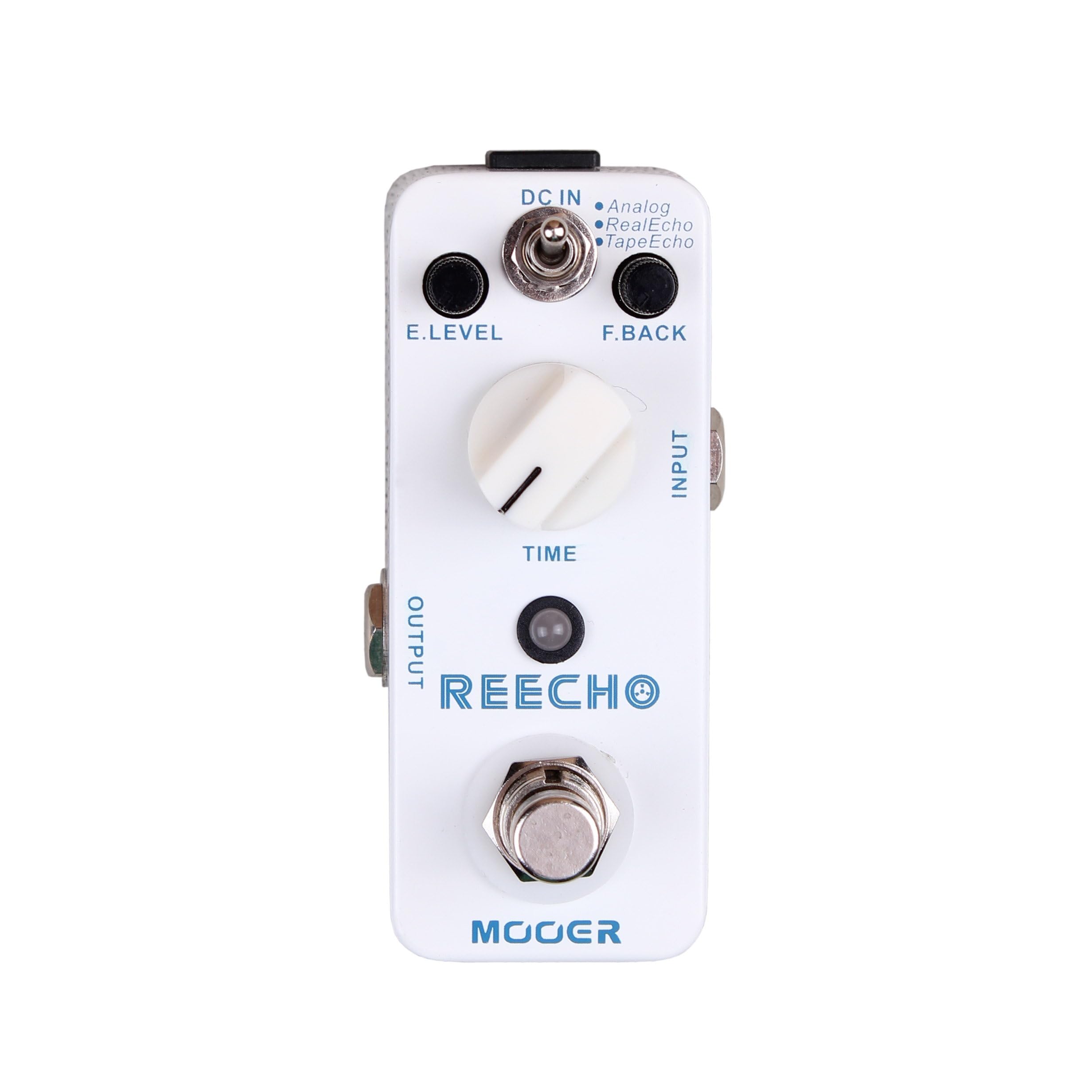
Slika 1: Spredaj view of the MOOER Reecho Digital Delay Pedal. This image shows the compact white enclosure with the E.LEVEL knob, TIME knob, mode toggle switch, input/output jacks, and footswitch.
2. Ključne značilnosti
- Trije načini zamika: Choose between Analog, Real Echo, and Tape Echo for diverse sonic textures.
- Wide Delay Time Range: Offers a delay time from 5ms to 780ms, suitable for various musical styles.
- Full Metal Shell: Durable and robust construction for reliable performance.
- Kompaktna zasnova: Very small and exquisite, optimizing pedalboard space.
- Pravi obvoz: Ensures signal integrity when the effect is disengaged.
3. Kontrole in funkcije
Familiarize yourself with the controls of your Reecho pedal:
Slika 2: Podrobno view of the MOOER Reecho pedal's controls, including E.LEVEL, TIME, and the mode switch. The image highlights the input and output jacks, DC input, and footswitch.
- E.LEVEL Knob: (Effect Level) Controls the mix of the delayed signal with the dry signal. Turn clockwise to increase the effect level, counter-clockwise to decrease it.
- Gumb ČAS: Adjusts the delay time, from a very short slapback to a longer, more ambient delay. Turn clockwise for longer delay times, counter-clockwise for shorter times.
- Preklopno stikalo za način: Selects one of the three delay modes:
- Analogni: Emulates classic analog delay pedals, offering a warm, natural decay.
- Real Echo: Provides a clear, pristine digital delay with accurate repeats.
- Tape Echo: Simulates the characteristics of vintage tape echo units, including subtle modulation and decay.
- INPUT priključek: Connect your instrument or the output of another pedal here.
- IZHODNI priključek: Povežite to s svojim amplifier or the input of the next pedal in your signal chain.
- DC IN priključek: Connect a 9V DC power adapter (center negative) here.
- Nožno stikalo: Engages or disengages the effect. This pedal features true bypass, ensuring your tone remains unaffected when the pedal is off.
4. Navodila za namestitev
- Napajalni priključek: Connect a standard 9V DC power adapter (center negative) to the DC IN jack on the side of the pedal. Ensure the power supply meets the pedal's requirements to prevent damage.
- Vhodna povezava: Connect your guitar or the output of a preceding effect pedal to the INPUT jack on the right side of the Reecho pedal using a standard 1/4-inch instrument cable.
- Izhodna povezava: Connect the OUTPUT jack on the left side of the Reecho pedal to your ampvhod efektorja ali vhod naslednjega efektnega pedala v verigi z uporabo standardnega 6,3 mm kabla za instrument.
- Začetne nastavitve: Before powering on, set the E.LEVEL and TIME knobs to their minimum positions (fully counter-clockwise) and the mode switch to your desired initial delay type (e.g., Real Echo).
- Vklop: Ko so vse povezave varne, vklopite amplifier and then the pedal.
Opomba: Always connect and disconnect cables with your amplifier turned off or on standby to avoid loud pops and potential damage to your equipment.
5. Navodila za uporabo
Using the MOOER Reecho pedal is straightforward. Follow these steps to achieve various delay effects:
- Engage the Effect: Press the footswitch to turn the delay effect on. The LED indicator will illuminate. Press it again to bypass the effect (LED off).
- Select Delay Mode: Use the toggle switch to select one of the three delay modes:
- Analogni: For warm, vintage-style delays.
- Real Echo: For clear, modern digital delays.
- Tape Echo: For delays with a characteristic tape saturation and subtle warble.
- Adjust Delay Time: Rotate the TIME knob to set the duration of the delay repeats. Experiment with different settings to find the perfect rhythm for your playing.
- Set Effect Level: Use the E.LEVEL knob to control how prominent the delayed signal is in your overall sound. Start with a lower setting and gradually increase it to avoid overwhelming your dry signal.
Experiment with different combinations of the TIME and E.LEVEL knobs within each delay mode to discover the full range of sounds the Reecho pedal can produce. From subtle ambience to rhythmic repeats, the possibilities are extensive.
6. Vzdrževanje
- Čiščenje: Use a soft, dry cloth to clean the pedal's exterior. Avoid using abrasive cleaners or solvents, as they may damage the finish.
- Shranjevanje: Ko pedala dlje časa ne uporabljate, ga shranite na hladnem in suhem mestu, stran od neposredne sončne svetlobe in ekstremnih temperatur.
- Napajanje: Always use a regulated 9V DC, center-negative power supply. Incorrect power can damage the unit and void the warranty.
- Izogibajte se vlagi: Keep the pedal away from water and excessive humidity.
7. Odpravljanje težav
| Težava | Možen vzrok | rešitev |
|---|---|---|
| Pri pritisku na pedal ni zvoka. | Incorrect cable connection, no power, E.LEVEL knob set to minimum. | Check all cable connections. Ensure power supply is connected and functional. Increase E.LEVEL knob. |
| No effect, but dry signal passes through. | E.LEVEL knob set to minimum, pedal bypassed. | Increase E.LEVEL knob. Press footswitch to engage effect (LED should be on). |
| Neželen hrup ali brenčanje. | Faulty power supply, ground loop, interference from other equipment. | Use a high-quality, regulated power supply. Try isolating the pedal's power. Check other cables and equipment. |
| Delay repeats are too short/long. | TIME knob setting. | Adjust the TIME knob to your desired delay duration. |
8. Specifikacije
- Znamka: MOOER
- Model: Reecho
- Načini zamika: Analog, Real Echo, Tape Echo
- Časovni razpon zakasnitve: 5ms ~ 780ms
- Vnos: 1/4" mono audio jack (Impedance: 470k Ohms)
- Izhod: 1/4" mono audio jack (Impedance: 100 Ohms)
- Zahteve glede napajanja: 9V DC, center negative (Power consumption: 128mA)
- Dimenzije: 93.5 mm (D) × 42 mm (Š) × 52 mm (V)
- Teža: 160 g (0.16 kilograma)
- Material: Polno kovinsko ohišje
9. Garancija in podpora
MOOER products are designed for reliability and performance. For warranty information and technical support, please refer to the official MOOER webspletno mesto ali se obrnite na lokalnega distributerja. Račun shranite kot dokazilo o nakupu za uveljavljanje garancije.
Za dodatno pomoč obiščite Trgovina MOOER na Amazonu or the official MOOER webmesto.


