
1. Uvod
The Polaroid PLRTC18 Shutter Release Timer Remote Control is designed to provide precise control over your camera's shutter, enabling advanced photographic techniques such as time-lapse, long exposures, and delayed shots. This device connects directly to your compatible Canon DSLR camera via a dedicated cable, allowing you to program various timing functions with accuracy.

Figure 1.1: User operating the PLRTC18 remote control with a camera on a tripod.
Please read this manual thoroughly to understand the features and proper operation of your new remote control.
2. Vsebina paketa
- Polaroid PLRTC18 Shutter Release Timer Remote Control
- Camera Connection Cables (2 types for broad compatibility)
- Uporabniški priročnik
- AAA baterije (2)
3. Nastavitev
3.1. Namestitev baterije
The PLRTC18 requires two AAA batteries for operation. To install:
- Poiščite pokrov prostora za baterije na zadnji strani daljinskega upravljalnika.
- Odprite pokrov v smeri puščice.
- Vstavite dve bateriji AAA in pazite na pravilno polarnost (+/-), kot je označeno v notranjosti predala.
- Zaprite pokrov predalčka za baterije, dokler se ne zaskoči.

Figure 3.1: Battery compartment with two AAA batteries.
Opomba: To conserve battery life, it is recommended to remove the batteries when the remote control will not be used for an extended period, as there is no dedicated ON/OFF switch.
3.2. Povezovanje s kamero
The remote control connects to your camera using one of the provided cables. Identify the correct cable for your specific Canon DSLR model.
- Plug one end of the appropriate connection cable into the remote control's port.
- Plug the other end of the cable into your camera's remote control terminal. This is typically a 3-pin or mini headphone jack style port, often located on the side of the camera body.
- Prepričajte se, da sta obe povezavi varni.

Figure 3.2: Connecting the remote control cable to a Canon camera.
4. Navodila za uporabo
4.1. Nadzor nadview
Familiarize yourself with the buttons and LCD display on the remote control:

Figure 4.1: PLRTC18 Remote Control Layout.
- LCD zaslon: Shows current settings for DELAY, LONG, INTVL (Interval), and N (Number of exposures).
- Gumb SET: Uporablja se za vstop v način nastavitev in potrditev izbir.
- Puščične tipke (gor/dol/levo/desno): Used to navigate between settings and adjust values.
- Gumb za VKLOP/IZKLOP ČASOVNIKA: Initiates or stops the programmed timer sequence.
- /LOCK Button: Functions as a manual shutter release (half-press for focus, full-press for shutter) and can lock the remote.
4.2. Nastavitev funkcij časovnika
The remote control allows you to set four primary timing parameters: Delay, Long Exposure, Interval, and Number of Exposures. All settings can be adjusted up to 99 hours, 59 minutes, and 59 seconds in one-second increments.
- Pritisnite NASTAVI button to enter the setting mode. The first parameter (DELAY) will begin to flash.
- Uporabite Puščica levo/desno buttons to navigate between DELAY, LONG, INTVL, and N.
- Uporabite Puščica navzgor / navzdol buttons to adjust the values for the selected parameter (hours, minutes, seconds).
- After setting a value, press NASTAVI again to move to the next digit or parameter.
- Once all desired parameters are set, press NASTAVI until the display stops flashing and returns to standby mode.
4.2.1. DELAY (Self-Timer)
This sets the amount of time before the first exposure sequence begins. Useful for getting into the shot or allowing camera vibrations to settle.
4.2.2. LONG (Exposure Time)
This sets the duration the camera's shutter will remain open for each exposure. Set your camera to Bulb mode for this function to work correctly.
4.2.3. INTVL (Interval Time)
This sets the time between the end of one exposure and the start of the next. Essential for time-lapse photography.
4.2.4. N (Number of Exposures)
This sets the total number of exposures the remote will trigger. Set to "---" for an unlimited number of shots.
4.3. Zagon in ustavitev časovnika
Once your desired settings are programmed:
- Pritisnite ČASOVNIK ZAGONA/USTAVITVE button to begin the programmed sequence. The LCD will display a countdown or active timer.
- Če želite ustaviti tekoče zaporedje, pritisnite ČASOVNIK ZAGONA/USTAVITVE gumb znova.
4.4. Ročno proženje zaklopa
The remote control can also function as a simple wired shutter release.
- Pritisk do polovice: Pritisnite /ZAKLJUČI button halfway down to activate your camera's autofocus.
- Celoten tisk: Pritisnite /ZAKLJUČI button fully down to trigger the shutter.
- Locking the Shutter: For continuous shooting or long exposures in Bulb mode (without using the LONG timer function), press the /ZAKLJUČI button fully down and slide it forward to lock it in the depressed position. Slide it back to release.
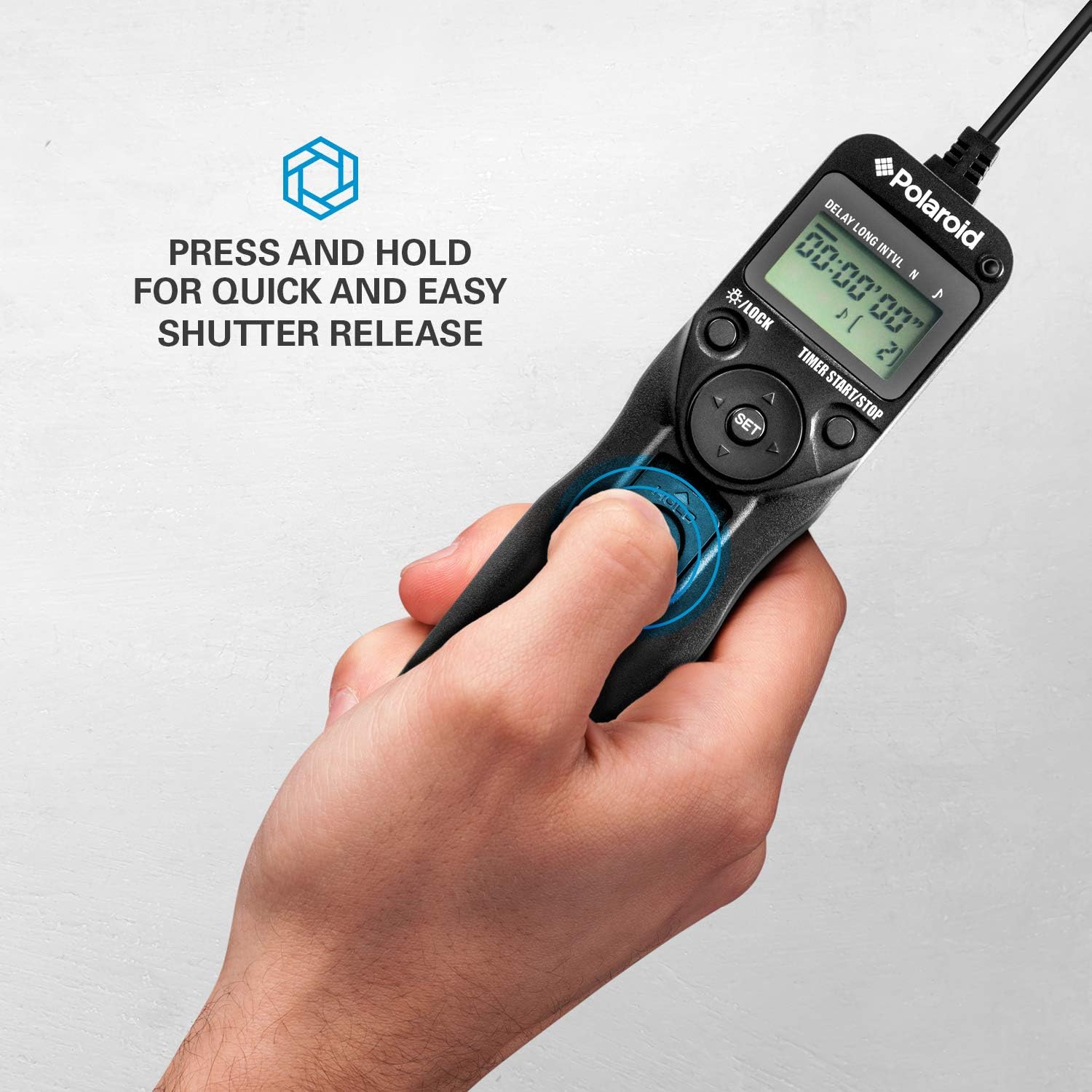
Figure 4.2: Manual shutter release operation.
5. Vzdrževanje
- Čiščenje: Daljinski upravljalnik obrišite z mehko, suho krpo. Ne uporabljajte tekočih čistil ali topil.
- Vzdrževanje baterije: Remove batteries if the unit will not be used for an extended period to prevent leakage. Replace batteries when the low battery indicator appears on the LCD.
- Shranjevanje: Daljinski upravljalnik shranjujte na hladnem in suhem mestu, stran od neposredne sončne svetlobe in ekstremnih temperatur.
- Skrb za kabel: Avoid bending or twisting the connection cables excessively to prevent damage.
6. Odpravljanje težav
| Težava | Možen vzrok | rešitev |
|---|---|---|
| Daljinski upravljalnik se ne vklopi. | Baterije so prazne ali nepravilno nameščene. | Preverite polarnost baterij. Zamenjajte z novimi baterijami AAA. |
| Kamera se ne sproži. |
|
|
| Zaporedje časovnika se ne zažene. | Settings not confirmed or START button not pressed. | Ensure all settings are confirmed with NASTAVI in nato pritisnite ČASOVNIK ZAGONA/USTAVITVE. |
| LCD-zaslon je zatemnjen ali utripa. | Nizka baterija. | Zamenjajte baterije AAA. |
7. Specifikacije
- Model: PLRTC18
- Znamka: Polaroid
- Povezljivost: Žično
- Funkcije časovnika: Delay, Long Exposure, Interval, Number of Exposures
- Nastavitve časovnika: 1 second to 99 hours, 59 minutes, 59 seconds (in 1-second increments)
- Število strelov: 1 to 9999, or unlimited (---)
- Zaslon: Osvetljen LCD
- vir energije: 2 x AAA baterije
- barva: Črna
8. Camera Compatibility
The Polaroid PLRTC18 is compatible with a wide range of Canon Digital SLR cameras that utilize a 3-pin or mini headphone jack style remote control terminal. Compatible models include, but are not limited to:
- Canon G10, G11, G12, G16
- Canon EOS Digital Rebel series
- Canon 60D, 70D
- Canon Elan II/IIE, Elan 7/7E
- Canon Rebel Ti /2000/G/GII/X/XS
- Canon IX/IX Lite
- Canon SX50 HS
- Canon EOS Rebel T1i, T2, T2i, T3, T3i, T4i, T5, T5i, T6
- And similar models with compatible shutter release ports.
Please consult your camera's manual to confirm the type of remote control port it uses.
9. Garancija in podpora
Za informacije o garanciji ali tehnično podporo glejte dokumentacijo, ki je priložena nakupu, ali obiščite uradno spletno stran Polaroid. webspletnega mesta. Shranite dokazilo o nakupu za uveljavljanje garancije.