
Uvod
The Jabra Music Street2 Bluetooth Stereo Headset is designed to provide high-quality audio and hands-free communication. This manual provides essential information for the proper use, maintenance, and troubleshooting of your device. Please read it carefully before use.
Nastavitev
1. Polnjenje slušalk
Before first use, fully charge the headset. Connect the micro-USB charging cable to the charging port on the headset and the other end to a USB power source.
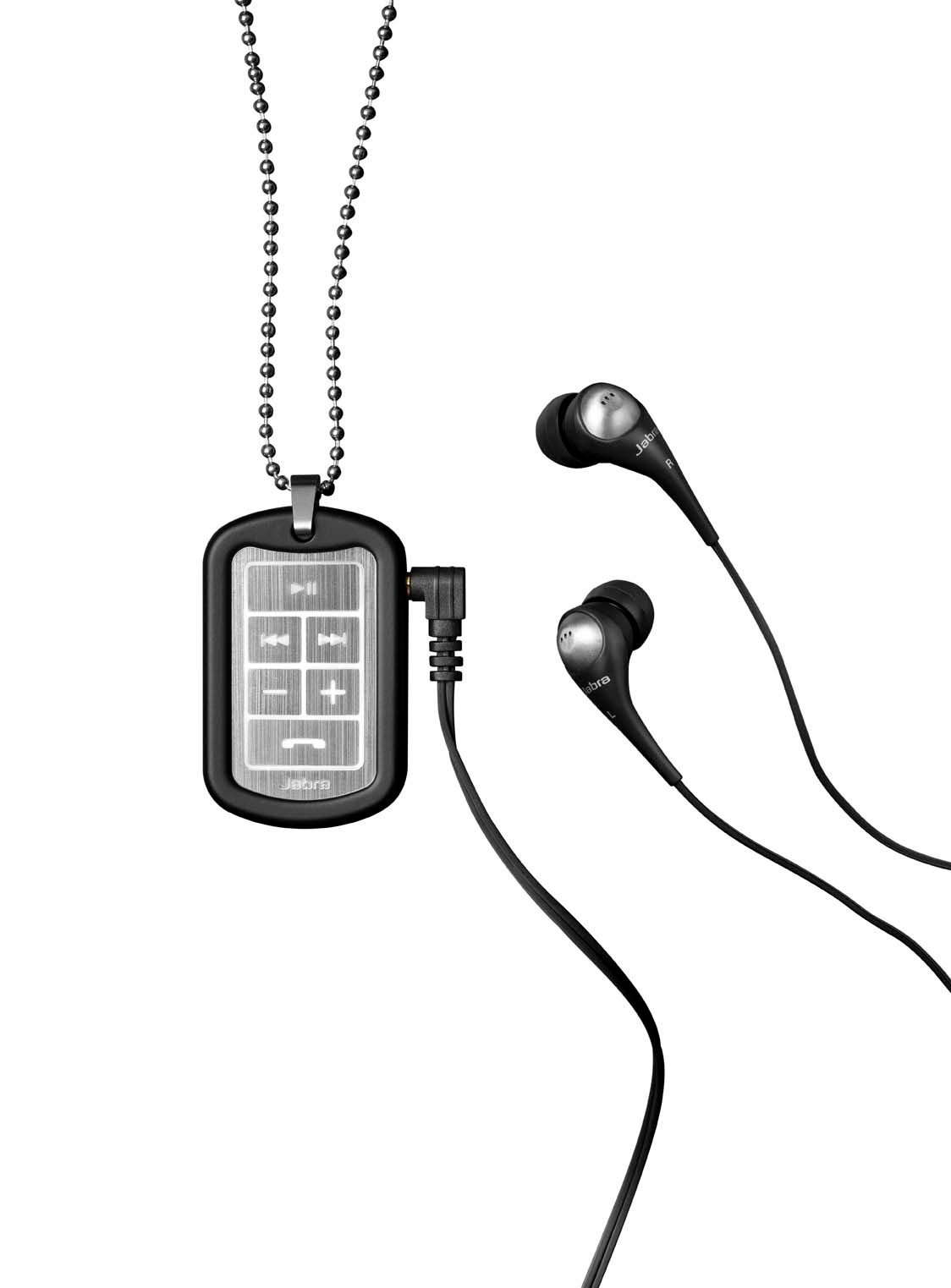
Image: The Jabra Music Street2 headset, highlighting the micro-USB charging port located on the side of the control unit.
- Polno polnjenje običajno traja približno 2 uri.
- LED indikator bo prikazoval stanje polnjenja (npr. rdeča za polnjenje, modra za polno napolnjenost).
2. Seznanjanje z napravo Bluetooth
- Prepričajte se, da so slušalke izklopljene.
- Press and hold the Multi-function button (usually the play/pause button) for approximately 5-7 seconds until the LED indicator flashes blue rapidly. This indicates pairing mode.
- V napravi, ki podpira Bluetooth (pametni telefon, tablični računalnik itd.), pojdite v nastavitve Bluetooth in omogočite Bluetooth.
- Iskanje available devices. "Jabra Street2" should appear in the list.
- Select "Jabra Street2" to connect. If prompted for a passcode, enter "0000" (four zeros).
- Ko je povezava uspešna, bo LED indikator počasi utripal modro.
The headset can remember multiple paired devices but can only be connected to one at a time.
Navodila za uporabo
Vklop/izklop
- Vklop: Pritisnite in držite večfunkcijski gumb, dokler LED ne utripa modro.
- Ugasniti: Pritisnite in držite večfunkcijski gumb, dokler LED ne utripne rdeče in se nato izklopi.
Nadzor glasbe
- Predvajanje/pavza: Enkrat pritisnite večfunkcijski gumb.
- Naslednja skladba: Press the "Next Track" button (usually marked with a forward arrow).
- Prejšnja skladba: Press the "Previous Track" button (usually marked with a backward arrow).
- Povečaj glasnost: Pritisnite gumb "+".
- Znižaj glasnost: Pritisnite gumb "-".
Upravljanje klicev
- Sprejmi klic: Enkrat pritisnite večfunkcijski gumb.
- Končaj klic: Med klicem enkrat pritisnite večnamensko tipko.
- Zavrni klic: Pritisnite in držite večfunkcijski gumb 2 sekundi.
- Ponovno klicanje zadnje številke: Dvakrat pritisnite večfunkcijski gumb, ko ne kličete.
- Glasovno klicanje: Press the Multi-function button once when not on a call (if supported by your phone).
The headset automatically switches between music and calls.
Vzdrževanje
- Keep the headset dry. Moisture can damage the electronic circuits.
- Avoid extreme temperatures. High temperatures can shorten the life of electronic devices, damage batteries, and warp or melt certain plastics.
- Do not attempt to open the headset. Unauthorized modifications can damage the unit and void your warranty.
- Clean the headset with a soft, dry cloth. Do not use harsh chemicals or detergents.
- Slušalke shranjujte na hladnem in suhem mestu, ko jih dlje časa ne uporabljate.
Odpravljanje težav
Brez moči
- Prepričajte se, da so slušalke popolnoma napolnjene. Priključite jih na vir napajanja in preverite indikator polnjenja.
Ni mogoče seznaniti z napravo
- Make sure the headset is in pairing mode (LED flashing blue rapidly).
- Prepričajte se, da je Bluetooth v vaši napravi omogočen in da je v dosegu (običajno 10 metrov ali 33 čevljev).
- Try turning off and on both the headset and your Bluetooth device.
- If previously paired, try deleting "Jabra Street2" from your device's Bluetooth list and re-pairing.
Ni zvoka ali slaba kakovost zvoka
- Preverite glasnost tako na slušalkah kot na povezani napravi.
- Prepričajte se, da so slušalke pravilno povezane z vašo napravo.
- Da se izognete motnjam, se premaknite bližje napravi.
- Ensure the ear buds are correctly inserted and fit snugly to block external noise.
Calls Not Switching Automatically
- Verify that the headset is the active audio device for calls on your phone's Bluetooth settings.
- Some phone models may require manual selection of the audio output during a call.
Specifikacije
| Ime modela | Jabra Music Street2 |
| Različica Bluetooth | 3.0 + EDR |
| Brezžično Domet | Do 10 metrov (33 čevljev) |
| Čas pogovora | Do 8 ur |
| Čas pripravljenosti | Do 9.5 dni |
| Čas polnjenja | Približno 2 ur |
| Povezljivost | Bluetooth, 3.5 mm Jack (for wired connection if applicable) |
| Lastnosti | Virtual surround sound, power bass, noise-blocking ear buds, automatic music/call switching |
Garancija in podpora
Jabra products are covered by a limited warranty. For specific warranty terms and conditions, please refer to the warranty card included with your product or visit the official Jabra webmesto.
For technical support, frequently asked questions, or to download the latest software/firmware updates, please visit the official Jabra support page:
You may also contact Jabra customer service directly for assistance.