
Uvod
Hvala za nakupasing the GPX Weatherx WR282B Weather and Alert Radio. This portable radio is designed to provide you with AM/FM radio reception and access to all 7 NOAA weatherband channels, ensuring you stay informed during various conditions. It offers flexible power options, operating on either AC power or D-size batteries, making it suitable for both indoor and outdoor use.
Pred uporabo naprave natančno preberite ta priročnik, da zagotovite pravilno uporabo in povečate njeno zmogljivost ter dolgo življenjsko dobo.
Pomembne varnostne informacije
- Preberite navodila: Pred uporabo izdelka preberite vsa varnostna navodila in navodila za uporabo.
- Shranite navodila: Varnostna navodila in navodila za uporabo shranite za prihodnjo uporabo.
- Upoštevajte opozorila: Upoštevajte vsa opozorila na izdelku in v navodilih za uporabo.
- Sledite navodilom: Upoštevati je treba vsa navodila za delovanje in uporabo.
- Voda in vlaga: Do not use this product near water (e.g., near a bathtub, washbowl, kitchen sink, laundry tub, in a wet basement, or near a swimming pool).
- Čiščenje: Čistite samo s suho krpo.
- Prezračevanje: Ne blokirajte prezračevalnih odprtin. Namestite v skladu z navodili proizvajalca.
- Toplota: Ne nameščajte v bližini virov toplote, kot so radiatorji, grelniki, peči ali druge naprave (vključno z amplifiers), ki proizvajajo toploto.
- Zaščita napajalnega kabla: Zaščitite napajalni kabel, da se po njem ne pohodi ali stisne, zlasti pri vtičih, vtičnicah in na mestu, kjer izstopa iz naprave.
- Strela: Izklopite napravo med nevihtami ali ko je dlje časa ne uporabljate.
- Servisiranje: Za vse servise se obrnite na usposobljeno servisno osebje. Servis je potreben, če je bil aparat kakor koli poškodovan, na primer poškodovan je napajalni kabel ali vtič, je bila polita tekočina ali so v aparat padli predmeti, je bil aparat izpostavljen dežju ali vlagi, ne deluje normalno , ali je bil opuščen.
Lastnosti
- AM/FM radijski sprejemnik
- Weatherband - All 7 NOAA Channels
- Swivel Telescopic Antenna
- Nadzor glasnosti
- Audio Line Input (Auxiliary Input)
- Integriran ročaj za prenašanje
- Dual Power Options: AC/DC Adapter or 3 x 'D' Batteries
Vsebina paketa
- GPX Weatherx WR282B Weather and Alert Radio
- AC/DC napajalnik
- Uporabniški priročnik (ta dokument)
Kontrole in indikatorji
Familiarize yourself with the various controls and indicators on your WR282B radio.
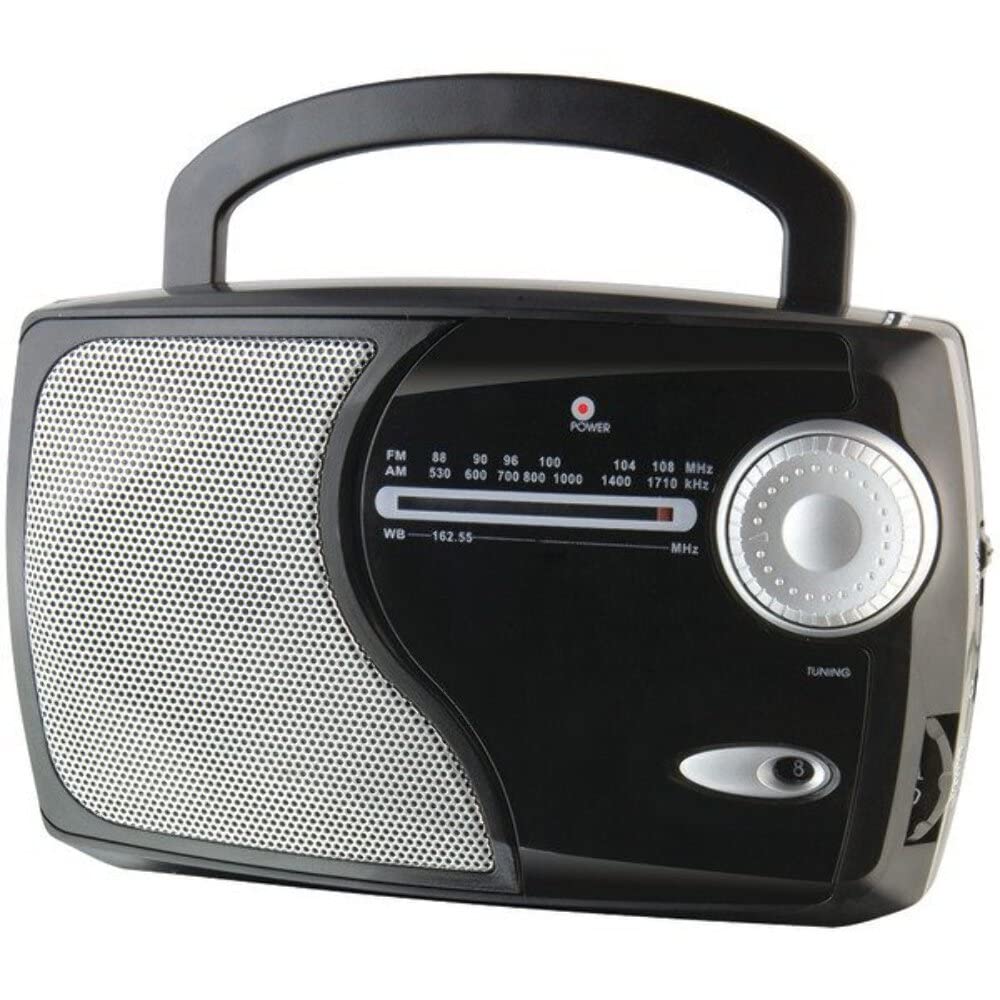
Slika: spredaj view of the GPX Weatherx WR282B radio, showing the speaker, tuning dial, and control knobs.
- Gumb za vklop/glasnost: Turns the radio on/off and adjusts the audio output level.
- Stikalo za izbiro pasu: Selects between AM, FM, and Weatherband (WB) modes.
- Gumb za nastavitev: Adjusts the frequency to tune into desired radio stations or weather channels.
- Tuning Indicator: Illuminates when a strong signal is received.
- Izbira frekvence: Prikaže trenutno radijsko frekvenco.
- Teleskopska antena: Extendable antenna for improved FM and Weatherband reception.
- Pomožni vhod (AUX IN): 3.5 mm priključek za priključitev zunanjih avdio naprav.
- Vhod za izmenični tok: Jack for connecting the included AC/DC power adapter.
- Predal za baterije: Located on the back, holds 3 'D' size batteries.
- Ročaj za nošenje: Za enostavno prenosljivost.
Nastavitev
Napajanje radia
The WR282B radio can be powered using either the included AC/DC power adapter or three 'D' size batteries.
1. AC Power Operation
- Ensure the radio is turned off by rotating the Power/Volume knob counter-clockwise until it clicks.
- Insert the small plug of the AC/DC power adapter into the AC Power Input jack on the radio.
- Plug the other end of the AC/DC power adapter into a standard wall outlet (AC 120V~60Hz).
- The radio is now ready for use with AC power.
Opomba: When the AC adapter is connected, battery power is automatically disconnected.
2. Battery Power Operation
- Prepričajte se, da je radio izklopljen.
- Poiščite predal za baterije na zadnji strani radia.
- Odprite pokrov prostora za baterije.
- Insert three (3) 'D' size batteries (not included) into the compartment, observing the correct polarity (+/-) as indicated inside the compartment.
- Trdno zaprite pokrov prostora za baterije.
- The radio is now ready for use with battery power.
Pomembno: Remove batteries if the radio will not be used for an extended period to prevent leakage and damage.
Navodila za uporabo
1. Turning On and Adjusting Volume
- Zavrtite Gumb za vklop/glasnost clockwise to turn on the radio. Continue rotating to increase the volume to a comfortable listening level.
- Za izklop radia zavrtite gumb Gumb za vklop/glasnost v nasprotni smeri urinega kazalca, dokler ne klikne.
2. Selecting a Radio Band (AM/FM/Weatherband)
- Uporabite Stikalo za izbiro pasu to choose your desired listening mode:
- AM: Za Amplitude Modulation radio stations.
- FM: For Frequency Modulation radio stations.
- WB: For NOAA Weatherband channels.
3. Tuning to a Station or Channel
- Podaljšajte teleskopska antena fully for optimal FM and Weatherband reception. For AM reception, the radio has a built-in antenna, and adjusting the radio's position may improve reception.
- Zavrtite Nastavitev gumba to scan through frequencies on the Frekvenčni klic.
- When a strong signal is received, the Kazalnik uglaševanja lučka bo zasvetila.
- For Weatherband (WB) mode, tune to one of the 7 NOAA weather channels (162.400 MHz to 162.550 MHz).
4. Using the Auxiliary Input (AUX IN)
- Connect a 3.5mm audio cable (not included) from your external audio device (e.g., MP3 player, smartphone) to the Pomožni vhod (AUX IN) jack on the radio.
- Ensure the radio is turned on and the volume is adjusted.
- The audio from your external device will now play through the radio's speaker. Control playback and track selection from your external device.
Vzdrževanje
- Čiščenje: Wipe the exterior of the radio with a soft, dry cloth. Do not use abrasive cleaners, waxes, or solvents.
- Zamenjava baterije: Replace all three 'D' batteries when the radio's performance diminishes or if the unit will not be used for an extended period. Always replace with new batteries of the same type.
- Shranjevanje: When storing the radio for a long time, remove the batteries to prevent leakage. Store in a cool, dry place away from direct sunlight and extreme temperatures.
- Skrb za anteno: S teleskopsko anteno ravnajte previdno, da se izognete upogibanju ali zlomu.
Odpravljanje težav
| Težava | Možen vzrok | rešitev |
|---|---|---|
| Brez moči |
|
|
| Slab radijski sprejem |
|
|
| Ni zvoka iz AUX IN-a |
|
|
Specifikacije
- Model: WR282B
- Radijski pasovi: AM, FM, Weatherband (7 NOAA channels)
- vir energije: AC 120V~60Hz (via included adapter) or 3 x 'D' Batteries (not included)
- Povezljivost: 3.5 mm pomožni vhod
- Antena: Telescopic (FM/WB), Built-in Ferrite Bar (AM)
- Dimenzije izdelka: 8.86" L x 2.76" W x 5.51" H (approximately)
- Teža artikla: 1.06 funta (brez baterij)
Garancija in podpora
For detailed warranty information and customer support, please refer to the warranty card included with your product or visit the official GPX webspletnega mesta. Račun shranite kot dokazilo o nakupu za morebitne garancijske zahtevke.
If you experience issues not covered in the troubleshooting section, please contact GPX customer service for assistance.