
1. Uvod
The Gembird Bi-Directional SATA/IDE Converter (Model SATA-IDE-2) is designed to bridge the gap between older IDE technology and modern SATA interfaces. This versatile converter allows you to connect older IDE devices, such as hard drives or optical drives, to a SATA host controller, or conversely, connect newer SATA devices to an older IDE host controller. It provides a cost-effective solution for extending the life of your existing hardware or integrating different generations of storage devices.
2. Varnostne informacije
- Always ensure your computer system is powered off and unplugged before installing or removing any hardware components.
- Handle the converter and connected devices with care to avoid static discharge, which can damage electronic components.
- Naprave ne izpostavljajte vlagi, ekstremnim temperaturam ali neposredni sončni svetlobi.
- Napravo hranite izven dosega otrok.
- Use only compatible power and data cables.
3. Vsebina paketa
Prosimo, preverite, ali vaš paket vsebuje naslednje predmete:
- Gembird Bi-Directional SATA/IDE Converter (SATA-IDE-2)
- Podatkovni kabel SATA
- 4-pin Molex Power Cable
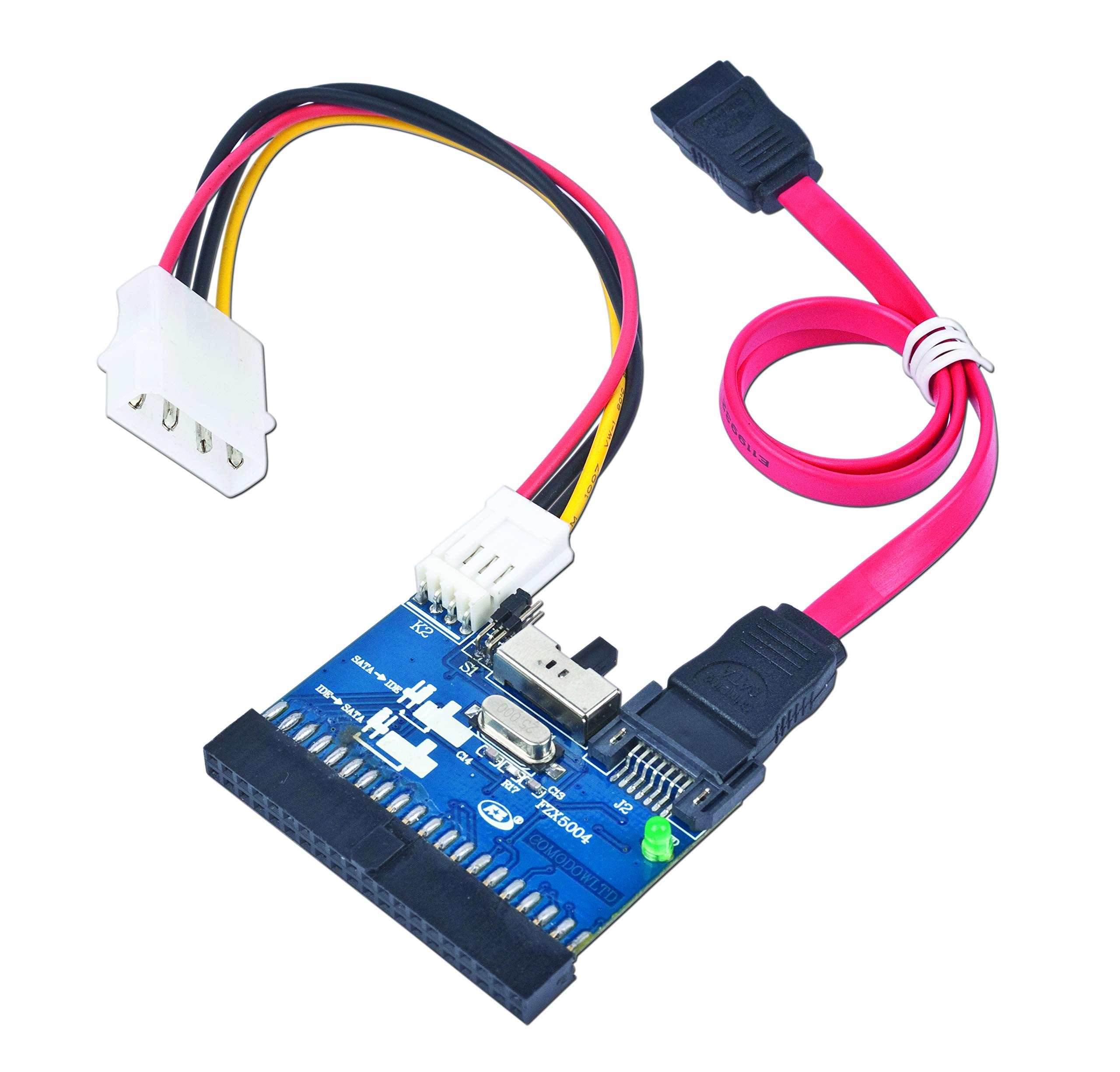
This image displays the Gembird Bi-Directional SATA/IDE Converter, its packaging, a red SATA data cable, and a 4-pin Molex power cable. The converter board is blue with various connectors.
4. Nastavitev in namestitev
The Gembird SATA/IDE converter supports bi-directional operation. Follow the appropriate steps below based on your connection needs.
4.1. Connecting an IDE Device to a SATA Host Controller
- Prepričajte se, da je računalnik izklopljen in odklopljen iz električnega omrežja.
- Connect the 40-pin IDE connector on the converter to the IDE port on your IDE hard drive or ATAPI device.
- Connect one end of the SATA data cable to the 7-pin SATA connector on the converter.
- Connect the other end of the SATA data cable to an available SATA port on your motherboard or SATA host controller.
- Connect the 4-pin Molex power cable from your power supply to the power input on the converter. Ensure the IDE device also receives power from your power supply.
- Power on your computer. The IDE device should now be detected by your SATA host controller.
4.2. Connecting a SATA Device to an IDE Host Controller
- Prepričajte se, da je računalnik izklopljen in odklopljen iz električnega omrežja.
- Connect the 7-pin SATA connector on the converter to the SATA port on your SATA hard drive or optical drive.
- Connect one end of the 40-pin IDE connector on the converter to an available IDE port on your motherboard or IDE host controller.
- Connect the 4-pin Molex power cable from your power supply to the power input on the converter. Ensure the SATA device also receives power from your power supply.
- Power on your computer. The SATA device should now be detected by your IDE host controller.
5. Navodila za uporabo
The Gembird SATA/IDE converter is designed for ease of use with plug-and-play functionality. No specific drivers are required for operation under most common operating systems, including Windows 8, 7, Vista, XP, 2000, Me, NT, 98SE, 95, 3.1, and DOS 5.0.
Once connected, the converter allows for data transfer between the connected device and the host system. It supports Serial ATA 1.0 interface with data transfer rates up to 150 MBytes/sec and is compatible with UDMA-33/66/100/133/150 IDE hard drives and most ATAPI devices.
Pomembna opomba: This converter, based on the JM20330 chipset, is intended for connecting secondary storage devices. It does not support booting from a connected drive. Do not attempt to install an operating system on a drive connected via this adapter if you intend to boot from it.
6. Vzdrževanje
The Gembird SATA/IDE converter requires minimal maintenance. Keep the device clean and free from dust. Use a soft, dry cloth for cleaning. Avoid using liquid cleaners or solvents. Ensure all connections are secure to prevent data transfer issues.
7. Odpravljanje težav
- Naprava ni zaznana:
- Prepričajte se, da so vsi napajalni in podatkovni kabli varno priključeni.
- Verify that the connected hard drive or optical drive is receiving power.
- Check the BIOS/UEFI settings of your computer to ensure the SATA/IDE ports are enabled.
- If connecting an IDE drive, ensure its jumper settings (Master/Slave/Cable Select) are configured correctly for your setup.
- Test with different cables if possible.
- Počasen prenos podatkov:
- Prepričajte se, da kabli niso poškodovani.
- Verify that the connected device is functioning correctly.
- The converter supports Serial ATA 1.0, which has a maximum transfer rate of 150 MBytes/sec. Performance will be limited by the slower of the two interfaces (SATA 1.0 or the IDE device's maximum speed).
- Cannot boot from connected drive:
- This converter, utilizing the JM20330 chipset, does not support booting an operating system from a connected drive. It is designed for data storage and transfer only. If you require a bootable solution, a different adapter with a boot-compatible chipset (e.g., Marvell 88SA8052) is necessary.
8. Specifikacije
| Številka modela | SATA-IDE-2 |
| Čipset | JM20330 |
| Vmesnik | Serial ATA 1.0, IDE (UDMA-33/66/100/133/150) |
| Hitrost prenosa podatkov | Up to 150 MBytes/sec (SATA 1.0) |
| Konektorji | Standard female IDE 40-pin, Standard 7-pin Serial ATA |
| Dimenzije | 52 x 48 mm (Converter board) |
| Neto teža | 12 g |
| Združljivost operacijskega sistema | Windows 8/7/Vista/XP/2000/Me/NT/98SE/95/3.1, DOS 5.0 |
| Lastnosti | Native Hot-Swap in Plug & Play zmogljivost (naprava brez zagona) |
9. Informacije o garanciji
Gembird products are manufactured to the highest quality standards. This product is covered by a limited warranty against defects in materials and workmanship. For specific warranty terms and conditions, please refer to the official Gembird webspletnega mesta ali se obrnite na lokalnega prodajalca.
10. Podpora
For technical support, frequently asked questions, and additional product information, please visit the official Gembird webspletno mesto: