
Uvod
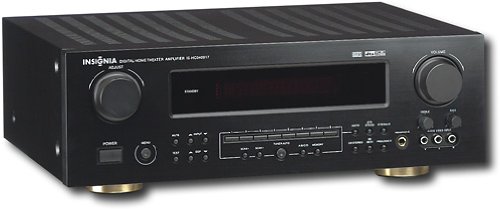
This manual provides essential instructions for the setup, operation, maintenance, and troubleshooting of your Insignia 6.1-Channel 600W Digital Home Theater Receiver, model IS-HC040917. Please read this manual thoroughly before using the receiver to ensure proper and safe operation.
Pomembna varnostna navodila
- Ne blokirajte prezračevalnih odprtin. Namestite v skladu z navodili proizvajalca.
- Ne nameščajte v bližini virov toplote, kot so radiatorji, grelniki, peči ali druge naprave (vključno z amplifiers), ki proizvajajo toploto.
- Zaščitite napajalni kabel, da se po njem ne pohodi ali stisne, zlasti pri vtičih, vtičnicah in na mestu, kjer izstopa iz naprave.
- Uporabljajte samo priključke/dodatke, ki jih je določil proizvajalec.
- Izklopite napravo med nevihtami ali ko je dlje časa ne uporabljate.
- Vsa servisna dela prepustite usposobljenemu servisnemu osebju. Servis je potreben, če je naprava kakor koli poškodovana.
Vodnik za namestitev
1. Razpakiranje
Carefully remove the receiver and all accessories from the packaging. Ensure all components are present:
- Insignia IS-HC040917 Receiver
- Daljinski upravljalnik
- AM zankasta antena
- FM žična antena
- Uporabniški priročnik (ta dokument)
2. Priključitev zvočnikov
The IS-HC040917 receiver supports a 6.1-channel speaker configuration. Connect your speakers to the corresponding terminals on the rear panel. Ensure correct polarity (+ to + and - to -) for each speaker.
- Spredaj levo/desno: For main stereo sound.
- Center: For dialogue.
- Prostorski levi/desni: For ambient sound effects.
- Zadnji prostorski zvok: For additional rear channel effects in 6.1 setups.
- Subwoofer (Pre-out): Connect to a powered subwoofer's LFE input.
Note: The receiver is designed for speakers with an impedance of 8 ohms.
3. Priključitev avdio/video virov
Connect your external devices (e.g., DVD player, Blu-ray player, game console, cable box) to the appropriate input jacks on the receiver.
- HDMI: Use HDMI cables for high-definition audio and video signals. The receiver has 3 HDMI input ports.
- Digital Audio (Optical/Coaxial): For digital audio from devices like CD players or set-top boxes.
- Analogni zvok (RCA): For standard stereo audio connections from devices like VCRs or older CD players.
- S-Video: For video signals from compatible devices.
4. Antenska povezava
Connect the supplied AM loop antenna and FM wire antenna to their respective terminals on the rear panel for radio reception.
5. Napajalni priključek
Once all audio/video and speaker connections are made, plug the receiver's power cord into a standard AC wall outlet.
Slika: Rear panel of the Insignia IS-HC040917 receiver, showing various input and output connections for speakers, audio/video sources (HDMI, RCA, S-Video, Digital), and antenna terminals. This diagram is crucial for correctly wiring the home theater system.
Navodila za uporabo
1. Vklop/izklop
Pritisnite MOČ gumb na sprednji plošči ali daljinskem upravljalniku za vklop ali izklop sprejemnika.
2. Izbira vhoda
Uporabite IZBORNIK VHODA knob/buttons on the front panel or the remote control to choose the desired audio/video source (e.g., HDMI 1, DVD, CD, Tuner).
3. Nadzor glasnosti
Glavno glasnost prilagodite z velikim GLASNOST gumb na sprednji plošči ali GLASNOST +/- gumbi na daljinskem upravljalniku.
4. Zvočni načini
The receiver supports various audio modes, including 6.1-channel surround sound. Use the NAČIN or DSP buttons on the remote to cycle through available sound modes (e.g., Stereo, Dolby Digital, DTS, Pro Logic).
5. Tuner Operation (AM/FM Radio)
Select the "Tuner" input. Use the BAND button to switch between AM and FM. Use the TUNE +/- buttons to manually tune to stations or PREDNASTAVITEV +/- to select stored stations. Refer to the remote control for specific tuner functions.
Vzdrževanje
1. Čiščenje
Wipe the exterior of the receiver with a soft, dry cloth. Do not use liquid cleaners or aerosol sprays, as they may damage the finish or internal components. Ensure the unit is unplugged before cleaning.
2. Prezračevanje
Ensure that the ventilation openings on the top and sides of the receiver are not blocked. Proper airflow is essential to prevent overheating and ensure long-term performance.
3. Upravljanje kablov
Periodically check all cable connections to ensure they are secure. Loose connections can lead to poor audio or video quality.
Odpravljanje težav
| Težava | Možen vzrok | rešitev |
|---|---|---|
| Brez moči | Napajalni kabel izklopljen; vtičnica ni aktivna. | Preverite priklop napajalnega kabla; poskusite z drugo vtičnico. |
| Brez zvoka | Incorrect input selected; speaker wires loose; volume too low; mute activated. | Izberite pravilen vhod; preverite povezave zvočnikov; povečajte glasnost; izklopite zvok. |
| Brez videa | Incorrect input selected; video cables loose or incorrect. | Select correct input; check video cable connections (HDMI, S-Video, RCA). |
| Daljinski upravljalnik ne deluje | Batteries depleted; obstruction between remote and receiver; incorrect remote mode. | Replace batteries; remove obstructions; ensure remote is in the correct operating mode. |
Specifikacije
- Model: IS-HC040917
- Znamka: ZNAČKA
- Izhodna moč: 600 vatov
- Število kanalov: 6.1 kanal
- Način avdio izhoda: Surround
- Skupno število vrat HDMI: 3
- Vrste priključkov: 3.5mm Jack, HDMI, RCA, USB
- Združljive naprave: Zvočnik
- Nadzorna metoda: Daljinsko
- barva: Črna
- UPC: 799530659962
- ASIN: B0075C3DN2
Garancija in podpora
For warranty information and customer support, please refer to the warranty card included with your product or visit the official Insignia webmesto. Shranite račun za garancijske zahtevke.
For further assistance, you may contact Insignia customer service. Contact details are typically available on the manufacturer's webmestu ali v embalaži izdelka.