
1. Uvod
The PAC RP4-VW11 Radiopro4 is a stereo replacement interface designed to integrate an aftermarket radio into select Volkswagen vehicles equipped with a CANbus system. This interface retains essential factory features, including steering wheel controls (SWC) and provides data-controlled accessory and navigation outputs. It also supports the retention of the factory amplifier in premium amplified systems, though fading capability may be limited to two input channels from the aftermarket radio.
The interface is pre-programmed for most vehicle factory SWC functions. Custom programming is available for re-assigning SWC functions or utilizing short press/long press dual command functionality.
2. Varnostne informacije
Always disconnect the vehicle's negative battery terminal before beginning any installation to prevent electrical shorts and potential damage to the vehicle's electrical system or the interface. Ensure all connections are secure and insulated to avoid short circuits. Consult a professional installer if you are unsure about any steps.
Opozorilo glede predloga 65: Ta izdelek vsebuje kemikalije, za katere je v zvezni državi Kalifornija znano, da povzročajo raka in prirojene okvare ali druge reproduktivne poškodbe.
3. Vsebina paketa
- All-in-One Radio Replacement & Steering Wheel Control Interface (PAC RP4-VW11 Module)
4. Nastavitev in namestitev
4.1. Koraki pred namestitvijo
- Odklopite baterijo: Before starting, disconnect the negative battery terminal of your vehicle.
- Odstranite tovarniški radio: Carefully remove the factory radio from the dashboard to access the wiring harness.
4.2. Povezave ožičenja
The PAC RP4-VW11 interface connects between your aftermarket radio's harness and the vehicle's factory harness. Match the wire colors between the aftermarket radio harness and the PAC interface harness. Some wires may not connect directly to the vehicle harness, such as an amplifier turn-on wire, parking sense wire, and Steering Wheel Control connections. Refer to the wiring diagram provided with your aftermarket radio and the PAC interface for specific connections.
Below is a general visual guide for wiring connections:
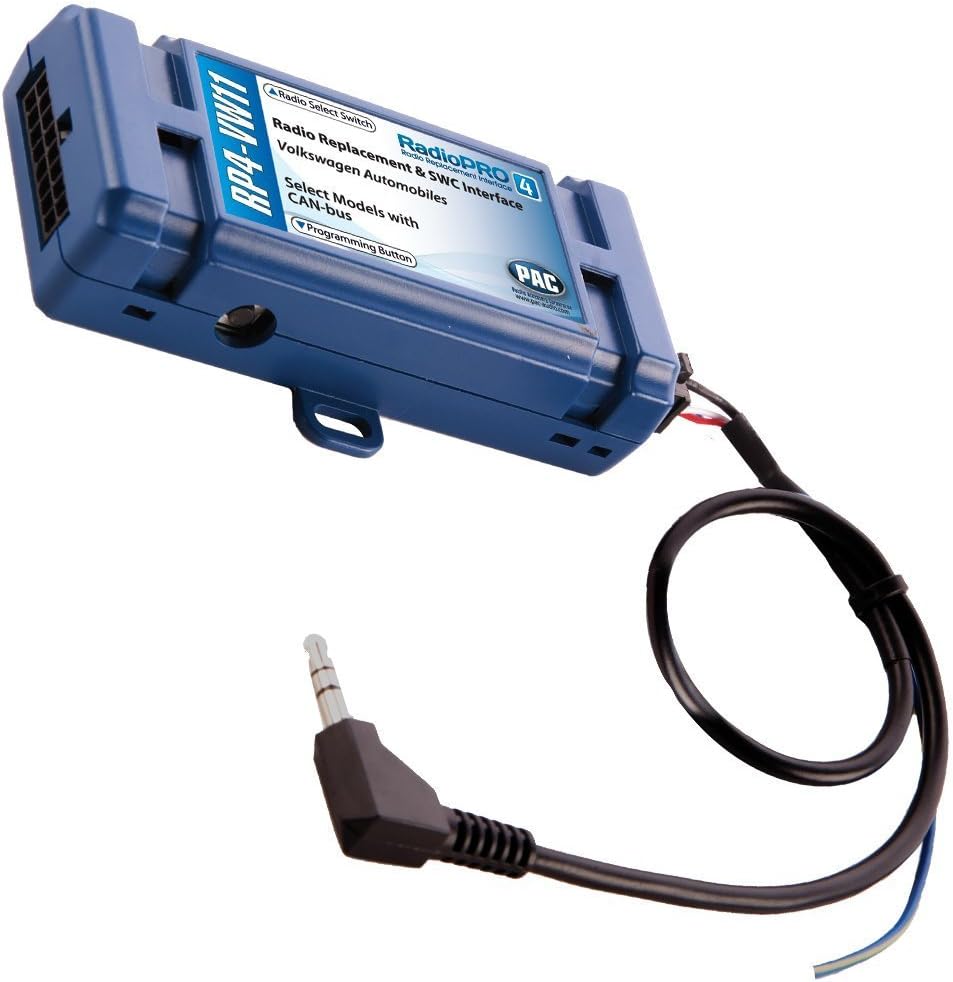
The main PAC RP4-VW11 module is a blue box with various wire connections and a rotary switch for radio selection. The module facilitates the integration of your new stereo with the vehicle's existing systems.
For a visual demonstration of general interface wiring, refer to the video below:
Another video demonstrating a generic wire harness connection is provided below for additional visual reference:
4.3. Setting the Radio Select Switch
Locate the rotary switch on the side of the PAC RP4-VW11 interface. This switch must be adjusted to the proper radio setting before plugging the interface into the vehicle. Refer to the chart below to determine the correct setting for your aftermarket radio brand:
| Nastavitev | Znamka radia |
|---|---|
| 1 | alpsko |
| 2 | JVC |
| 3 | Kenwood |
| 4 | Clarion |
| 7 | Pioneer/Other (Advent, BOYO, Dual, Lightning Audio, Rockford Fosgate, Visteon) |
| 8 | Sony |
| 9 | Fuzija |
4.4. Programming Steering Wheel Controls
The interface comes pre-programmed for all factory SWC functions. If you wish to re-assign SWC functions or utilize short press/long press dual command functionality, follow these programming instructions:
- Obrnite ključ v položaj za vžig.
- Pritisnite in spustite gumb za programiranje na strani vmesnika.
- Within 7 seconds, press the button on the steering wheel that is to be learned. The LED on the interface will turn off when the button is pressed.
- At this point, you have two options:
- Za funkcijo kratkega pritiska: Spustite gumb v 1.5 sekunde. LED se bo ponovno vklopila.
- Za funkcijo dolgega pritiska: Držite gumb, dokler lučka LED ne začne utripati. Spustite gumb in LED bo ponovno svetila.
- If you need to program more buttons, repeat step 3 for each additional audio function on the steering wheel. If you come across a function in the chart that your steering wheel does not have, or you do not want to program, press and release the program button on the side of the interface to skip that function.
- Once programming is completed, wait seven seconds. The LED will flash three times, indicating the end of programming.
- Preizkusite pravilno delovanje vmesnika. Kadarkoli pritisnete tipko SWC, mora LED na vmesniku utripati. Če katera koli funkcija ne deluje, ponovite korake programiranja.
4.5. Po namestitvi
- Ponovno priključite baterijo: Ponovno priključite negativni pol akumulatorja.
- Testna funkcionalnost: Turn on the radio and test all functions, including steering wheel controls, audio output, and any other integrated features.
5. Navodila za uporabo
Once installed and programmed, the PAC RP4-VW11 allows your factory steering wheel controls to operate your aftermarket radio. The specific functions (e.g., Volume Up/Down, Track Up/Down, Source, Mute, Phone) will correspond to how they were programmed during the setup phase. Refer to your aftermarket radio's manual for any specific settings related to external controls.
6. Vzdrževanje
The PAC RP4-VW11 interface is designed for long-term reliability and typically requires no regular maintenance. Ensure all wiring connections remain secure. If you experience any issues, refer to the troubleshooting section or contact customer support.
7. Odpravljanje težav
- Brez napajanja radia: Check all power connections, including the constant 12V and accessory 12V wires. Ensure the vehicle's battery is properly connected.
- Upravljanje na volanu ne deluje: Verify the rotary switch setting on the PAC module matches your aftermarket radio. Re-attempt the programming steps for the steering wheel controls, ensuring each button press is registered correctly.
- No Fading Capability with Factory Ampdvigalo: In premium amplified systems, only two input channels from the aftermarket radio can be used, which may limit fading functionality. This is a characteristic of the system and not a defect.
- Občasna funkcionalnost: Check all wire splices and connections for looseness or corrosion. Ensure the programming button on the interface is not stuck.
8. Specifikacije
| Funkcija | Podrobnost |
|---|---|
| Teža predmeta | 3.52 unč |
| Dimenzije izdelka | 9 x 9 x 2 palcev |
| Številka modela artikla | RP4-VW11 |
| Proizvajalec | AAMP Amerike |
| Združljive naprave | Poprodajni radio |
| Vrsta priključka | Radio frekvenca |
| barva | Modra |
9. Garancija in podpora
For warranty information and technical support, please refer to the documentation included with your product or visit the official PAC website. Contacting customer service directly can provide the most accurate and up-to-date assistance for your specific product model and vehicle.