
Uvod
Hvala za nakupasing the Edifier Tick Tock Retro Multifunctional Alarm Clock. This device combines a retro design with modern functionality, offering an alarm clock, FM radio, and media playback from SD cards, USB drives, and auxiliary input. This manual provides detailed instructions for setup, operation, and maintenance to ensure optimal performance and longevity of your device.
Lastnosti izdelka
- SD card reader and USB input port for media playback.
- LCD display screen for time, date, alarm status, and input mode (SD/USB/FM/AUX).
- Alarm clock function with customizable audio sources: SD card, USB drive, FM radio, or Auxiliary input.
- Auxiliary 3.5mm input jack for connecting external audio devices.
- FM radio function with 24 preset channels for easy access to your favorite stations.
- Two 360° omni-directional full-range speakers for rich, multi-directional sound.
Kontrole in vrata
Vrata na zadnji plošči
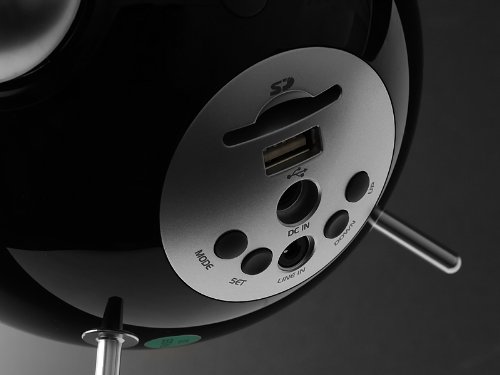
This image displays the rear panel of the Edifier Tick Tock alarm clock. Visible ports and buttons include:
- Reža za kartico SD: Insert an SD card for music playback.
- Vrata USB: Za predvajanje glasbe priključite USB-ključ.
- DC IN: Vhod za napajanje priloženega napajalnika.
- LINE IN (AUX): 3.5 mm avdio vhod za zunanje naprave.
- Gumb MODE: Cycles through input modes (SD, USB, FM, AUX).
- Gumb SET: Used for entering settings menus (e.g., time, alarm).
- Gumba GOR/DOL: Navigate menus, adjust volume, or change settings.
Nadzor na zgornji plošči
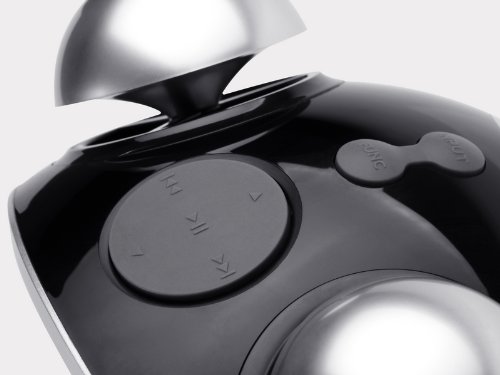
This image shows the top panel controls of the Edifier Tick Tock alarm clock. These include:
- Gumb za predvajanje/pavzo: Zažene ali začasno ustavi predvajanje medijev.
- Gumbi za prejšnjo/naslednjo skladbo: Skips to the previous or next track during media playback. Also used for tuning FM radio.
- Gumbi za povečanje / zmanjšanje glasnosti: Prilagodi glasnost zvočnega izhoda.
- Gumb DREMEST/LUČKA: Med alarmom aktivira dremež ali prilagodi svetlost zaslona.
Nastavitev
- Razpakiranje: Carefully remove the alarm clock and all accessories from the packaging. Ensure all components are present: the alarm clock unit, AC power adapter, and this user manual.
- Napajalni priključek: Connect the AC power adapter to the "DC IN" port on the rear of the alarm clock. Plug the adapter into a standard wall outlet. The display should illuminate.
- Začetni vklop: The unit should power on automatically. If not, press the power button (if available, otherwise it's always on when plugged in).
- Antenna (FM Radio): Extend the FM antenna located at the back of the unit for optimal radio reception.
Navodila za uporabo
Nastavitev ure in datuma
- Pritisnite in držite NASTAVI gumb, dokler prikaz časa ne začne utripati.
- Uporabite UP in DOL gumbe za nastavitev ure. Pritisnite NASTAVI za potrditev in premik na minute.
- Prilagodite minute z uporabo UP in DOL. Pritisnite NASTAVI za potrditev.
- Continue this process to set the year, month, and day. Press NASTAVI to exit the time/date setting mode.
Nastavitev alarma
- Pritisnite NASTAVI button once (do not hold) to enter alarm setting mode. The alarm time will flash.
- Uporabite UP in DOL gumbe za nastavitev ure budilke. Pritisnite NASTAVI za potrditev in premik na minute.
- Prilagodite minute z uporabo UP in DOL. Pritisnite NASTAVI za potrditev.
- Next, select the alarm source (FM, SD, USB, AUX). Use UP in DOL to cycle through options. Press NASTAVI za potrditev.
- If FM is selected, use UP in DOL to select a preset FM station (P01-P24).
- If SD or USB is selected, ensure a card/drive with audio is inserted. The alarm will play the first track.
- If AUX is selected, ensure an external device is connected and playing audio.
- Pritisnite NASTAVI again to activate the alarm. An alarm icon will appear on the display.
- To deactivate the alarm, press NASTAVI until the alarm icon disappears.
- Ko se oglasi alarm, pritisnite tipko SNOOZE / LUČ button to activate snooze (typically 9 minutes). To turn off the alarm completely, press any other button.
Delovanje radia FM
- Pritisnite NAČIN večkrat pritisnite gumb, dokler se na zaslonu ne prikaže "FM".
- Auto Scan and Preset: Pritisnite in držite PREDVAJAJ/PAVZA button. The radio will automatically scan for available stations and save them to presets (P01-P24).
- Ročna nastavitev: Uporabite PREJŠNJA/NASLEDNJA SKLADBA gumbe za natančno nastavitev frekvence.
- Izbira prednastavitev: V načinu FM na kratko pritisnite PREJŠNJA/NASLEDNJA SKLADBA buttons to cycle through saved preset stations.
- Glasnost prilagodite s tipko UP in DOL buttons on the rear panel.
SD Card / USB Playback
- Insert an SD card into the SD card slot or a USB flash drive into the USB port on the rear panel.
- Pritisnite NAČIN button repeatedly until "SD" or "USB" appears on the display. The device will automatically start playing audio files.
- Uporabite PREDVAJAJ/PAVZA gumb za premor ali nadaljevanje predvajanja.
- Uporabite PREJŠNJA/NASLEDNJA SKLADBA buttons on the top panel to skip tracks.
- Glasnost prilagodite s tipko UP in DOL buttons on the rear panel.
Auxiliary Input (LINE IN)
- Connect an external audio device (e.g., smartphone, MP3 player) to the "LINE IN" (3.5mm) port on the rear panel using an audio cable (not included).
- Pritisnite NAČIN button repeatedly until "AUX" appears on the display.
- Začnite predvajanje na priključeni zunanji napravi.
- Glasnost prilagodite s tipko UP in DOL buttons on the rear panel, and also control volume from your external device.
Svetlost zaslona
Na kratko pritisnite SNOOZE / LUČ button on the top panel to cycle through different display brightness levels.
Vzdrževanje
- Čiščenje: Use a soft, dry cloth to clean the surface of the alarm clock. Do not use abrasive cleaners, waxes, or solvents.
- Umestitev: Place the unit on a stable, flat surface. Avoid direct sunlight, high temperatures, humidity, or dusty environments.
- moč: Če enote dalj časa ne boste uporabljali, izključite napajalnik iz stenske vtičnice.
Odpravljanje težav
| Težava | Možen vzrok/rešitev |
|---|---|
| Ni napajanja / Zaslon izklopljen |
|
| Iz zvočnikov ni zvoka |
|
| Slab FM radijski sprejem |
|
| Alarm does not sound or plays static |
|
| Zaslon je ponoči presvetel |
|
Specifikacije
| Znamka | Edifier |
| Številka modela | MF240Reto |
| Vrsta zaslona | LCD |
| Tehnologija povezljivosti | AUX, USB |
| Posebne lastnosti | Alarm, Radio, SD Card Reader, USB Playback |
| Vir napajanja | Električni na kabel |
| Material | Plastika |
| Teža predmeta | 0.74 funta (približno 0.34 kg) |
| Proizvajalec | Edifier USA |
Garancija in podpora
This Edifier product comes with a 2-letna garancija proizvajalca. For warranty claims, technical support, or further assistance, please contact Edifier USA customer service. Please retain your proof of purchase for warranty validation.
Za najnovejše informacije o podpori obiščite uradno spletno stran Edifier. webmesto.