
1. Uvod
The HTC Radar is a smartphone designed for communication and multimedia. It features a unibody metal design and operates on Windows Phone OS 7.5. This manual provides essential information for setting up, operating, maintaining, and troubleshooting your device.
Key features include a 5-megapixel camera, a 3.8-inch touchscreen display, Wi-Fi, and GPS capabilities.
2. Naprava je končanaview

Slika 2.1: Spredaj, zadaj in ob strani views of the HTC C110E Radar smartphone. This image illustrates the phone's overall design, including the display, camera, and various ports.

Slika 2.2: Spredaj view of the HTC C110E Radar with the Windows Phone interface displayed. This shows the home screen layout with various application tiles.
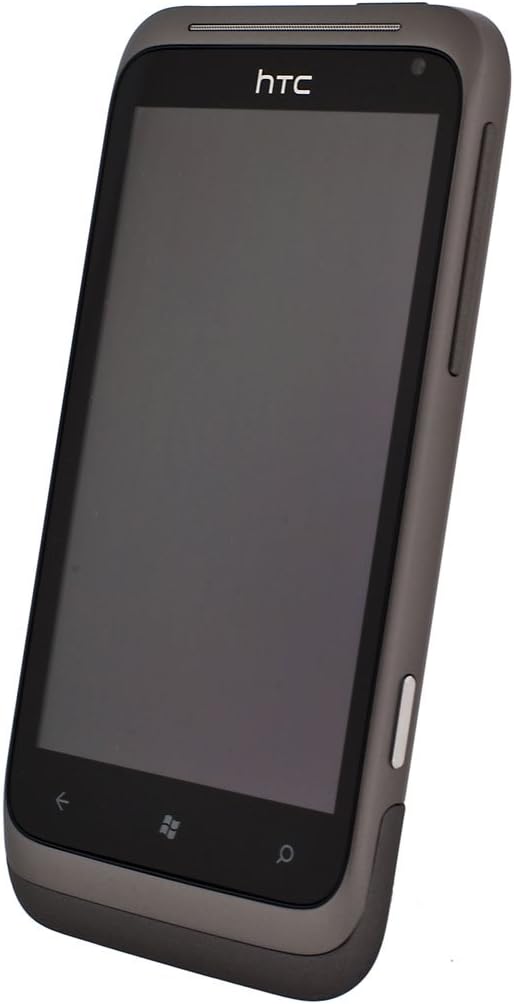
Slika 2.3: Pod kotom view of the HTC C110E Radar with the screen off, highlighting the device's form factor and button placement.
3. Nastavitev
3.1. Vstavljanje SIM kartice
The HTC C110E Radar uses a single SIM card. Locate the SIM card slot, typically on the side or top edge of the device. Carefully insert your SIM card into the designated tray or slot until it clicks into place. Ensure the phone is powered off before inserting or removing the SIM card.
3.2. Polnjenje baterije
The device is powered by a 1520 mAh rechargeable Lithium-ion battery. To charge, connect the provided USB cable to the micro-USB 2.0 port on the phone and then to a compatible USB power adapter or computer. A full charge is recommended before first use.
Note: Some users have reported issues with non-standard or ill-fitting USB cables and European chargers. Ensure you are using a compatible USB cable and a North American power adapter if applicable.
3.3. Vklop/izklop
To power on the device, press and hold the Power button (usually located on the side) until the screen illuminates. To power off, press and hold the Power button, then follow the on-screen prompts to shut down.
4. Navodila za uporabo
4.1. Windows Phone OS 7.5 Interface
The HTC C110E Radar runs on Windows Phone OS 7.5. The home screen features Live Tiles that display real-time information and provide quick access to applications. Swipe left to access the application list.
4.2. Osnovna navigacija
- Zaslon na dotik: Interact with the device using touch gestures such as tap, swipe, pinch-to-zoom. The display is a 3.8-inch touchscreen with 480 x 800 resolution.
- Gumb za nazaj: Vrnitev na prejšnji zaslon.
- Gumb za začetek: Vrne se na začetni zaslon.
- Gumb za iskanje: Odpre funkcijo iskanja.
4.3. Funkcije kamere
The device features a 5-megapixel rear camera with an F2.2 lens, LED flash, and BSI sensor for improved low-light performance. It also includes a VGA front camera. The rear camera supports 720p HD video recording.
- Fotografirati: Open the Camera application, frame your shot, and tap the on-screen shutter button or use the dedicated camera button (if available).
- Snemanje videoposnetkov: Switch to video mode within the Camera application and tap the record button.
4.4. Povezljivost
- Wi-Fi: Za dostop do interneta se povežite z brezžičnimi omrežji. Za omogočanje in povezavo pojdite v Nastavitve > Wi-Fi.
- Bluetooth: Pair with other Bluetooth-enabled devices such as headsets or car kits. Supports Bluetooth 2.1 with A2DP, PBAP, HFP, and HSP profiles. Go to Settings > Bluetooth to enable and pair.
- GPS: Utilize location services for navigation and location-based applications. The device has an internal GPS antenna.
- USB: Connect to a computer using the micro-USB 2.0 port for data transfer and charging.
- Zvočni priključek: A 3.5 mm stereo audio jack is available for headphones or external audio devices.
5. Vzdrževanje
5.1. Nega naprave
- Napravo hranite suho. Vlaga lahko poškoduje elektronske komponente.
- Izogibajte se ekstremnim temperaturam. Visoke ali nizke temperature lahko skrajšajo življenjsko dobo elektronskih naprav in poškodujejo baterije.
- Naprave ne spuščajte, ne udarjajte ali stresajte. Grobo ravnanje lahko pokvari notranja vezja in fino mehaniko.
- Clean the screen and body with a soft, lint-free cloth. Avoid using harsh chemicals or abrasive cleaners.
5.2. Posodobitve programske opreme
Periodically check for software updates to ensure optimal performance and security. Updates can typically be found in the device's settings menu under "Phone update."
6. Odpravljanje težav
6.1. Pogoste težave in rešitve
- Naprava se ne vklopi:
Ensure the battery is charged. Connect the device to a charger for at least 15 minutes before attempting to power on again. If the issue persists, try a different charging cable and adapter.
- Težave s polnjenjem:
If the device is not charging, verify that the USB cable is securely connected to both the phone and the power source. Ensure the USB cable is compatible and not damaged. Some users have reported issues with the fit of certain USB cables.
- SIM kartica ni bila zaznana:
Power off the device, remove the SIM card, and reinsert it carefully to ensure proper seating. Verify that the SIM card is not damaged. If the issue persists, test with another known-good SIM card if available.
- Device unresponsive or frozen:
Izvedite mehko ponastavitev tako, da pritisnete in držite gumb za vklop približno 10–15 sekund, dokler se naprava ne zažene znova.
- Slaba omrežna povezljivost:
Check your location for network coverage. Restart the device. Ensure airplane mode is not enabled. Verify SIM card is properly inserted.
7. Specifikacije
| Funkcija | Podrobnost |
|---|---|
| Številka modela | C110E |
| Operacijski sistem | Windows Phone OS 7.5 |
| Hitrost procesorja | 1 GHz |
| RAM | 512 MB |
| Notranji pomnilnik | 8 GB (up to 6.54 GB available) |
| Zaslon | 3.8-inch Touchscreen, 480 x 800 resolution |
| Zadnja kamera | 5 MP with F2.2 lens, LED flash, BSI sensor, 720p HD video recording |
| Sprednja kamera | VGA |
| Omrežje | Quad-band GSM/GPRS/EDGE (850/900/1800/1900 MHz), HSPA/WCDMA (Europe/Asia: 900/2100 MHz) |
| Povezljivost | Wi-Fi, Bluetooth 2.1 (A2DP, PBAP, HFP, HSP), GPS, micro-USB 2.0, 3.5 mm audio jack |
| Baterija | 1520 mAh litij-ionska |
| Čas pogovora | Up to 485 minutes (WCDMA), Up to 600 minutes (GSM) |
| Čas pripravljenosti | Do 535 ur |
| Dimenzije | 4.74 x 0.42 x 2.42 palcev |
| Teža | 4.8 unč |
8. Garancija in podpora
This product is sold without a manufacturer's warranty, as indicated in the product description. For technical support or further assistance, please refer to the official HTC support resources available online or contact your retailer.
Proizvajalec: HTC