
Uvod
This manual provides essential instructions for setting up, operating, and maintaining your Canon PowerShot ELPH 310 HS digital camera. Please read this manual thoroughly to ensure proper use and to maximize your camera's performance.
Kaj je v škatli
Po razpakiranju preverite, ali so priloženi vsi naslednji elementi:
- Canon PowerShot ELPH 310 HS Camera
- Baterijski paket NB-4L
- Battery Charger CB-2LV
- Zapestni trak
- USB kabel
- CD-ROM (Software/Drivers)
Nastavitev
1. Polnjenje baterije
Insert the Battery Pack NB-4L into the Battery Charger CB-2LV. Plug the charger into a power outlet. The charging indicator light will show the charging status. Once fully charged, remove the battery.
2. Vstavljanje baterije in pomnilniške kartice
Open the battery/card compartment cover on the camera. Insert the charged battery pack, ensuring correct orientation. Insert a compatible SD/SDHC/SDXC memory card into the card slot until it clicks into place. Close the compartment cover securely.

Slika: spredaj view of the Canon PowerShot ELPH 310 HS digital camera, showcasing its silver finish and lens.
Upravljanje kamere
1. Vklop/izklop
Pritisnite VKLOP/IZKLOP button located on the top or side of the camera to power it on or off. The lens will extend when powered on.
2 Osnove fotografije
- Fokusiranje: Gently press the shutter button halfway down to focus. The camera will emit a beep and display a green frame when focus is achieved.
- Fotografiranje: Pritisnite sprožilec do konca, da posnamete sliko.
- Zoom: Za nastavitev optičnega zooma (8x) uporabite ročico za zoom okoli sprožilca.
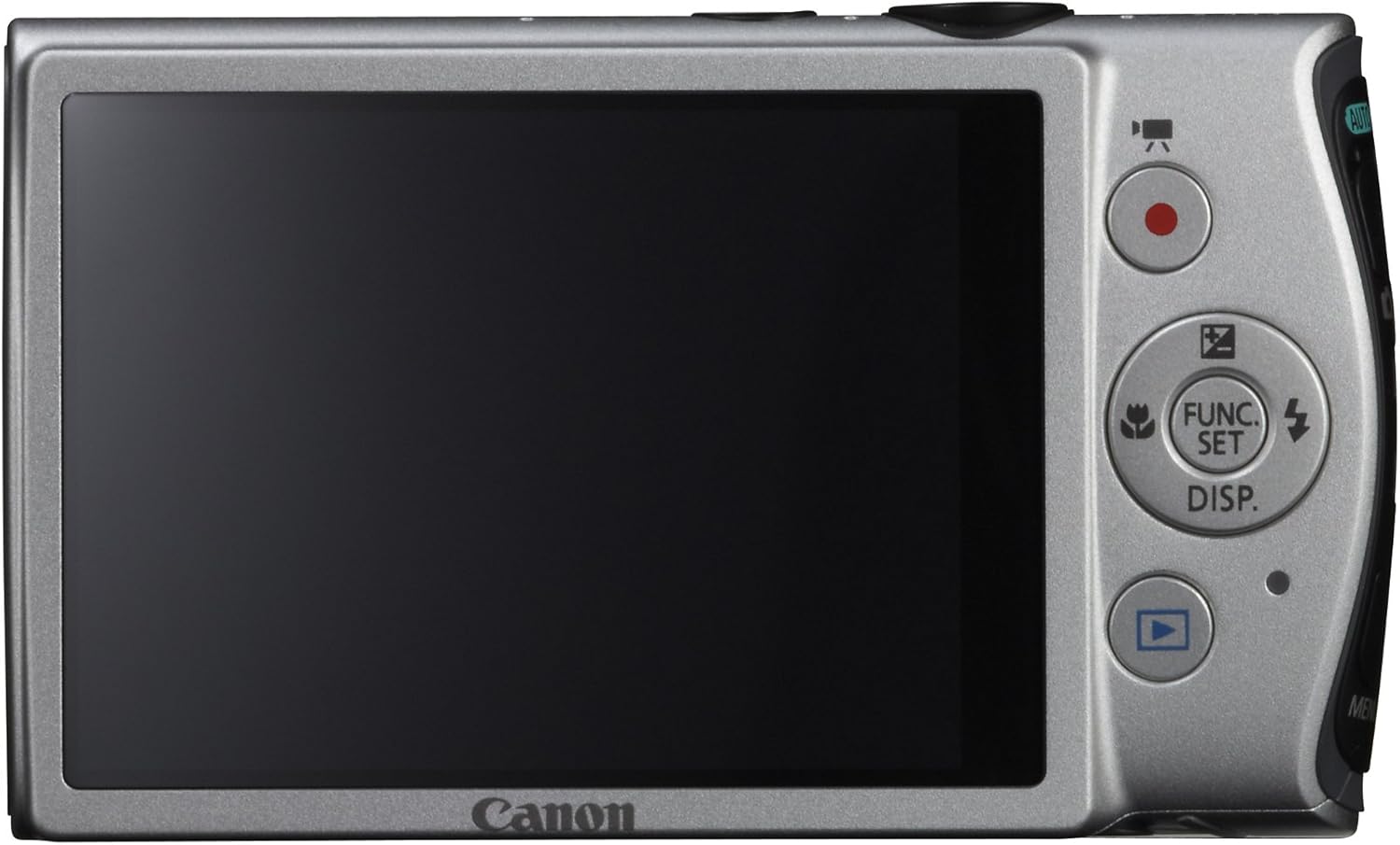
Slika: Zadaj view of the Canon PowerShot ELPH 310 HS, displaying the 3.0-inch LCD screen and various control buttons for navigation and function selection.
3. Načini fotografiranja
The PowerShot ELPH 310 HS offers various shooting modes to suit different situations. Use the mode dial or menu to select:
- Smart AUTO: Automatically detects scenes and applies optimal settings for point-and-shoot simplicity.
- Program (P): Allows for automatic aperture/shutter speed selection based on conditions, with some user control.
- Movie Digest: Records a short video clip before each still image, combining them into a daily video.
- Rafal pri visoki hitrosti: Captures rapid action at approximately 8.7 frames per second.
- Super Slow Motion Movie: Records video at high frame rates (up to 240 fps) for slow-motion playback.
- Posebni scenski načini: Includes options like Handheld Night Scene, Portrait, Beach, Snow, Fireworks, Fisheye Effect, Miniature Effect, Toy Camera Effect, and more for specific photographic effects.
4. Video snemanje
To record videos, press the dedicated movie button. The camera supports Full HD 1080p video at 24 fps and 720p HD video at 30 fps. The iFrame movie format is also supported for easier editing.
5. Image Stabilization (Intelligent IS)
The camera features Intelligent IS, which automatically selects the best shake correction method for your shooting situation. This includes modes for stills (Normal, Panning, Macro, Tripod) and videos (Dynamic, Powered, Macro, Tripod) to ensure steady images and footage.
Vzdrževanje
1. Čiščenje fotoaparata
- Objektiv: Use a soft, lint-free cloth specifically designed for camera lenses. Avoid touching the lens directly with fingers.
- LCD zaslon: Nežno obrišite z mehko, suho krpo. Ne uporabljajte abrazivnih čistil.
- Telo kamere: Use a soft, dry cloth to wipe away dust and smudges.
2. Skrb za baterijo
- Ko baterije ne uporabljate, jih hranite na hladnem in suhem mestu.
- Izogibajte se pogostemu popolnemu praznjenju baterije, da podaljšate njeno življenjsko dobo.
- Baterij ne izpostavljajte ekstremnim temperaturam.
3. Shranjevanje
Ko fotoaparat shranjujete dalj časa, odstranite baterijo in pomnilniško kartico. Fotoaparat shranjujte v suhem in brezprašnem okolju, po možnosti v torbi ali etuiju za fotoaparat.
Odpravljanje težav
| Težava | Možen vzrok/rešitev |
|---|---|
| Kamera se ne vklopi. | Battery may be depleted or incorrectly inserted. Ensure battery is charged and inserted correctly. |
| Slike so zamegljene. | Camera shake, subject movement, or incorrect focus. Ensure proper grip, use Intelligent IS, or check focus settings. |
| Napaka pomnilniške kartice. | Memory card may be full, corrupted, or incompatible. Try formatting the card (this will erase all data) or use a different card. |
| Bliskavica se ne sproži. | Flash may be set to OFF or Red-Eye Reduction mode. Check flash settings in the menu. |
| Videoposnetka ni mogoče snemati. | Memory card may be full or too slow. Ensure sufficient space and use a high-speed memory card. |
Specifikacije
| Funkcija | Podrobnost |
|---|---|
| Ime modela | Canon PowerShot ELPH 310 HS |
| Slikovni senzor | CMOS z 12.1 milijoni slikovnih pik |
| Procesor slike | DIGIC 4 |
| Optični zoom | 8x |
| Objektiv | 28mm Wide-Angle (35mm equivalent: 28-224mm) |
| Stabilizacija slike | Optični (inteligentni stabilizator slike) |
| Snemanje videa | Full HD 1080p (24 fps), HD 720p (30 fps) |
| LCD zaslon | 3.0-inch PureColor LCD (461,000 dots) |
| Mediji za shranjevanje | SD, SDHC, SDXC Memory Cards |
| Povezljivost | HDMI, USB |
| Baterija | NB-4L Lithium-ion Battery Pack |
| Teža | Približno 0.31 funta (vključno z baterijo in pomnilniško kartico) |
Garancija in podpora
For warranty information and technical support, please refer to the documentation included with your product or visit the official Canon webspletnega mesta. Račun shranite kot dokazilo o nakupu za uveljavljanje garancije.
Canonova podpora Webspletno mesto: www.usa.canon.com/support