
InFocus IN126
Uporabniški priročnik za DLP projektor InFocus IN126
Model: IN126 | Brand: InFocus
1. Izdelek je končanview
The InFocus IN126 is a DLP projector designed for various projection needs, offering high brightness and a clear image. This manual provides essential information for the proper setup, operation, and maintenance of your projector.
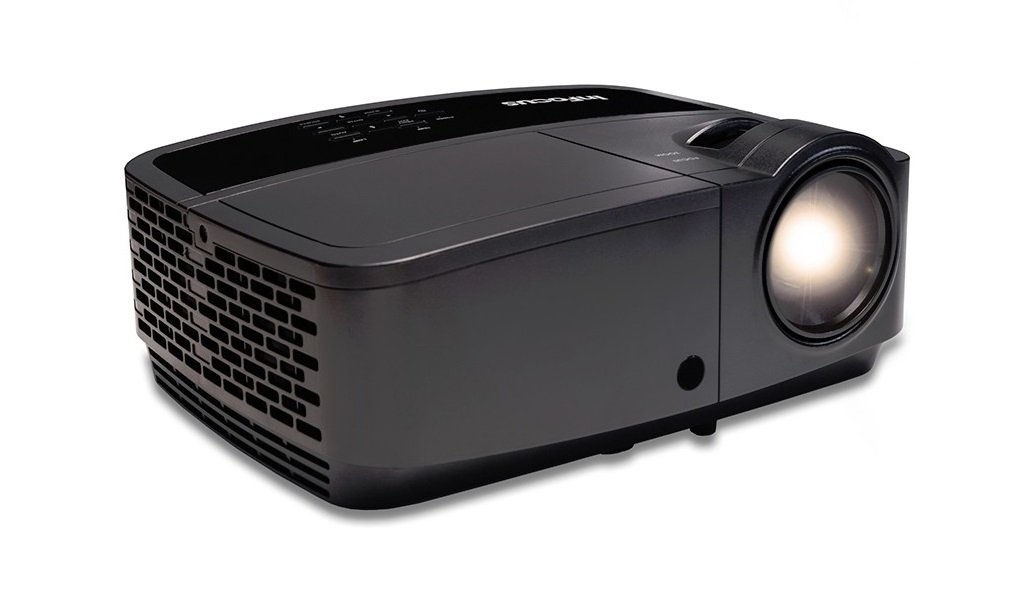
Slika 1.1: Spredaj view of the InFocus IN126 DLP Projector.
Ključne značilnosti:
- High brightness of up to 3200 lumens for clear images in various lighting conditions.
- High 3000:1 contrast ratio for sharp detail.
- Compact and portable design, weighing approximately 4.8 lbs. (2.17 kg).
- 3D-Ready capability for immersive viewizkušnje.
- HDMI connectivity for versatile input options.
2. Nastavitev in namestitev
2.1 Razpakiranje
Carefully remove the projector and all accessories from the packaging. Verify that all components are present according to the packing list.
2.2 Postavitev projektorja
Place the projector on a stable, flat surface or mount it securely. Ensure adequate ventilation around the projector to prevent overheating. Position the projector at an appropriate distance from the screen to achieve the desired image size.
2.3 Povezovanje naprav
Connect your video source (e.g., laptop, gaming console) to the projector using an HDMI cable. Ensure the cable is securely plugged into both the source device and the projector's HDMI input port.

Image 2.1: An InFocus projector set up for a business presentation, demonstrating typical usage.
2.4 Vklop/izklop
- Za vklop: Connect the power cord to the projector and a power outlet. Press the power button on the projector or remote control. The power indicator light will illuminate.
- Za izklop: Press the power button twice. The projector will enter a cooling cycle before completely shutting down. Do not unplug the projector during the cooling cycle.
2.5 Prilagoditev slike
- Fokus: Vrtite obroč za ostrenje na objektivu, dokler slika ni ostra in jasna.
- Trapezni popravek: Use the keystone adjustment feature (usually found in the projector's menu or via dedicated buttons) to correct trapezoidal image distortion if the projector is not perfectly perpendicular to the screen.
3. Upravljanje projektorja
3.1 Izbira vhodnega vira
Press the 'Source' or 'Input' button on the remote control or projector control panel to cycle through available input sources (e.g., HDMI, VGA). Select the input corresponding to your connected device.
3.2 Navigacija po meniju
Use the arrow buttons on the remote or control panel to navigate the on-screen display (OSD) menu. Press 'Enter' or 'OK' to confirm selections and 'Menu' or 'Exit' to go back or close the menu.
3.3 Prilagoditve slike
V zaslonskem meniju lahko prilagodite različne nastavitve slike:
- Svetlost: Prilagodi splošno svetlost ali temnost slike.
- Kontrast: Controls the difference between the lightest and darkest parts of the image.
- barva: Prilagodi intenzivnost barv.
- Razmerje stranic: Izbere format prikaza (npr. 4:3, 16:9).
3.4 Nastavitve zvoka
If your projector has built-in speakers or is connected to an external audio system, you can adjust the volume and other audio settings through the OSD menu.
3.5 3D-delovanje
The IN126 projector is 3D-Ready. To view 3D content, you will need compatible 3D glasses, a 3D-enabled source device, and 3D content. Refer to your 3D glasses and source device manuals for specific instructions on enabling 3D mode.
4. Vzdrževanje
4.1 Čiščenje leče
Za nežno brisanje leče projektorja uporabite mehko krpo, ki ne pušča vlaken in je posebej zasnovana za optične leče. Izogibajte se uporabi abrazivnih čistil ali prekomerne sile, saj lahko lečo opraskate.
4.2 Čiščenje projektorja Casing
Wipe the projector's exterior casing z mehkim, damp krpo. Ne uporabljajte močnih kemikalij ali topil.
4.3 Vzdrževanje zračnega filtra
Regularly check and clean the air filter to ensure proper airflow and prevent overheating. Refer to the full product manual for instructions on locating and cleaning or replacing the air filter.
4.4 Lamp Zamenjava
Projektor lamp has an estimated operating life of up to 20,000 hours. When the lamp reaches the end of its life, a warning message may appear, or the image brightness may significantly decrease. Refer to the full product manual for detailed instructions on safe lamp replacement. Always use genuine InFocus replacement lamps.
5. Odpravljanje težav
This section addresses common issues you might encounter with your InFocus IN126 projector.
5.1 Ni slike na zaslonu
- Prepričajte se, da je projektor vklopljen in da lučka indikatorja napajanja sveti neprekinjeno.
- Check all cable connections (HDMI, power) are secure.
- Verify the correct input source is selected on the projector.
- Confirm the source device (laptop, etc.) is powered on and outputting a signal.
5.2 Slika je popačena ali zamegljena
- Prilagodite obroč za ostrenje na objektivu.
- Use keystone correction to fix trapezoidal distortion.
- Ensure the projector is placed on a stable surface and is not vibrating.
- Check the resolution settings of your source device; ensure it is compatible with the projector's native resolution (1280 x 720).
5.3 Ni zvoka
- Povečajte glasnost na projektorju in izvorni napravi.
- Če uporabljate zunanje zvočnike, se prepričajte, da so pravilno priključeni in vklopljeni.
- Preverite nastavitve zvoka v zaslonskem meniju projektorja.
5.4 Pregrevanje projektorja
- Ensure there is sufficient space around the projector for ventilation.
- Clean the air filter to remove any dust buildup.
- Ne blokirajte prezračevalnih odprtin.
6. Specifikacije
The following table outlines the key technical specifications for the InFocus IN126 DLP Projector:
| Funkcija | Specifikacija |
|---|---|
| Znamka | InFocus |
| Ime modela | IN126 DLP |
| Vrsta zaslona | DLP |
| Izvorna ločljivost | 1280 x 720 |
| Največja ločljivost zaslona | 1920 x 1080 |
| Svetlost | 3200 lumens (ANSI) |
| Kontrastno razmerje | 3000:1 |
| Življenjska doba svetlobnega vira | 20000 ur |
| Lamp Wattage | 230 vatov |
| Tehnologija povezljivosti | HDMI |
| Posebna funkcija | 3D-pripravljen |
| Faktor oblike | Prenosni |
| Vrsta namestitve | Namizni nosilec |
| Teža predmeta | 4.85 funtov (2.2 kg) |
| Certifikat za zunanje testiranje | UL, c-UL, FCC, CE |
7. Informacije o garanciji
The InFocus IN126 DLP Projector comes with a limited manufacturer's warranty. For specific details regarding warranty coverage, duration, and terms, please refer to the warranty card included with your product or visit the official InFocus webspletnega mesta. Shranite dokazilo o nakupu za uveljavljanje garancije.
8. Podpora strankam
For further assistance, technical support, or to inquire about replacement parts, please visit the official InFocus support website or contact their customer service department. Contact information can typically be found on the InFocus website or in the documentation included with your projector.
Ask a question about this manual
Ask about setup, troubleshooting, compatibility, parts, safety, or missing instructions. Manuals+ will review the question and use this page’s manual context to help answer it.