
1. Uvod
Hvala za nakupasing the Caliber RMD 068-2 Car Radio USB/SD Player. This manual provides detailed instructions for the installation, operation, and maintenance of your new car radio. Please read this manual thoroughly before using the product to ensure proper functionality and safety. Keep this manual for future reference.
2. Varnostne informacije
- Namestitev: Ensure the unit is installed by a qualified technician to prevent damage to the vehicle's electrical system. Incorrect wiring can cause fire or electrical shock.
- Napajanje: Napravo priključite samo na 12V DC avtomobilski akumulator z negativno ozemljitvijo.
- Varovalke: Always replace fuses with new ones of the specified rating. Using an incorrect fuse can cause damage to the unit or vehicle.
- Raven glasnosti: Do not operate the unit at excessively high volume levels, as this may impair your ability to hear external traffic sounds and could be dangerous.
- Čiščenje: Za čiščenje uporabite mehko, suho krpo. Ne uporabljajte abrazivnih čistil ali topil.
- Vlaga: Enote ne izpostavljajte vlagi ali vodi.
3. Vsebina paketa
Prosimo, preverite, ali so vsi elementi prisotni:
- Caliber RMD 068-2 Car Radio Unit
- Snemljiva sprednja plošča
- ISO kabelski snop
- Montažni okvir
- Disassembly Keys (2 pcs)
- Uporabniški priročnik (ta dokument)
4. Izdelek je končanview
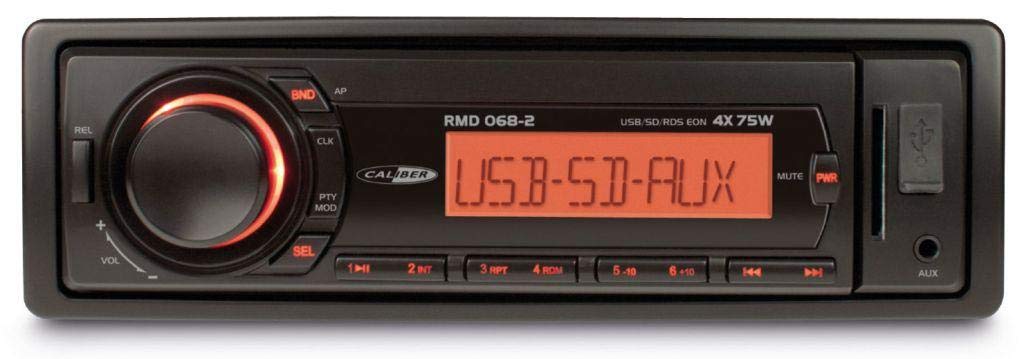
Slika 1: Spredaj view of the Caliber RMD 068-2 Car Radio. This image shows the main unit with its detachable front panel, including the display, control buttons, USB port, and SD card slot.
4.1 Kontrole sprednje plošče
- POWER/MODE Button: Press to turn on/off. Short press to switch between Radio, USB, SD, AUX modes.
- Gumb VOLUME: Rotate to adjust volume. Press to access audio settings (Bass, Treble, Balance, Fader).
- DISPLAY: Shows current time, radio frequency, track information, etc.
- Vrata USB: Za predvajanje medijev priključite USB-ključke.
- Reža za kartico SD: Vstavite SD kartice za predvajanje medijev.
- AUX vhod (3.5 mm priključek): Priključite zunanje zvočne naprave.
- Gumb BAND/AMS: In radio mode, press to select radio band (FM1, FM2, FM3). Long press for Automatic Memory Store.
- Gumbi PREDNASTAVITVE (1–6): Store and recall radio stations. In USB/SD mode, use for direct track selection.
- Gumb PLAY/PAUSE: Play or pause media playback.
- FORWARD/BACKWARD Buttons: Skip tracks or tune radio frequency.
- Gumb za IZVRŽENJE: Release the detachable front panel.
4.2 Zadnji priključki
The rear of the unit features standard ISO connectors for power and speakers, along with an antenna input.
- ISO Power Connector: For connecting to the vehicle's power supply (constant 12V, ignition 12V, ground).
- ISO Speaker Connector: For connecting to the vehicle's speakers (Front Left, Front Right, Rear Left, Rear Right).
- Antenski vhod: For connecting the car's radio antenna.
5. Nastavitev
5.1 Namestitev
- Odklopite baterijo: Before starting, disconnect the negative terminal of your car battery to prevent short circuits.
- Odstranite staro enoto: Previdno odstranite obstoječi avtoradio z armaturne plošče.
- Namestitev montažnega okvirja: Insert the supplied mounting frame into the dashboard opening and bend the tabs to secure it.
- Povežite ožičenje: Refer to the wiring diagram in section 5.2. Connect the ISO wiring harness to the car's wiring and then to the Caliber RMD 068-2 unit. Connect the antenna cable.
- Slide Unit In: Carefully slide the Caliber RMD 068-2 unit into the mounting frame until it clicks into place.
- Ponovno priključite baterijo: Reconnect the negative terminal of your car battery.
- Pritrdite sprednjo ploščo: Snemljivo sprednjo ploščo pritrdite na glavno enoto.
5.2 Shema ožičenja
The Caliber RMD 068-2 uses standard ISO connectors. Ensure correct connections as shown below. If your vehicle does not have ISO connectors, an adapter may be required.
| Pin št. | Wire Color (Typical) | funkcija |
|---|---|---|
| 4 | Rumena | Konstantno 12V (baterija) |
| 7 | Rdeča | Preklopno 12V (vžig) |
| 8 | Črna | Tla |
| 5 | Modra | Antenna Remote Out |
| Pin št. | Wire Color (Typical) | funkcija |
|---|---|---|
| 1 | Vijolična | Zadaj desno (+) |
| 2 | Vijolična/črna | Zadaj desno (-) |
| 3 | zelena | Zadaj levo (+) |
| 4 | Zelena/črna | Zadaj levo (-) |
| 5 | siva | Spredaj desno (+) |
| 6 | Siva/črna | Spredaj desno (-) |
| 7 | Bela | Spredaj levo (+) |
| 8 | Bela/črna | Spredaj levo (-) |
Note: Wire colors may vary depending on vehicle manufacturer. Always consult your vehicle's wiring diagram.
6. Navodila za uporabo
6.1 Osnovne funkcije
- Vklop/izklop: Pritisnite MOČ / NAČIN gumb za vklop ali izklop enote.
- Nadzor glasnosti: Zavrtite GLASNOST v smeri urinega kazalca za povečanje glasnosti, v nasprotni smeri urinega kazalca za zmanjšanje.
- Izbira načina: Kratek pritisk na MOČ / NAČIN button to cycle through available modes: Radio (FM), USB, SD, AUX.
- Nastavitve zvoka: Pritisnite GLASNOST knob to enter audio settings. Rotate the knob to select settings like BASS, TREBLE, BALANCE, FADER. Press the knob again to confirm or move to the next setting.
6.2 Radijsko delovanje
- Izbira pasu: V načinu radia pritisnite PAS/AMS button to switch between FM1, FM2, and FM3 bands.
- Ročna nastavitev: Kratek pritisk na NAPREJ/NAZAJ gumbe za natančno nastavitev frekvence.
- Samodejno iskanje: Dolgo pritisnite NAPREJ/NAZAJ gumbe za samodejno iskanje naslednje postaje z močnim signalom.
- Shrani prednastavitve: Tune to your desired station. Long press one of the PREDNASTAVITEV (1–6) buttons until you hear a beep. The station is now stored.
- Priklic prednastavitev: Short press one of the PREDNASTAVITEV (1–6) buttons to recall a stored station.
- Automatic Memory Store (AMS): Dolgo pritisnite PAS/AMS button to automatically scan and store the strongest stations into the current band's presets.
6.3 Predvajanje z USB-ja/SD-kartice
- Vstavi medij: Insert a USB flash drive into the USB port or an SD card into the SD card slot. The unit will automatically switch to USB/SD mode and begin playback.
- Predvajanje/pavza: Pritisnite PREDVAJAJ/PAVZA gumb za premor ali nadaljevanje predvajanja.
- Preskoči skladbo: Kratek pritisk na NAPREJ/NAZAJ gumbe za preskok na naslednjo ali prejšnjo skladbo.
- Hitro previjanje naprej/nazaj: Dolgo pritisnite NAPREJ/NAZAJ gumbe za hitro previjanje naprej ali nazaj znotraj skladbe.
- Navigacija po mapah: Uporabite PREDNASTAVITEV 5 in PREDNASTAVITEV 6 buttons to navigate between folders on your USB/SD media.
6.4 AUX vhod
- Priključite napravo: Connect your external audio device (e.g., smartphone, MP3 player) to the 3.5mm AUX input jack on the front panel using an audio cable.
- Izberite način AUX: Pritisnite MOČ / NAČIN button repeatedly until "AUX" is displayed.
- Nadzor predvajanja: Control playback (play, pause, skip) directly from your connected external device. The car radio will control the volume.
7. Vzdrževanje
- Čiščenje enote: Use a soft, dry cloth to wipe the front panel and display. Do not use harsh chemicals, cleaning sprays, or abrasive cloths, as these can damage the surface.
- Snemljiva sprednja plošča: When detaching the front panel, handle it carefully. Store it in a protective case (if supplied) to prevent scratches or damage.
- USB/SD Ports: Keep the USB port and SD card slot free from dust and debris.
8. Odpravljanje težav
| Težava | Možen vzrok | rešitev |
|---|---|---|
| Brez moči | Pregorela varovalka; Nepravilno ožičenje; Ohlapna povezava | Check and replace fuse; Verify wiring connections (Yellow to constant 12V, Red to ignition 12V, Black to ground); Ensure front panel is securely attached. |
| Brez zvoka | Volume too low; Mute activated; Incorrect speaker wiring; Damaged speakers | Increase volume; Check if mute is active; Verify speaker connections; Test with known good speakers. |
| Slab sprejem radia | Antenna not connected; Damaged antenna; Weak signal area | Ensure antenna is securely connected; Check antenna for damage; Try tuning to a stronger station or move to a different location. |
| USB/SD se ne predvaja | Nepodprto file format; Corrupted media; Incorrectly inserted media; Max capacity exceeded | Zagotovite files are MP3/WMA format; Try a different USB/SD card; Reinsert media correctly; Check media capacity (max 32GB recommended). |
| Front panel cannot be detached | Eject button not fully pressed; Mechanism jammed | Press the EJECT button firmly; Do not force the panel. |
If the problem persists after trying these solutions, please contact your dealer or a qualified service center.
9. Specifikacije
- Model: Caliber RMD 068-2
- Izhodna moč: 4 x 75 Watts Max
- Napajanje: 12V DC (10.8V-15.6V), Negative Ground
- Varovalka: 10A
- Podprti zvočni formati: MP3, WMA (via USB/SD)
- USB/SD Compatibility: Do 32 GB (format FAT32)
- FM sprejemnik: RDS, 18 Presets
- AUX vhod: 3.5 mm stereo priključek
- Snemljiva sprednja plošča: ja
- Teža: Približno 0.95 kg (2.09 lbs)
10. Garancija in podpora
This Caliber product is covered by a warranty in accordance with applicable European laws. For detailed warranty terms and conditions, please refer to the warranty card included with your product or visit the official Caliber website. For technical support, troubleshooting assistance, or service inquiries, please contact your authorized Caliber dealer or the customer service department in your region. Please have your product model number (RMD 068-2) and proof of purchase ready when contacting support.
Note: Specifications and design are subject to change without notice for improvement.