
1. Uvod
This manual provides essential instructions for the safe and efficient operation of your Sharp CD-DH950P 240W Mini-Component System. This system features a 5-disc CD changer, a cassette deck, an iPod/iPhone docking station, a USB host for digital audio playback, and an AM/FM tuner. Please read this manual thoroughly before using the system and retain it for future reference.
2. Varnostne informacije
- vir energije: Napravo priključite samo na izmenično vtičnico z navedeno glasnostjotage.
- Prezračevanje: Zagotovite zadostno prezračevanje. Ne blokirajte prezračevalnih odprtin.
- Voda in vlaga: Enote ne izpostavljajte dežju, vlagi ali kapljajočim/brizgajočim tekočinam.
- Toplota: Napravo hranite stran od virov toplote, kot so radiatorji, grelniki, štedilniki ali druge naprave, ki proizvajajo toploto.
- Čiščenje: Pred čiščenjem izključite enoto iz stenske vtičnice. Uporabite mehko, suho krpo.
- Servisiranje: Tega izdelka ne poskušajte servisirati sami. Vsa servisna dela prepustite usposobljenemu servisnemu osebju.
3. Vsebina paketa
Preverite, ali vaš paket vsebuje naslednje elemente:
- Main Unit (CD-DH950P)
- Levi zvočnik
- Desni zvočnik
- Daljinski upravljalnik z baterijami
- AM zankasta antena
- FM žična antena
- Napajalni kabel
4. Nastavitev
4.1 Priključitev zvočnikov
Connect the speaker wires from the main unit to the corresponding terminals on the back of each speaker. Ensure correct polarity (red to red, black to black) for optimal sound quality. The left speaker connects to the left speaker output, and the right speaker to the right speaker output.
4.2 Priključitev anten
- FM antena: Connect the supplied FM wire antenna to the FM antenna terminal on the rear of the main unit. Extend the wire for better reception.
- AM antena: Connect the supplied AM loop antenna to the AM antenna terminals on the rear of the main unit. Position the antenna for best reception.
4.3 Napajalni priključek
Plug the power cord into the AC IN jack on the rear of the main unit, then plug the other end into a standard AC wall outlet.
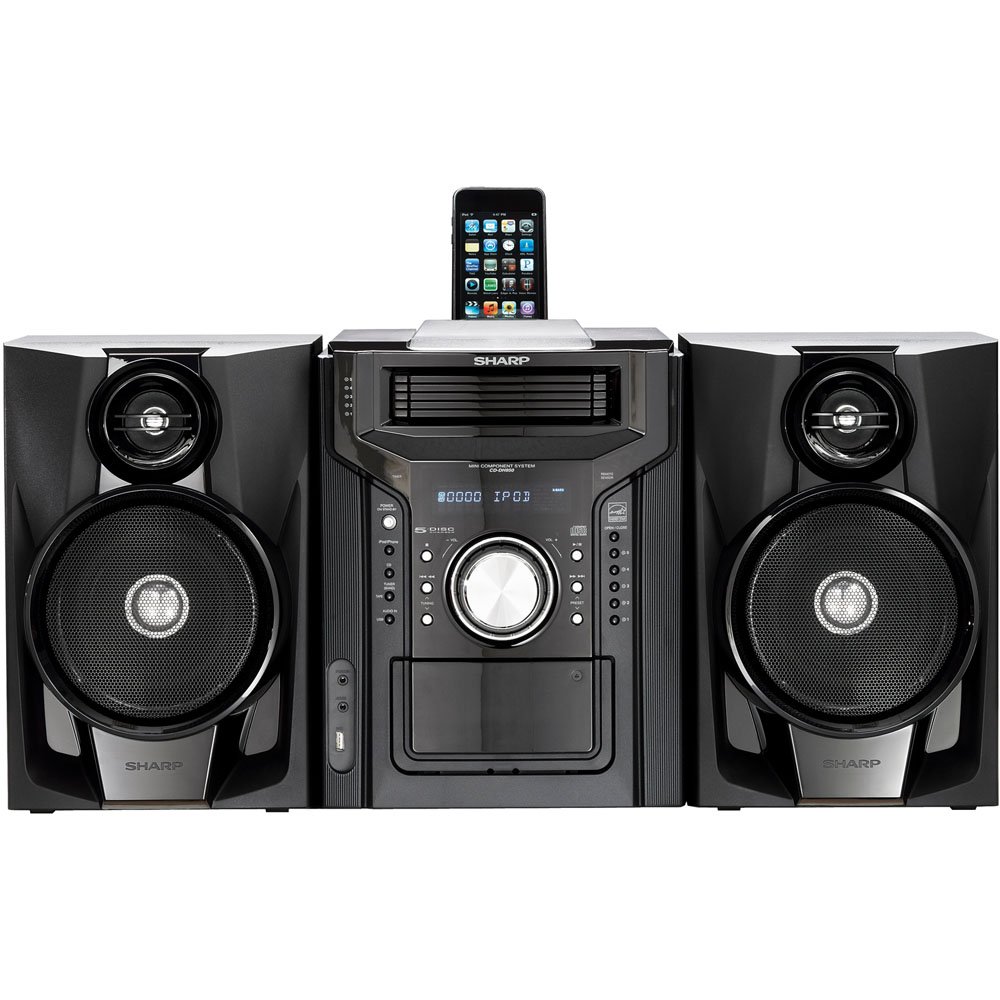
Slika 4.3.1: Na splošno view of the Sharp CD-DH950P Mini-Component System, showing the main unit flanked by two speakers, with an iPhone docked on top of the main unit.
5. Navodila za uporabo
5.1 Vklop/izklop in nadzor glasnosti
- Pritisnite MOČ gumb na sprednji plošči ali daljinskem upravljalniku za vklop ali izklop enote.
- Zavrtite GLASNOST gumb na sprednji plošči ali uporabite GLASNOST +/- gumbe na daljinskem upravljalniku za nastavitev glasnosti.
5.2 Predvajanje CD-ja
This system features a 5-disc CD changer.
- Pritisnite ODPRTO/ZAPRI gumb za odpiranje pladnja za CD.
- Place up to five CDs on the disc trays, label side up.
- Pritisnite ODPRTO/ZAPRI ponovno, da zaprete pladenj.
- Pritisnite CD gumb za izbiro funkcije CD.
- Pritisnite PREDVAJAJ/PAVZA gumb za začetek predvajanja.
- Uporabite PRESKOČI buttons to navigate between tracks or discs.
5.3 Cassette Deck Operation
- Pritisnite TAPE OPEN/CLOSE button to open the cassette deck.
- Vstavite kaseto.
- Pritisnite TRAK gumb za izbiro funkcije kasete.
- Pritisnite IGRAJ za začetek predvajanja.
- To record, ensure the source is selected (e.g., CD, Tuner) and press the SNEMANJE button on the cassette deck.
5.4 iPod/iPhone Docking
The system includes a top-mounted docking slot for compatible iPod and iPhone devices (30-pin connector).
- Carefully place your iPod or iPhone into the docking slot.
- The system will automatically switch to iPod/iPhone mode or you may need to press the iPod/iPhone gumb.
- Use the system's controls or your device's controls to play music. The device will also charge while docked.
5.5 USB Host Playback
Connect a USB storage device containing MP3 or WMA audio files to the USB port on the front panel.
- Napravo USB vstavite v vrata USB.
- Pritisnite USB button to select the USB function.
- Use the playback controls to navigate and play files.
5.6 AM/FM sprejemnik
- Pritisnite TUNER gumb za izbiro AM ali FM radia.
- Uporabite UGLAŠEVANJE +/- gumbe za ročno uglaševanje postaje.
- To auto-scan, press and hold the UGLAŠEVANJE +/- gumbi.
- To store a preset, tune to the desired station, then press SPOMIN sledi prednastavljena številka.
5.7 Avdio vhod
Connect an external audio device (e.g., MP3 player, smartphone) to the AUDIO IN jack on the front panel using a 3.5mm stereo cable.
- Connect your device to the AUDIO IN jack.
- Pritisnite AUDIO VHOD button to select this source.
- Upravljajte predvajanje iz povezane naprave.
6. Vzdrževanje
6.1 Čiščenje enote
Zunanjost enote obrišite z mehko, suho krpo. Ne uporabljajte abrazivnih čistil, voskov ali topil. Pred čiščenjem se prepričajte, da je enota izklopljena iz električnega omrežja.
6.2 CD and Cassette Care
- Handle CDs by their edges to avoid fingerprints and scratches. Clean discs with a soft, lint-free cloth from the center outwards.
- Store cassette tapes away from strong magnetic fields and direct sunlight.
7. Odpravljanje težav
| Težava | Možen vzrok | rešitev |
|---|---|---|
| Brez moči | Napajalni kabel ni priključen; vtičnica je okvarjena | Prepričajte se, da je napajalni kabel varno priključen; poskusite z drugo vtičnico |
| Brez zvoka | Glasnost je prenizka; Zvočniki niso priključeni; Izbran je napačen vir | Povečaj glasnost; Preverite povezave zvočnikov; Izberite pravilen vhodni vir |
| CD se ne predvaja | Disc inserted incorrectly; Disc is dirty or scratched | Insert disc correctly (label side up); Clean or replace disc |
| Slab radijski sprejem | Antenna not positioned correctly; Weak signal | Adjust position of AM/FM antennas; Try auto-tuning or manual fine-tuning |
| iPod/iPhone not charging/playing | Device not properly docked; Device not compatible (e.g., newer connector) | Re-dock the device; Note that this system uses a 30-pin connector, newer devices may require an adapter (not included) |
8. Specifikacije
- Znamka: Ostra
- Model: CD-DH950P
- Skupna izhodna moč: 240 Watts RMS (85W/ch FTC)
- Konfiguracija zvočnikov: 2.1 kanal
- Podprti zvočni formati: CD, MP3, WMA
- Razmerje med signalom in šumom: 100 dB
- Združljive naprave: MP3 Player, Smartphone (via 30-pin dock or USB/Audio In)
- Dimenzije (D x Š x V): 27.6 x 13.6 x 13.5 palcev
- Teža artikla: 24.4 funta
- UPC: 074000369863, 074000369290
9. Informacije o garanciji
This product is covered by a 1-year limited warranty from the date of purchase. Please refer to the warranty card included with your product for full terms and conditions, or contact Sharp customer service for details.
10. Podpora
For further assistance, technical support, or service inquiries, please contact Sharp customer service. Contact information can typically be found on the Sharp official webspletnem mestu ali v dokumentaciji, ki je priložena vašemu izdelku.