
1. Uvod
This manual provides detailed instructions for the installation, operation, and maintenance of your Foxconn TSAA725 ATX Tower Case. Please read this manual thoroughly before beginning installation to ensure proper setup and safe use of the product. Keep this manual for future reference.
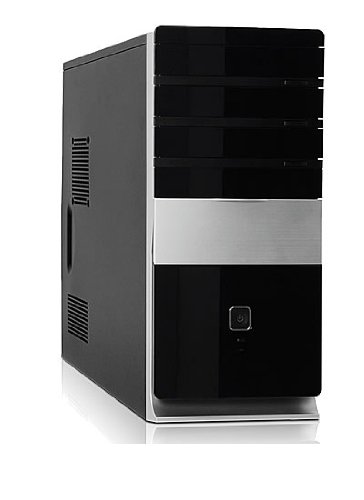
Slika: spredaj view of the Foxconn TSAA725 ATX Tower Case, showcasing its design and front panel ports.
2. Varnostne informacije
Da preprečite poškodbe izdelka ali telesne poškodbe, upoštevajte naslednje varnostne ukrepe:
- Always disconnect the power supply from the wall outlet before opening the computer case or performing any installation/maintenance.
- Handle internal components with care to avoid electrostatic discharge (ESD) damage. Use an anti-static wrist strap if available.
- Zagotovite ustrezno prezračevanje okoli ohišja, da preprečite pregrevanje.
- Do not expose the case to moisture or extreme temperatures.
- Majhne dele hranite izven dosega otrok.
3. Vsebina paketa
Preverite, ali so v paketu prisotni vsi elementi:
- Foxconn TSAA725 ATX Tower Case
- 350W Power Supply (pre-installed)
- Komplet dodatne opreme (vijaki, distančniki, kabelske vezice)
- Ta navodila za uporabo
4. Ključne značilnosti
The Foxconn TSAA725 ATX Tower Case offers the following features:
- Material: 0.5mm SGCC Alloy Steel construction for durability.
- Podpora za matično ploščo: Compatible with ATX and Micro ATX motherboards.
- Drive zalivi:
- 3x 5.25" External Bays
- 2x 3.5" External Bays
- 4x 3.5" Internal Bays
- Hladilni sistem:
- 1x 80/92/120mm rear fan support (fan not included)
- Optional 1x 80/92/120mm front fan support (fan not included)
- 80mm Air Duct for CPU cooling.
- Sprednja V/I plošča:
- 2x USB 2.0 priključki
- 1x priključek za slušalke
- 1x priključek za mikrofon
- Napajanje: Integrated 350W Power Supply.
5. Namestitev in namestitev komponent
Follow these steps to install your computer components into the Foxconn TSAA725 case:
- Pripravite primer:
Place the case on a flat, stable surface. Remove the side panel(s) by unscrewing the thumbscrews at the rear of the case and sliding the panel backward.
- Namestite matično ploščo:
Install the necessary standoffs onto the motherboard tray according to your motherboard's form factor (ATX or Micro ATX). Carefully place the motherboard onto the standoffs, aligning the screw holes. Secure the motherboard with screws provided in the accessory kit.
- Install Drives (HDD/SSD):
For 3.5" internal drives, slide the drive into an available 3.5" internal bay and secure it with screws from the side. For 5.25" external drives (e.g., optical drives), remove the front panel bay cover, slide the drive in from the front, and secure it with screws.
- Namestitev razširitvenih kartic:
Remove the appropriate expansion slot covers at the rear of the case. Insert your graphics card or other expansion cards into the PCIe/PCI slots on the motherboard and secure them with screws.
- Povežite kable:
Connect the power supply cables to the motherboard (24-pin ATX, 4/8-pin CPU), graphics card (if applicable), and drives (SATA power). Connect the front panel cables (USB, audio, power switch, reset switch, LED indicators) to the corresponding headers on the motherboard. Refer to your motherboard manual for header locations.
- Upravljanje kablov:
Route cables neatly to improve airflow and aesthetics. Use cable ties from the accessory kit if needed.
- Zaprite zadevo:
Once all components are installed and cables are connected, reattach the side panel(s) and secure them with the thumbscrews.
6. Navodila za uporabo
After successful assembly, connect your peripherals (monitor, keyboard, mouse) and power cable to the case. Press the power button on the front panel to start your computer.
Vhodna/izhodna vrata na sprednji plošči:
- Vrata USB 2.0: For connecting USB devices such as keyboards, mice, and external storage.
- Priključek za slušalke: Za priklop slušalk ali zvočnikov.
- Priključek za mikrofon: Za priklop mikrofona.
- Gumb za vklop: Za vklop ali izklop računalnika.
- Gumb za ponastavitev: To restart the computer.
7. Vzdrževanje
Regular maintenance helps ensure optimal performance and longevity of your computer case:
- Čiščenje prahu: Periodically clean dust from inside the case, especially from fans and heatsinks, using compressed air. Ensure the computer is powered off and unplugged before cleaning.
- Zunanje čiščenje: Zunanjost ohišja obrišite z mehko krpoamp krpo. Izogibajte se abrazivnim čistilom ali topilom.
- Upravljanje kablov: Občasno preverjajte napeljavo kablov, da se prepričate, da noben kabel ne ovira pretoka zraka ali delovanja ventilatorja.
8. Odpravljanje težav
Če naletite na težave, si oglejte naslednje pogoste rešitve:
- Računalnik se ne vklopi:
- Ensure the power cable is securely connected to both the case's power supply and the wall outlet.
- Check if the power supply switch (if present) is in the 'ON' position.
- Verify that the front panel power button cable is correctly connected to the motherboard.
- Ni prikaza na monitorju:
- Ensure the monitor is powered on and connected to the correct video output on your graphics card or motherboard.
- Ponovno namestite grafično kartico in module RAM-a.
- Vrata USB ne delujejo:
- Verify that the front panel USB cables are correctly connected to the motherboard's USB headers.
- Poskusite priključiti napravo na druga vrata USB.
9. Specifikacije
| Funkcija | Podrobnost |
|---|---|
| Znamka | FOXCONN |
| Model | TSAA725-ISO450 |
| Material | 0.5mm SGCC Alloy Steel |
| Združljivost matične plošče | ATX, mikro ATX |
| Drive Bays (External) | 3x 5.25", 2x 3.5" |
| Ležišča za pogone (notranja) | 4x 3.5" |
| Podpora za hladilni sistem | 1x 80/92/120mm rear fan, 1x 80/92/120mm front fan (optional), 80mm Air Duct |
| Sprednja V / I vrata | 2x USB 2.0, 1x Headphone, 1x Microphone |
| Napajalnik | 350 W (vgrajeno) |
| Dimenzije izdelka (DxŠxV) | 50.17 x 24.13 x 54.61 cm |
| Teža predmeta | 6.96 kg |
10. Garancija in podpora
For warranty information and technical support, please refer to the official Foxconn webali se obrnite na lokalnega prodajalca. Shranite dokazilo o nakupu za uveljavljanje garancije.
Spletni viri: For additional support and updated drivers, visit the official Foxconn support page.
Opomba: Garancijski pogoji se lahko razlikujejo glede na regijo.