
Uvod
The GIGABYTE GM-M7600 is a wireless precision optical mouse designed for comfortable and reliable use. This manual provides instructions for setting up, operating, maintaining, and troubleshooting your device.
Vsebina paketa
Prosimo, preverite vsebino paketa in se prepričajte, da so prisotni vsi elementi:
- GIGABYTE GM-M7600 Wireless Optical Mouse
- Portable Nano USB Receiver
- 2 x AAA baterije
Nastavitev
1. Namestitev baterij
The GM-M7600 mouse requires two AAA batteries for operation. The batteries are included in the package.
- Poiščite pokrov predalčka za baterije na spodnji strani miške.
- Nežno potisnite ali dvignite pokrov, da odprete predal.
- Vstavite dve bateriji AAA in se prepričajte, da sta pozitivni (+) in negativni (-) pol pravilno poravnana z oznakami v predalu.
- Trdno zaprite pokrov prostora za baterije.
2. Priključitev USB-sprejemnika
The mouse connects to your computer via a portable Nano USB receiver.
- Locate the Nano USB receiver. It may be stored inside the mouse's battery compartment or packaged separately.
- Plug the Nano USB receiver into an available USB port on your computer (Laptop or Personal Computer).
- Your operating system (e.g., Windows XP, Linux) should automatically detect and install the necessary drivers. This process may take a few moments.
- Ko so gonilniki nameščeni, je miška pripravljena za uporabo.
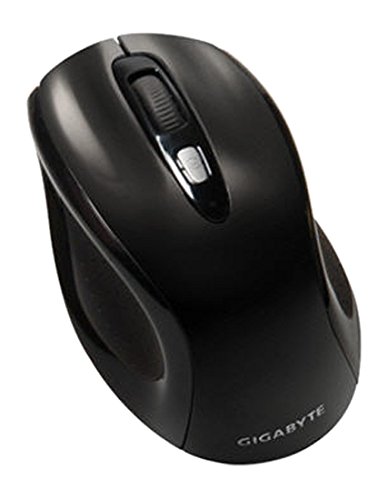
Slika 1: GIGABYTE GM-M7600 Wireless Optical Mouse. This image displays the ergonomic design of the mouse, highlighting its form factor and the location of its buttons. The Nano USB receiver is typically stored within the mouse or connected to a computer's USB port.
Navodila za uporabo
1. Vklop/izklop
The mouse typically has a power switch on its underside. Slide the switch to the 'ON' position to activate the mouse. Slide it to 'OFF' when not in use to conserve battery life.
2. Prilagajanje DPI (občutljivosti)
The GM-M7600 features an adjustable DPI switch, allowing you to change the mouse sensitivity between 800 DPI and 1600 DPI. This switch is usually located near the scroll wheel. Press the DPI button to toggle between the two sensitivity settings.
3. Osnovne funkcije miške
- Levi klik: Glavni gumb za izbiranje elementov, odpiranje filein interakcijo s programsko opremo.
- Desni klik: Drugi gumb za dostop do kontekstnih menijev in dodatnih možnosti.
- Kolesce za pomikanje: Uporablja se za pomikanje po dokumentih in web strani. Deluje lahko tudi kot gumb za srednji klik.
Vzdrževanje
1. Čiščenje
Za ohranjanje optimalne zmogljivosti in videza:
- Disconnect the mouse from your computer and turn off the power switch.
- Uporabite mehko krpo, ki ne pušča vlaken, dampPovršino miške obrišite z vodo ali blago čistilno raztopino.
- Izogibajte se uporabi agresivnih kemikalij, abrazivnih čistil ali pršenju tekočin neposredno na miško.
- Clean the optical sensor area on the underside of the mouse with a dry cotton swab to remove any dust or debris.
2. Zamenjava baterije
When the mouse performance degrades or it stops responding, it may be time to replace the batteries.
- Turn off the mouse using the power switch.
- Open the battery compartment as described in the 'Installing Batteries' section.
- Odstranite stare baterije AAA.
- Vstavite dve novi bateriji AAA in pri tem upoštevajte pravilno polarnost (+/-).
- Zaprite predalček za baterije in ponovno vklopite miško.
Odpravljanje težav
If you encounter issues with your GIGABYTE GM-M7600 mouse, try the following solutions:
- Miška se ne odziva:
- Prepričajte se, da je miška vklopljena.
- Preverite, ali so baterije pravilno vstavljene in ali so dovolj napolnjene. Po potrebi jih zamenjajte.
- Ensure the Nano USB receiver is securely plugged into a working USB port on your computer. Try a different USB port.
- Znova zaženite računalnik.
- Neenakomerno gibanje kurzorja:
- Očistite optični senzor na spodnji strani miške.
- Miško uporabljajte na primerni površini. Izogibajte se močno odsevnim ali prozornim površinam.
- Check for any wireless interference. Move the mouse closer to the receiver or away from other wireless devices.
- DPI switch not working:
- Prepričajte se, da je miška vklopljena in priključena.
- Trdno pritisnite gumb DPI.
Specifikacije
| Ime modela | GM-M7600 |
| Znamka | GIGABYTE |
| Tehnologija povezljivosti | 2.4GHz Radio Frequency Wireless |
| Zaznavanje gibanja | Optični |
| Nastavljiv DPI | 800/1600 DPI |
| Število gumbov | 3 (levi, desni, drsni kolesce/srednji klik) |
| Vir napajanja | 2 x AAA baterije (priložene) |
| Vrsta sprejemnika | Portable Nano USB Receiver |
| Združljive naprave | Prenosni računalnik, osebni računalnik |
| Podpora za operacijski sistem | Linux, Windows XP |
| Material ohišja | Plastic with Rubberized Finish |
| barva | Črna |
Garancija in podpora
For warranty information and technical support, please refer to the warranty card included with your product or visit the official GIGABYTE webmesto. Shranite račun za garancijske zahtevke.