
plustek SmartOffice PS286 Plus
Plustek SmartOffice PS286 Plus Document Scanner User Manual
Model: SmartOffice PS286 Plus
Znamka: Plustek
1. Uvod
The Plustek SmartOffice PS286 Plus is a compact and efficient document scanner designed for fast and reliable digitization of various documents. It is ideal for office environments requiring quick processing of paper documents and rigid cards.
Ključne značilnosti:
- Advanced image enhancement for automatic straightening, rotation, brightness adjustment, and cropping.
- Ability to scan rigid cards, including ID cards and driver's licenses.
- Equipped with a 50-sheet Automatic Document Feeder (ADF) for batch scanning.
- Supports duplex scanning (scanning both sides of a document simultaneously).
- Fast scan speed of up to 25 pages per minute (50 images per minute for duplex).
- Daily duty cycle of 1500 pages.
- Single-touch customizable buttons for automating up to 9 frequent scanning jobs.

Figure 1.1: Plustek SmartOffice PS286 Plus Document Scanner (Closed)
2. Nastavitev
2.1 Vsebina paketa
Preden začnete, se prepričajte, da so v paketu vsi elementi:
- Plustek SmartOffice PS286 Plus Scanner
- AC napajalnik
- USB kabel
- Kratek vodnik
- Installation CD (or download instructions for drivers/software)
2.2 Fizična postavitev
- Skener postavite na stabilno, ravno površino z dovolj prostora za podajanje in izpis dokumentov.
- Open the Automatic Document Feeder (ADF) cover and extend the output tray.
- Priključite kabel USB iz optičnega bralnika v prosta vrata USB na računalniku.
- Connect the AC power adapter to the scanner's power input, then plug it into a power outlet.
- Press the power button to turn on the scanner.

Figure 2.1: Scanner with ADF Open and Output Tray Extended
2.3 Namestitev programske opreme
To use the scanner, you must install the necessary drivers and software. The SmartOffice PS286 Plus is TWAIN compliant, ensuring compatibility with various imaging applications.
- Insert the Installation CD into your computer's optical drive. If your computer does not have an optical drive, download the latest drivers and software directly from the official Plustek webspletno mesto (www.plustek.com).
- Follow the on-screen instructions to complete the installation process. This typically includes installing the scanner driver, Plustek's scanning utility, and any bundled software.
- Po namestitvi znova zaženite računalnik, če se to od vas zahteva.
3. Navodila za uporabo
3.1 Nalaganje dokumentov
The scanner's Automatic Document Feeder (ADF) can hold up to 50 sheets of paper. It also supports scanning of rigid cards up to 1.2mm thick without additional adjustments.
- Standardni dokumenti: Fan the edges of the paper stack to prevent misfeeds. Place the documents face down into the ADF, ensuring they are aligned with the paper guides.
- Rigid Cards: Insert rigid cards (e.g., ID cards, driver's licenses) one at a time into the designated card slot or feed them through the ADF if supported for mixed batches.

Figure 3.1: Loading Documents into the ADF
3.2 Skeniranje dokumentov
The SmartOffice PS286 Plus offers one-touch scanning for convenience.
- Vstavite dokumente v samodejni podajalnik dokumentov, kot je opisano zgoraj.
- On the scanner's control panel, select a pre-configured scan job using the function buttons (1-9). These jobs can be customized via the scanning utility software to define scan settings such as destination, file format, and resolution.
- Press the 'Scan' button to initiate the scanning process. The scanner will automatically feed and scan the documents.
- Scanned images will be processed and saved to the specified location on your computer.
3.3 Image Enhancement Features
The scanner includes several built-in image processing functions to improve scan quality and reduce manual adjustments:
- Auto Color Detection: Automatically detects and scans documents in color, grayscale, or black and white.
- Auto Rotate for Text Orientation: Automatically rotates scanned pages so text is correctly oriented.
- Multi-image Output: Allows saving multiple images from a single scan.
- Blank Pages Removal: Automatically deletes blank pages from duplex scans.
- Punch Holes Removal: Digitally removes punch hole marks from scanned images.
- Remove Background: Cleans up background noise for clearer images.
- Odpravljanje hrupa: Reduces image noise for cleaner scans.
- Character Enhancement: Improves the readability of text.
Figure 3.2: Smart Archiving and Labeling Solution
4. Vzdrževanje
4.1 Čiščenje skenerja
Redno čiščenje zagotavlja optimalno delovanje in podaljšuje življenjsko dobo vašega skenerja.
- Zunanjost: Zunanjost skenerja obrišite z mehko, suho krpo, ki ne pušča vlaken. Ne uporabljajte abrazivnih čistil ali topil.
- Steklene površine: Gently clean the glass scanning surfaces with a soft cloth dampened with a non-abrasive glass cleaner. Ensure no residue is left behind.
- Valji: Periodically clean the paper feed rollers with a lint-free cloth lightly dampened with isopropyl alcohol. This helps maintain proper paper feeding.
Pred čiščenjem vedno izklopite in izključite skener iz električnega omrežja.
4.2 Potrošni material
Over time, certain parts of the scanner, such as the feed rollers, may wear out and require replacement. Refer to the Plustek website or contact customer support for information on purchasing replacement parts and service kits.
5. Odpravljanje težav
This section addresses common issues you might encounter with your Plustek SmartOffice PS286 Plus scanner.
5.1 Pogoste težave in rešitve
| Težava | Možen vzrok/rešitev |
|---|---|
| Scanner not recognized by computer / "Program was unable to allocate enough memory" error. | Ensure USB cable is securely connected. Try a different USB port. Verify scanner is powered on. Close other demanding applications to free up system memory. Reinstall the latest drivers from the official Plustek webmesto. |
| Papir se pogosto zatika. | Ensure documents are fanned and aligned correctly in the ADF. Do not overload the ADF. Check for any foreign objects in the paper path. Clean the feed rollers as described in the Maintenance section. |
| Scanned images are black or blank. | Check if the scanner's light source is active. Ensure the document is placed correctly (face down). Reinstall scanner drivers. If the issue persists, contact technical support. |
| Scanner freezes or makes unusual noises during scanning. | Power off the scanner, unplug it, and check for any jammed paper or obstructions. Clean the scanner. Ensure drivers are up to date. Reboot your computer. |
| Slaba kakovost skeniranja (proge, zamegljene slike). | Clean the scanner's glass surfaces and rollers. Adjust scan resolution and image enhancement settings in the software. Ensure original documents are clean and flat. |
5.2 Tehnična podpora
If you encounter issues that cannot be resolved using the troubleshooting steps above, Plustek offers comprehensive customer support.
- Spletna podpora: Visit the official Plustek webspletno mesto (www.plustek.com) for FAQs, driver downloads, and online support resources.
- Telefonska podpora: Contact Plustek's US-based customer support for direct assistance. Refer to the Plustek webspletnega mesta za trenutne kontaktne številke in delovni čas.
- Podpora po e-pošti: Send your inquiries via email for detailed assistance.
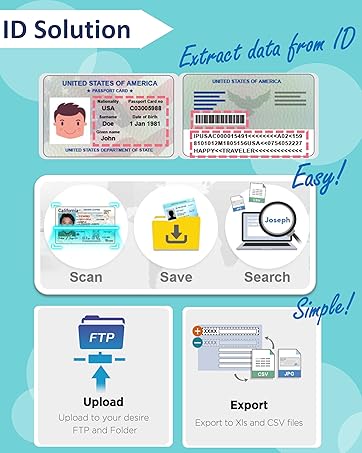
Figure 5.1: Plustek US-Based Customer Support
6. Specifikacije
Detailed technical specifications for the Plustek SmartOffice PS286 Plus Document Scanner:
| Specifikacija | Vrednost |
|---|---|
| Dimenzije izdelka | 14.2 x 9.9 x 11.8 palcev |
| Teža predmeta | 3.66 funtov |
| Ime modela | SmartOffice PS286 Plus |
| Vrsta optičnega bralnika | Dokument |
| Tehnologija povezljivosti | USB |
| Resolucija | 600 dpi (optično) |
| Wattage | 18 vatov |
| Velikost lista | A4, Letter, Legal |
| Barvna globina | 24 bazne točke |
| Hitrost skeniranja | 25 ppm (50 ipm duplex) at 200dpi, LTR |
| Dnevni delovni cikel | 1500 strani |
| Združljivost operacijskega sistema | Windows XP / Vista / 7 / 8 / 10, Mac 10.8.x ~ 10.14.x, Linux (SANE for Systems Integrator) |

Slika 6.1: Dimenzije skenerja
7. Informacije o garanciji
Plustek provides a limited warranty for the SmartOffice PS286 Plus scanner. The warranty period and terms may vary by region. Please refer to the warranty card included with your product or visit the official Plustek webza podrobne informacije o garanciji in postopkih registracije.
Račun shranite kot dokazilo o nakupu za uveljavljanje garancije.
Sorodni dokumentiSmartOffice PS286 Plus


Ask a question about this manual
Ask about setup, troubleshooting, compatibility, parts, safety, or missing instructions. Manuals+ will review the question and use this page’s manual context to help answer it.