
1. Uvod
Hvala za nakupasing Stagg 15-Watt Guitar Amplifier with Digital Reverb. This amplifier is designed to provide a versatile and reliable sound solution for guitar and double bass players. Please read this manual thoroughly to understand the features and proper operation of your new amplifier.
2. Varnostna navodila
- Te naprave ne izpostavljajte dežju ali vlagi.
- Ne blokirajte prezračevalnih odprtin.
- Prepričajte se, da napajalni kabel ni stisnjen ali preščipnjen.
- Odklopite amprešilnik med nevihtami ali kadar ga dalj časa ne uporabljate.
- Za vse servise se obrnite na usposobljeno servisno osebje.
3. Vsebina paketa
Preverite, ali so v vašem paketu priloženi vsi spodaj navedeni elementi:
- Stagg 15-Watt Guitar Amplifier (Model: 15 GA DR USA)
- Napajalni kabel
- Uporabniški priročnik (ta dokument)
4. Izdelek je končanviewKontrole in funkcije
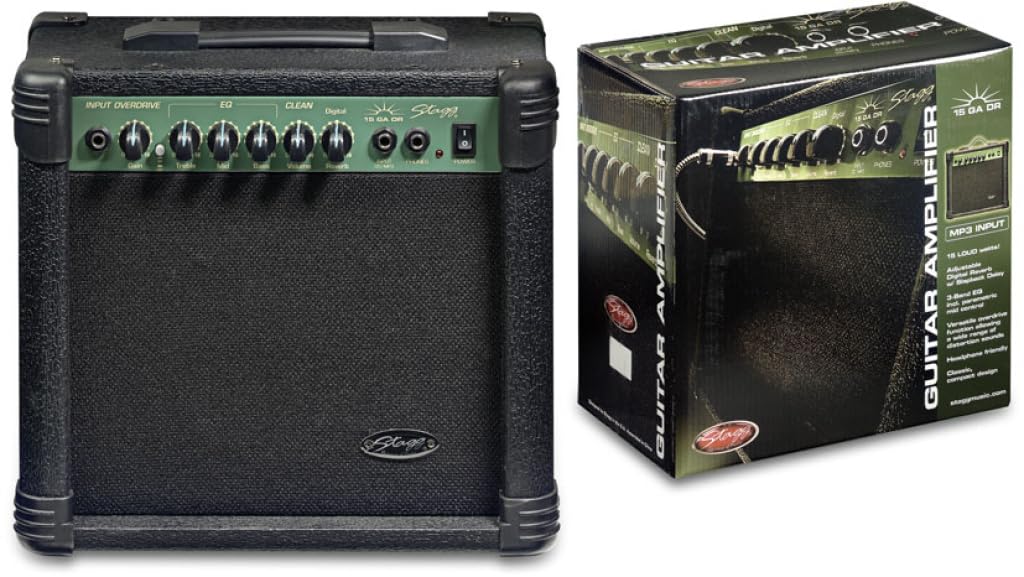
Figure 1: Front panel of the Stagg 15-Watt Guitar Amplifier. Shows input jack, control knobs, and switches.
Stagg 15-Watt Guitar Amplifier features a comprehensive set of controls for shaping your sound:
- Vhodni priključek: Tukaj priključite svojo kitaro ali drug instrument.
- Gain Control: Adjusts the input sensitivity and the amount of overdrive.
- Overdrive Switch: Engages the built-in distortion effect for versatile sounds.
- Nadzor glasnosti: Adjusts the overall output level of the amplifier.
- 3-pasovni izenačevalnik (bas, srednji toni, visoki toni): Allows for precise tonal shaping across low, mid, and high frequencies.
- Parametric Mid Control: Provides additional control over the mid-range frequencies for fine-tuning your sound.
- Digital Reverb: Adds a spacious, ambient effect to your sound.
- Izhod za slušalke: For silent practice. Connect standard stereo headphones.
- Stereo Jack Input (CD/MP3 Players): Connect external audio sources like CD or MP3 players for practice along.
5. Nastavitev
- Umestitev: Postavite ampIzparilnik postavite na stabilno, ravno površino. Zagotovite zadostno prezračevanje okoli enote.
- Napajalni priključek: Zagotovite amplifier's power switch is in the OFF position. Connect the supplied power cord to the amplifier's power input and then to a suitable AC power outlet.
- Priključek instrumenta: Connect your guitar or double bass to the Vhodni priključek using a standard 6.35mm instrument cable.
- Zunanji zvok (neobvezno): If desired, connect an external audio source (e.g., CD/MP3 player) to the Stereo Jack Input using an appropriate cable.
- Slušalke (neobvezno): Za tiho vadbo priključite slušalke na Izhod za slušalke. This will mute the ampgovornik življenjepisca.
6. Navodila za uporabo
- Vklop: Obrnite amplifier's power switch to the ON position. The power indicator light should illuminate.
- Začetne nastavitve:
- Nastavite Glasnost control to its minimum position.
- Nastavite Dobiček control to a low setting.
- Nastavite Bas, sredina, in Visoki toni EQ controls to their center (12 o'clock) positions.
- Zagotovite Overdrive Switch is disengaged for a clean sound.
- Adjusting Volume and Gain: Počasi povečajte Glasnost control to your desired listening level. Adjust the Dobiček control to achieve the desired amount of input sensitivity and clean tone. For distorted sounds, engage the Overdrive Switch and then adjust the Dobiček control to increase the distortion level.
- Oblikovanje tona: Uporabite Bas, sredina, in Visoki toni controls to adjust the amplifier's tonal characteristics. The Parametric Mid Control allows for more precise adjustments to the mid-range frequencies.
- Učinek odmeva: Prilagodite Digitalni odmev control to add depth and ambiance to your sound.
- Ugasniti: Before disconnecting any cables or moving the amplifier, turn the Glasnost control to minimum and then switch the power OFF.
7. Vzdrževanje
- Čiščenje: Za čiščenje uporabite mehko, suho krpo ampzunanjost čistilca. Ne uporabljajte abrazivnih čistil ali topil.
- Shranjevanje: Shranite ampShranjujte v suhem in hladnem okolju, stran od neposredne sončne svetlobe in ekstremnih temperatur.
- Prezračevanje: Prepričajte se, da so prezračevalne odprtine čiste od prahu in umazanije, da preprečite pregrevanje.
- Skrb za kabel: Regularly inspect power and instrument cables for damage. Replace any damaged cables immediately.
8. Odpravljanje težav
| Težava | Možen vzrok | rešitev |
|---|---|---|
| Brez zvoka |
|
|
| Distorted sound (unintended) |
|
|
| Brenčanje ali brenčanje |
|
|
9. Specifikacije
| Model | 15 GA DR USA |
| Izhodna vattage | 15 vatov |
| Dimenzije (D x Š x V) | 12.2 x 13.8 x 7.5 palcev |
| Teža predmeta | 13.9 funtov |
| Vrsta priključka | 6.35 mm vtičnica |
| Vir napajanja | Električni na kabel |
| Združljive naprave | Guitar, Double Bass |
10. Garancija in podpora
For warranty information and technical support, please refer to the warranty card included with your purchase or visit the official Stagg webspletnega mesta. Shranite dokazilo o nakupu za morebitne garancijske zahtevke.
Proizvajalec: Stagg
Webspletno mesto: www.staggmusic.com