
1. Izdelek je končanview
The Amazon Basics 7-Port USB 2.0 Hub Tower provides expanded connectivity for your computer, allowing you to connect multiple USB devices simultaneously. It features a compact design and includes a dedicated power adapter to ensure stable performance for all connected devices.

The Amazon Basics 7-Port USB 2.0 Hub Tower, showcasing its compact design and multiple USB ports.
Vsebina paketa:
- 1 x Amazon Basics 7-Port USB 2.0 Hub Tower
- 1 x 5V/4A napajalnik
- 1 x USB 2.0 Cable (3 feet)
- 1 x Uporabniški priročnik (ta dokument)
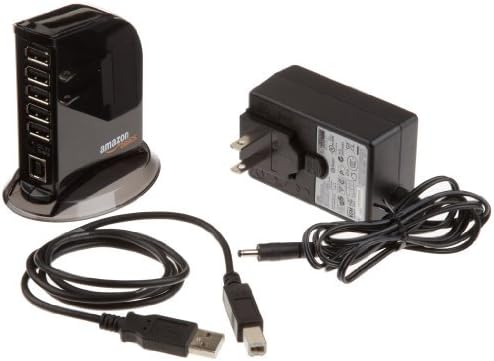
The package includes the 7-Port USB 2.0 Hub, a 5V/4A power adapter, and a USB 2.0 cable.
2. Navodila za nastavitev
The Amazon Basics 7-Port USB 2.0 Hub is designed for plug-and-play installation, requiring no additional drivers for most operating systems.
Koraki povezave:
- Connect the provided 5V/4A Power Adapter to the DC 5V input port on the back of the USB hub. Plug the power adapter into a standard electrical outlet.
- Connect one end of the included USB 2.0 cable to the USB Type B input port on the back of the hub.
- Connect the other end of the USB 2.0 cable (USB Type A) to an available USB port on your computer (laptop or desktop).
- Ko je vozlišče priključeno, se bo prižgala indikatorska lučka, kar pomeni, da je vklopljeno in pripravljeno za uporabo.
- You can now connect your USB devices to the available USB Type A ports on the hub.

A visual guide demonstrating the connection of the USB hub to a computer via a USB Type B input, and the connection of various devices like flash drives, external HDDs, keyboards, mice, tablets, and smartphones to the USB Type A output ports.
3. Navodila za uporabo
The Amazon Basics 7-Port USB 2.0 Hub is designed to extend your computer's USB connectivity and provide power to connected devices.
Funkcionalnost vrat USB:
- Standardna vrata USB: The hub features 5 standard USB 2.0 ports, each providing a maximum output of 500mA. These ports are suitable for connecting peripherals such as keyboards, mice, flash drives, and other low-power devices.
- Vrata za hitro polnjenje: Two dedicated USB ports are available for fast charging, each offering a maximum output of 1.5A. These ports are ideal for charging smartphones, tablets, and other devices that require higher current.
- Skupna izhodna moč: The hub's power adapter provides a total output of 20W (5V/4A) across all 7 ports. For optimal performance and to ensure sufficient power delivery to all connected devices, especially high-power devices, always use the included power adapter.
- Prenos podatkov: The hub supports data transfer speeds of up to 480Mbps, compliant with USB 2.0 specifications and backward compatible with USB 1.1.
Pomembni premisleki:
- When charging devices, verify their loading current requirements. Insufficient current may result in slow charging or device malfunction.
- For high-power devices like external hard drives, ensure the power adapter is connected to prevent operational issues.

The USB hub in operation, with several USB devices connected, illustrating its use as an expansion port for a computer.
4. Vzdrževanje
To ensure the longevity and optimal performance of your Amazon Basics 7-Port USB 2.0 Hub, follow these simple maintenance guidelines:
- Pesto vzdržujte čistočo tako, da ga obrišete z mehko, suho krpo. Izogibajte se uporabi agresivnih kemikalij ali abrazivnih čistil.
- Ensure the hub is placed in a well-ventilated area to prevent overheating.
- Avoid exposing the hub to moisture, extreme temperatures, or direct sunlight.
- Handle the USB cables and ports gently to prevent damage.
5. Odpravljanje težav
If you encounter issues with your Amazon Basics 7-Port USB 2.0 Hub, refer to the following troubleshooting tips:
Device Not Recognized or Working Slowly:
- Preverite napajalno povezavo: Ensure the 5V/4A power adapter is securely connected to the hub and a working electrical outlet. The hub's indicator light should be on.
- Preverite kabel USB: Ensure the USB 2.0 cable connecting the hub to your computer is securely plugged in at both ends. Try using a different USB port on your computer or a different USB cable if available.
- Nezadostna moč: High-power devices (e.g., external hard drives, some tablets) require more power. Always use the included power adapter. If multiple high-power devices are connected, try disconnecting some to see if performance improves.
- Težave z gonilniki: The hub is plug-and-play. If a device connected to the hub is not working, the issue might be with the device's specific drivers, not the hub itself. Ensure your computer's USB drivers are up to date.
- Port Specificity: Remember that the two front ports are designed for fast charging (1.5A), while the five side ports are standard (500mA). Ensure you are using the appropriate port for your device's needs.
Hub Indicator Light Not On:
- Ensure the power adapter is correctly connected and the electrical outlet is functional.
- Check for any visible damage to the power adapter or its cable.
6. Specifikacije
| Funkcija | Specifikacija |
|---|---|
| Znamka | Osnove Amazona |
| Številka modela | HU2W70E1 |
| Število vrat USB 2.0 | 7 |
| Standard USB Port Output | 500mA per port (5 ports) |
| Fast Charging Port Output | 1.5A per port (2 ports) |
| Skupna izhodna moč | 20W (5V/4A) |
| Hitrost prenosa podatkov | Do 480Mbps |
| Skladnost USB | USB 2.0 (združljiv nazaj z USB 1.1) |
| Združljivost operacijskega sistema | Windows Vista and newer (Plug-and-Play) |
| Teža predmeta | 7.1 unč |
| Dimenzije izdelka (DxŠxV) | 3.53 x 2.35 x 3.55 palcev |
| barva | Črna |
7. Garancija in podpora
Informacije o garanciji:
This Amazon Basics product is covered by a standard warranty. For detailed information regarding warranty terms, conditions, and duration, please refer to the official Amazon Basics webspletnem mestu ali garancijskem listu, ki je bil priložen nakupu.
Podpora strankam:
For technical assistance, troubleshooting, or any other inquiries regarding your Amazon Basics 7-Port USB 2.0 Hub Tower, please visit the Amazon Basics support page on the official Amazon website. You can find FAQs, contact information, and additional resources there.
Spletni viri: Osnovna trgovina Amazon