
Uvod
This manual provides detailed instructions for the operation and maintenance of your Garmin GPSMAP 78sc 2.6-Inch Waterproof Marine GPS and Chartplotter. The GPSMAP 78sc series is designed for recreational navigation, featuring a bright 2.6-inch LCD color display, built-in basemap, and a high-sensitivity GPS receiver. All models are waterproof to IPX7 standards and float in water, making them suitable for boating and watersports. Key features include a built-in microSD card slot for additional maps and a dedicated Man Over Board (MOB) button.
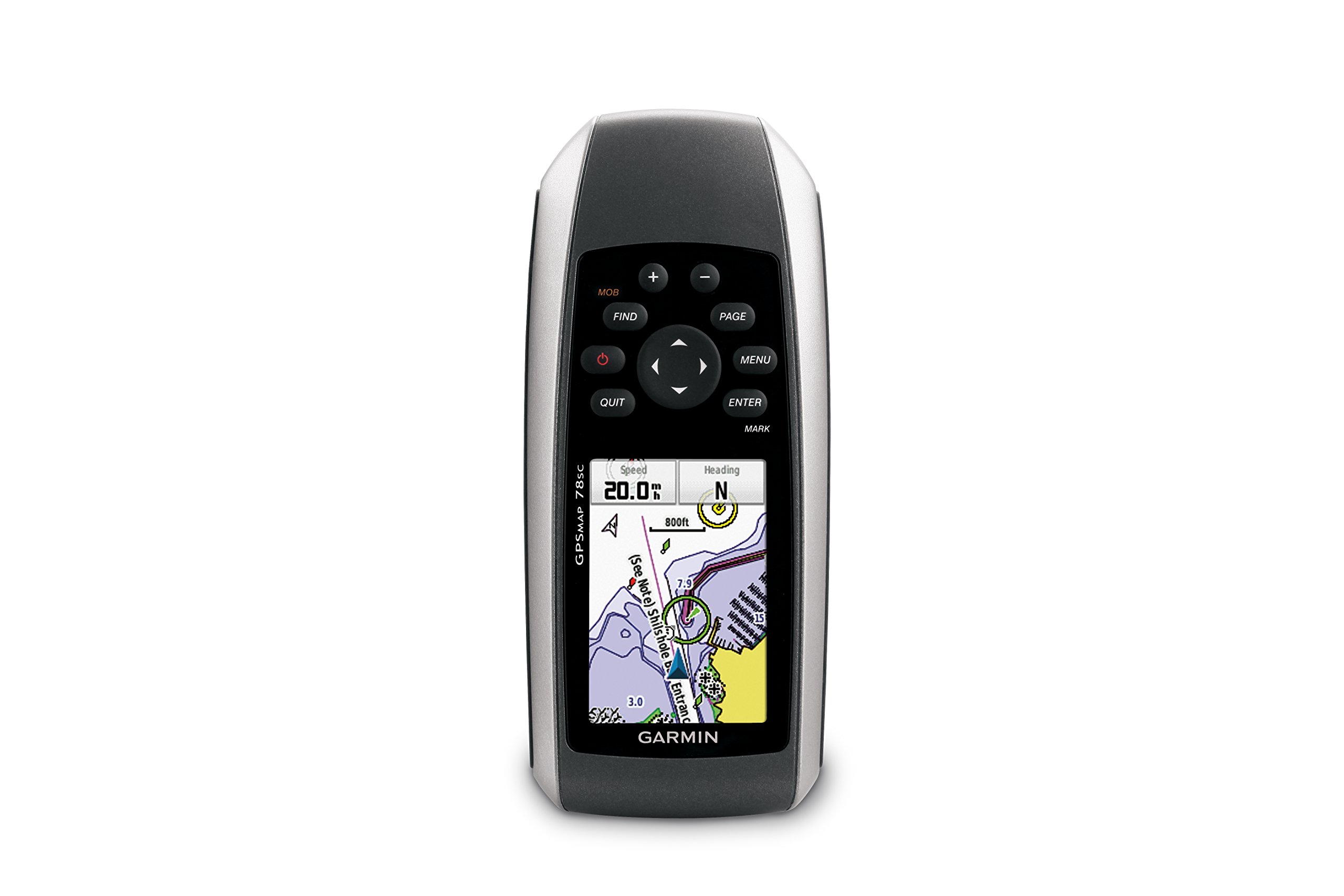
Slika 1: Spredaj view of the Garmin GPSMAP 78sc handheld marine GPS and chartplotter.
Konec izdelkaview
Ključne značilnosti:
- Marine-friendly handheld with high-sensitivity GPS receiver and 2.6-inch color TFT display.
- Waterproof to IPX7 standards; floats in water.
- Built-in BlueChart g2 U.S./Bahamas coastal charts with shorelines, depth contours, navaids, harbors, marinas, and more.
- Built-in 3-axis tilt-compensated electronic compass and barometric altimeter for heading, altitude, and weather information.
- Wireless sharing of waypoints, tracks, routes, and geocaches with other compatible devices.
Kaj je v škatli:
- GPSMAP 78sc device
- Zapestni trak
- USB kabel
- Priročnik

Slika 2: Pod kotom view of the Garmin GPSMAP 78sc, highlighting its button interface.
Video posnetki izdelkov:
Garmin GPSmap 78 handheld GPS Overview
Ta videoposnetek ponuja splošen pregledview of the Garmin GPSMAP 78 handheld GPS, demonstrating its features and design.
Konec izdelkaview Video
A concise product overview video from the seller, highlighting key aspects of the device.
Nastavitev
1. Namestitev baterij:
The GPSMAP 78sc operates on two AA batteries (not included). To install:
- Poiščite pokrov predalčka za baterije na zadnji strani naprave.
- Za odklepanje in odstranitev pokrova zavrtite D-obroč v nasprotni smeri urinega kazalca.
- Vstavite dve bateriji AA in pazite na pravilno polarnost (+ in -).
- Namestite pokrov in zavrtite D-obroč v smeri urinega kazalca, da ga pritrdite.

Slika 3: Zadaj view of the Garmin GPSMAP 78sc, illustrating the battery compartment.
2. Vklop/izklop:
Pritisnite in držite Moč button (located on the left side) to turn the device on or off. A short press will adjust the backlight.
3. Začetne nastavitve:
Upon first use, the device may prompt you to set language, time zone, and other preferences. Follow the on-screen instructions using the directional pad and ENTER gumb.
Delovanje
Navigation Basics:
- Glavni meni: Pritisnite MENI button twice to access the main menu.
- Gumb strani: Pritisnite STRAN to cycle through the main pages (Map, Compass, Trip Computer, etc.).
- Usmerjevalna ploščica: Use the directional pad to scroll through menus, pan the map, or adjust settings.
- Gumb ENTER: Pritisnite ENTER to select an item or confirm an action.
- Gumb IZHOD: Pritisnite ODNEHAJ to return to the previous page or cancel an action.
Ustvarjanje smernih točk:
To mark your current location as a waypoint:
- Pritisnite MARK gumb.
- Edit the waypoint name, symbol, and coordinates if desired.
- Izberite Končano or Shrani to store the waypoint.
Man Over Board (MOB) Function:
V nujnih primerih pritisnite MOB button to immediately mark the current location and initiate navigation back to that point. This feature is critical for safety in marine environments.
Vzdrževanje
Čiščenje naprave:
Napravo obrišite s krpo dampened with a mild detergent solution. Dry thoroughly. Avoid using abrasive cleaners or solvents that could damage the device's finish or screen.
Vzdrževanje baterije:
Always use fresh, high-quality AA batteries. If the device will not be used for an extended period, remove the batteries to prevent leakage and corrosion.
Posodobitve programske opreme:
Občasno preverite Garmin website for software updates to ensure optimal performance and access to the latest features. Updates can typically be installed by connecting the device to a computer via the USB cable.
Odpravljanje težav
Naprava se ne vklopi:
- Prepričajte se, da so baterije pravilno nameščene in popolnoma napolnjene.
- Try new batteries.
- Preverite kontakte baterije glede korozije.
Slab GPS signal:
- Prepričajte se, da ima naprava čisto view neba.
- Avoid areas with tall buildings, dense foliage, or other obstructions.
- Allow sufficient time for the device to acquire satellites, especially after being off for a long period.
Zaslon se ne odziva:
- Izvedite mehko ponastavitev tako, da odstranite in ponovno vstavite baterije.
- Prepričajte se, da je zaslon čist in brez umazanije.
Specifikacije
| Funkcija | Podrobnost |
|---|---|
| Znamka | Garmin |
| Ime modela | gps zemljevid |
| Številka modela | 010-00864-02 |
| Velikost zaslona | 2.6 palcev |
| Vrsta zaslona | LCD |
| Resolucija | 160 x 240 slikovnih pik |
| Ocena vodotesnosti | IPX7 (floats) |
| Življenjska doba baterije | 20 uri (običajno) |
| Vrsta baterije | 2 AA baterije (niso vključene) |
| Zmogljivost pomnilnika | 1 GB |
| Compatible Flash Memory Type | microSD |
| Podprti satelitski navigacijski sistem | GPS |
| Posebne lastnosti | Rugged case, Barometric altimeter, Garmin Connect compatible, Electromagnetic compass, Garmin HotFix, Custom POIs, Automatic routing, Hunt/fish calendar, Geocaching, Photo navigation |
| Dimenzije artikla D x Š x V | 2.6 cm D x 1.2 cm Š x 6 cm V |
| Teža predmeta | 7.7 unč |
Garancija in podpora
The Garmin GPSMAP 78sc comes with a 1 Year Limited Warranty. For detailed warranty information, product support, or service inquiries, please refer to the official Garmin website or contact Garmin customer service directly. The included manual also contains contact information and further support resources.