
Uvod
Hvala za nakupasing the Optimus F-1760 16-inch Wave Oscillating Stand Fan. This manual provides important information regarding the safe operation, assembly, maintenance, and troubleshooting of your fan. Please read these instructions thoroughly before use and retain them for future reference.

Image: The Optimus F-1760 stand fan positioned in a bedroom, showcasing its design and size relative to furniture.
Pomembna varnostna navodila
Pri uporabi električnih naprav je treba vedno upoštevati osnovne previdnostne ukrepe, da zmanjšate tveganje požara, električnega udara in poškodb oseb, vključno z naslednjimi:
- Pred uporabo tega ventilatorja preberite vsa navodila.
- Ventilator uporabljajte samo tako, kot je opisano v tem priročniku. Druga uporaba, ki ni priporočena, lahko povzroči požar, električni udar ali poškodbe oseb.
- Za zaščito pred električnim udarom ventilatorja ne postavljajte v okno, ne potapljajte enote, vtiča ali kabla v vodo in jih ne pršite s tekočinami.
- Potreben je natančen nadzor, kadar katero koli napravo uporabljajo otroci ali v njeni bližini.
- Unplug fan from outlet when not in use, when moving fan from one location to another, and before cleaning.
- Do not operate fan in the presence of explosive and/or flammable fumes.
- Ne postavljajte ventilatorja ali katerega koli dela v bližini odprtega ognja, kuhalne ali druge grelne naprave.
- Do not operate fan with a damaged cord or plug, or after the fan malfunctions or has been dropped or damaged in any manner.
- Izogibajte se stiku z gibljivimi deli.
- Za odklop primite vtič in ga izvlecite iz stenske vtičnice. Nikoli ne vlecite za kabel.
- Vedno uporabljajte na suhi, ravni površini.
- Ne obešajte ali montirajte ventilatorja na steno ali strop.
- Ne uporabljajte, če ventilatorske rešetke niso pravilno nameščene.
- This product employs overload protection (fuse). A blown fuse indicates an overload or short-circuit situation. If the fuse blows, unplug the product from the outlet. Replace the fuse as per the servicing instructions (follow product marking for proper fuse rating) and check the product. If the replacement fuse blows, a short-circuit may be present and the product should be discarded or returned to an authorized service facility for examination and/or repair.
Postavitev in montaža
The Optimus F-1760 fan requires minimal assembly. Ensure all components are present and undamaged before proceeding.
- Osnovni sklop: Attach the weighted base legs to the main pole. Ensure they are securely fastened to provide stability. The base is designed to be sturdy, with weights at the ends of the feet.
- Nastavitev višine: The fan's height can be adjusted. Loosen the height adjustment knob on the pole, extend or retract the pole to the desired height, and then securely tighten the knob.
- Nastavek za glavo ventilatorja: Ensure the fan head is securely attached to the top of the pole. The motor housing and fan blade are plastic, while the grill is metal.
- Umestitev: Place the fan on a dry, level surface. Ensure there is adequate space around the fan for proper air circulation and oscillation.
Navodila za uporabo
The Optimus F-1760 fan offers multiple control options and features for customized comfort.
Nadzorna plošča
The fan features a 4-position push-button switch on the pole for basic operation.
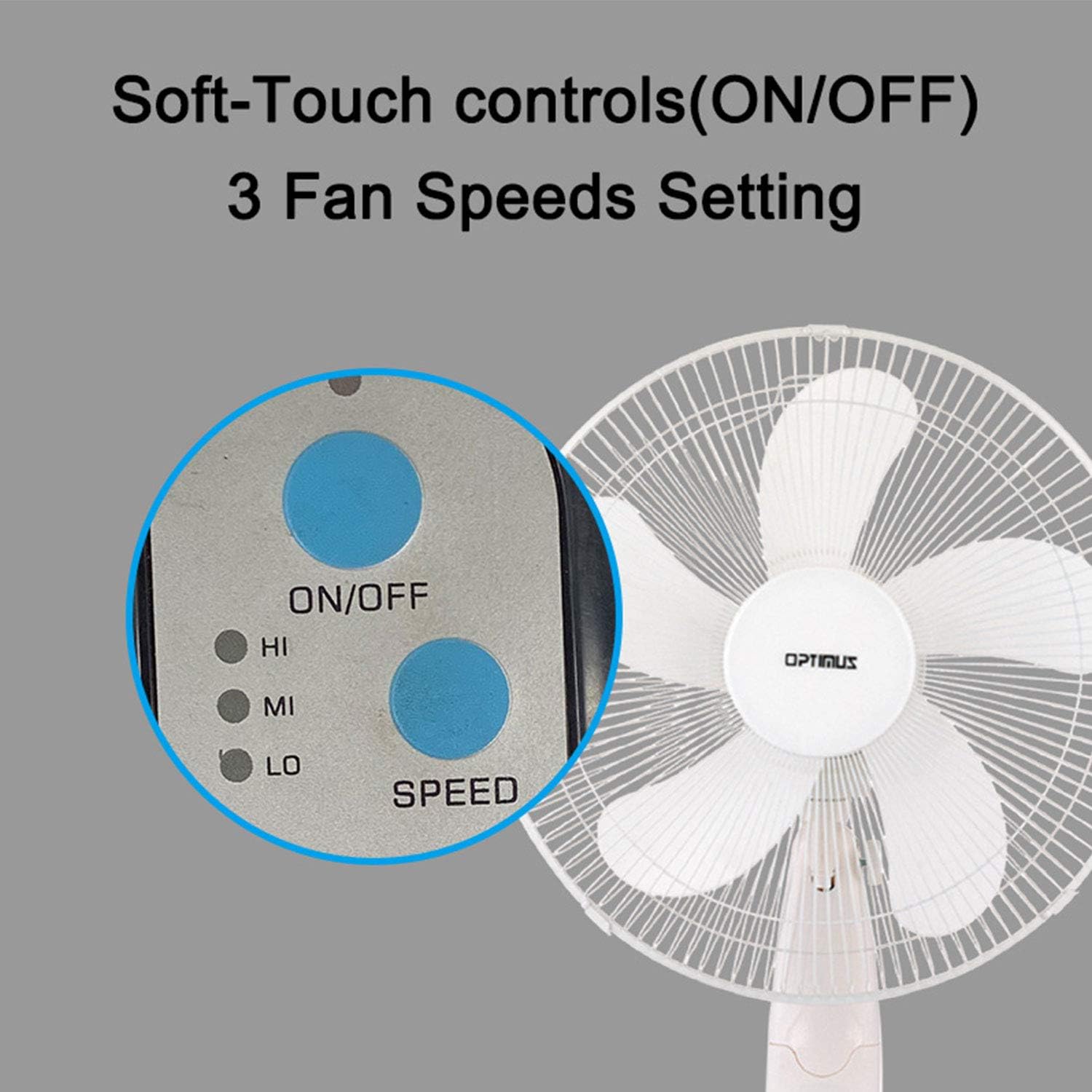
Image: The fan's soft-touch control panel, showing buttons for ON/OFF and SPEED, with indicators for High (HI), Medium (MI), and Low (LO) fan speeds.
- VKLOP/IZKLOP: Pritisnite za vklop ali izklop ventilatorja.
- Nastavitve hitrosti: Select from Low, Medium, or High speeds. The 3-speed, energy-saving, whisper-quiet operation motor provides efficient airflow.
Daljinski upravljalnik
The fan comes with a remote control for convenient operation from a distance. (Batteries not included).

Image: The remote control for the fan, featuring buttons for Mode, Time, Speed, and ON/OFF functions.
- VKLOP/IZKLOP: Vklopi ali izklopi ventilator.
- HITROST: Cycles through the three fan speeds (Low, Medium, High).
- NAVODILA: Selects between different wind modes.
- ČAS: Activates and sets the shut-off timer.
Načini vetra
The fan offers three distinct wind modes to suit your preference:

Image: The fan's control panel highlighting the MODE button and indicators for Normal, Natural, and Sleep wind modes.
- Normalni način: The fan blows at a constant speed based on your selected setting.
- Naravni način: The fan speed fluctuates to mimic a natural breeze.
- Spanje: The fan operates at a lower, quieter speed, ideal for sleeping, with gentle speed variations.
Nihanje
The F-1760 features unique wave oscillation for comprehensive air distribution.

Image: A diagram illustrating the fan's capability for both vertical (up/down) and horizontal (left/right) wave oscillation, providing wider air coverage.
- Up/Down & Left/Right Wave Oscillating: Activates a unique oscillation pattern that moves the fan head both horizontally and vertically, distributing air throughout the room.
- Za ustavitev nihanja ponovno pritisnite gumb za nihanje.
Funkcija časovnika
Nastavite ventilator, da se po določenem času samodejno izklopi.

Image: The fan's control panel showing the TIME button and indicators for 1 hour (1H), 2 hours (2H), and 4 hours (4H) timer settings. The fan can be programmed for up to 7 hours.
- The timer can be set for 1, 2, 4, or up to 7 hours. Press the TIME button repeatedly to cycle through the desired duration.
Vzdrževanje in čiščenje
Redno čiščenje pomaga ohranjati delovanje ventilatorja in podaljšuje njegovo življenjsko dobo.
- Pred čiščenjem: Always unplug the fan from the electrical outlet before cleaning.
- Čiščenje zunanjosti: Uporabite mehko, damp krpo za brisanje zunanjih površin ventilatorja. Ne uporabljajte abrazivnih čistil ali topil.
- Čiščenje žara: The metal grill can be cleaned with a soft brush or vacuum cleaner to remove dust. For thorough cleaning, the grill may need to be carefully removed.
- Čiščenje rezila: If necessary, the fan blades can be cleaned. Ensure the fan is completely off and unplugged. The care instructions specify "Hand Wash" for components.
- Shranjevanje: Ko ventilatorja dalj časa ne uporabljate, ga shranite na hladnem in suhem mestu, po možnosti v originalni embalaži.
Odpravljanje težav
| Težava | Možen vzrok | rešitev |
|---|---|---|
| Ventilator se ne vklopi. | No power supply. Blown fuse. | Ensure the fan is plugged into a working outlet. Check the fuse in the plug and replace if necessary (refer to safety instructions for fuse replacement). |
| Fan operates but air movement is weak. | Low speed setting. Dust accumulation on blades/grill. | Povečajte hitrost ventilatorja. Očistite lopatice in rešetke ventilatorja v skladu z navodili za vzdrževanje. |
| Daljinski upravljalnik ne deluje. | Dead batteries. Obstruction between remote and fan. | Replace batteries in the remote control. Ensure a clear line of sight between the remote and the fan's receiver. |
| Fan changes speed automatically or unexpectedly. | Interference from other remote controls (e.g., TV remote). | This fan may respond to frequencies from other remote controls. Try operating the fan manually or repositioning the fan/other devices to minimize interference. |
| Fan makes clicking noises during oscillation. | Normal operation of oscillation gears. | A slight clicking noise from the oscillation gears can occur during normal operation. If the noise is excessive or new, ensure the fan head is securely attached. |
| Fan feels unstable. | Base not properly assembled or tightened. Uneven surface. | Ensure all base components are securely fastened and the fan is placed on a firm, level surface. |
Specifikacije
- Ime modela: F-1760
- Znamka: Optimus
- Premer ventilatorja: 16 palcev
- Zasnova električnega ventilatorja: Talni ventilator
- vir energije: Električni na kabel
- Wattage: 60 vatov
- voltage: 6 volta
- Število rezil: 3
- Nastavitve hitrosti: 3 vrtljaji na minuto (nizko, srednje, visoko)
- Nadzorna metoda: Daljinski upravljalnik, gumb
- Posebne lastnosti: Up/Down & Left/Right Wave Oscillating, Adjustable Height, Timer Function (up to 7 hours), Wind Modes (Normal, Natural, Sleep)
- Notranja/zunanja uporaba: Notranja
- Teža artikla: 9.9 funtov
- Vključene komponente: Izdelek, priročnik
Informacije o garanciji
This Optimus F-1760 fan comes with a 1-letna omejena garancija from the date of purchase. This warranty covers defects in materials and workmanship under normal use. It does not cover damage resulting from misuse, accident, alteration, or unauthorized repair. Please retain your proof of purchase for warranty claims.
Podpora uporabnikom
For technical assistance, warranty claims, or questions regarding your Optimus F-1760 fan, please contact Optimus customer service. Refer to the product packaging or the official Optimus webspletno mesto za najnovejše kontaktne podatke.