
Klip Xtreme KES-390
Klip Xtreme KES-390 Stereo Speakers 2.0 User Manual
Model: KES-390
1. Uvod
Hvala za nakupasing the Klip Xtreme KES-390 2.0 Stereo Speakers. These speakers are designed to provide a true stereo audio experience, offering flexibility in positioning each unit to optimize sound delivery. Please read this manual carefully to ensure proper setup, operation, and maintenance of your new speakers.
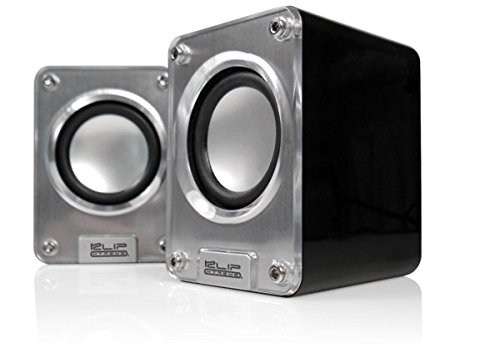
Image: Klip Xtreme KES-390 2.0 Stereo Speakers. The image shows two compact silver and black speakers positioned in front of a black laptop, highlighting their desktop use.
2. Vsebina paketa
Prepričajte se, da so v paketu prisotni vsi elementi:
- Klip Xtreme KES-390 2.0 Stereo Speakers (2 units)
- USB napajalni kabel
- 3.5 mm avdio kabel
- Uporabniški priročnik
3. Značilnosti izdelka
- 2.0 Channel Stereo Speakers
- USB Powered for convenience
- High-quality stereophonic sound
- 3.5mm audio input for versatile connectivity
- Kompakten in prenosen dizajn
- Audio playback via USB and SD
4. Navodila za nastavitev
- Postavitev zvočnikov: Place the two speaker units on a stable, flat surface. For optimal stereo separation, position them equidistant from your listening position.
- Priključna moč: Connect the USB power cable from one of the speakers to an available USB port on your computer, laptop, or a USB wall adapter (not included). The speakers will power on automatically.
- Priključitev avdio vira:
- Via 3.5mm Audio Cable: Connect one end of the included 3.5mm audio cable to the audio input jack on the speaker (usually marked "Audio In" or with a headphone icon). Connect the other end to the audio output jack of your device (e.g., computer, smartphone, MP3 player).
- Via USB/SD Card: Insert your USB flash drive or SD card into the designated slot on the speaker. The speaker should automatically detect and begin playing audio files. Refer to the operating instructions for specific playback controls.
- Prilagoditev glasnosti: Adjust the volume using the volume control knob on the speaker or through your connected audio device.
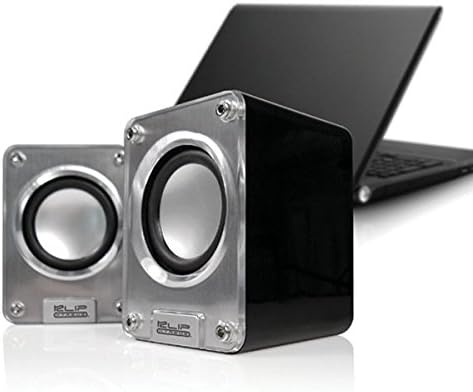
Slika: Bližnji posnetek view of the two Klip Xtreme KES-390 speakers, showing their silver speaker cones and black casing, ready for connection.
5. Navodila za uporabo
5.1 Vklop/izklop
The speakers are powered on automatically when connected to a USB power source. Disconnect the USB cable to power them off.
5.2 Nadzor glasnosti
Locate the volume control knob on one of the speaker units. Rotate it clockwise to increase the volume and counter-clockwise to decrease it. You can also control the volume from your connected audio device.
5.3 Audio Playback (3.5mm Input)
Once the 3.5mm audio cable is connected to your device, ensure your device's volume is turned up and playback is initiated. The sound will be output through the speakers.
5.4 Predvajanje z USB-ja/SD-kartic
Insert the USB drive or SD card into the corresponding slot. The speakers should automatically detect and play compatible audio files. Use the integrated controls (if available) on the speaker to navigate tracks or adjust playback settings.
6. Vzdrževanje
- Čiščenje: Use a soft, dry cloth to clean the speaker surfaces. Do not use liquid cleaners or abrasive materials, as they may damage the finish.
- Shranjevanje: Ko zvočnikov dalj časa ne uporabljate, jih shranite na hladnem in suhem mestu, stran od neposredne sončne svetlobe in ekstremnih temperatur.
- Ravnanje: Pazite, da vam zvočniki ne padejo na tla ali da jih ne izpostavljate močnim udarcem.
7. Odpravljanje težav
| Težava | Možen vzrok | rešitev |
|---|---|---|
| Brez zvoka |
|
|
| Popačen zvok |
|
|
| Speakers not recognized (USB/SD playback) |
|
|
8. Specifikacije
| Funkcija | Podrobnost |
|---|---|
| Znamka | Klip Xtreme |
| Model | KES-390 |
| Vrsta zvočnika | 2.0 Channel Stereo Speakers |
| Tehnologija povezljivosti | USB (for power), 3.5mm Audio Jack (for input), USB/SD Card (for playback) |
| Največja izhodna moč zvočnika | 48 vatov |
| Vir napajanja | Napajanje USB |
| Vrsta namestitve | Namizni nosilec |
| Material | Akril |
| barva | Srebrna |
| Teža predmeta | 453 gramov |
| UPC | 798304071054 |
| ASIN | B002KXZD02 |
9. Garancija in podpora
For warranty information, please refer to the warranty card included with your product or contact your retailer. For technical support or service inquiries, please visit the official Klip Xtreme webali se obrnite na njihov oddelek za pomoč uporabnikom.
Povezani dokumenti - KES-390
 |
Uporabniški priročnik za pametno stikalo Zemismart Zigbee Uporabniški priročnik za pametno stikalo Zemismart Zigbee (serija KES-606US), ki podrobno opisuje specifikacije izdelka, namestitev, ožičenje, povezovanje z vozlišči Zigbee in funkcije upravljanja prek aplikacije Tuya ali Smart Life. |
 |
Zemismart Zigbee Smart Switch KES-606US User Manual and Installation Guide Comprehensive user manual and installation guide for the Zemismart Zigbee Smart Switch (Model KES-606US series). Learn about product specifications, wiring, pairing, app integration with Tuya/Smart Life, and advanced settings for smart home automation. |
 |
Omejena enoletna garancija KES in navodila za namestitev steklene police Ta dokument opisuje enoletno omejeno garancijo za izdelke KES in vsebuje podrobna navodila za namestitev steklenih polic KES, vključno z varnostnimi opozorili in kontaktnimi podatki za podporo. |
 |
Navodila za namestitev prostostoječega stojala za brisače KES BTH217 Uradni priročnik za namestitev prostostoječega stojala za brisače KES BTH217. Vsebuje podrobna navodila za sestavljanje, sezname komponent in informacije o garanciji za ta domači dodatek. |
 |
Servisni priročnik za VHF FM oddajnik/sprejemnik Kenwood TK-7302 This service manual provides comprehensive technical information for the Kenwood TK-7302 VHF FM Transceiver, including installation, system setup, disassembly for repair, circuit descriptions, parts lists, and specifications, intended for experienced technicians. |
 |
Uporabniški priročnik in dodatna oprema za sistem časovnika zvočnikov DSAN Limitimer Obsežen vodnik za sistem časovnikov za zvočnike DSAN Limitimer, ki zajema dodatno opremo, nastavitev, uporabo programa, globalne nastavitve, brezžično delovanje in konfiguracijo signalnih luči za debate, tekmovanja in predstavitve. |
Ask a question about this manual
Ask about setup, troubleshooting, compatibility, parts, safety, or missing instructions. Manuals+ will review the question and use this page’s manual context to help answer it.