
Uvod
This manual provides comprehensive instructions for the safe and efficient operation of your Memorex MVDP1078 Portable DVD Player. Designed for both home and travel, this device features an 8-inch widescreen TFT LCD display and supports various disc formats including DVD, CD, MP3 CD, and Picture CD. Please read this manual thoroughly before using the player and retain it for future reference.
Lastnosti izdelka
- 8-inch widescreen TFT LCD display for clear viewing.
- Compatible with DVD, DVD+R/RW, DVD-R/RW, CD-R/RW, CD+R/RW, MP3 CD, and Picture CD formats.
- Built-in stereo speakers for audio playback.
- On-screen graphical user interface for easy navigation.
- Anti-shock protection ensures smooth DVD playback during movement.
- Zoom function for detailed viewing.
- Rechargeable Lithium-Ion battery pack providing up to 2 hours of playback.
- Includes wireless remote control for convenient operation.
- Priključek za slušalke za zasebno poslušanje.
- AC/DC Adaptor for home and car use.
Vsebina paketa
Preverite, ali so v paketu prisotni vsi elementi:
- Memorex MVDP1078 Portable DVD Player
- Brezžični daljinski upravljalnik
- AC/DC napajalnik
- Car Power Adapter (DC)
- Audio/Video (AV) Cable
- Uporabniški priročnik
Nastavitev
1. Polnjenje baterije
Before initial use, fully charge the built-in Lithium-Ion battery. Connect the AC/DC power adapter to the DC IN 9V port on the player and plug the other end into a standard wall outlet. The charging indicator light will illuminate. A full charge typically takes approximately 3-4 hours and provides up to 2 hours of playback.
2. Priključitev na napajanje
For continuous operation or to charge the battery, use the provided AC/DC adapter. For in-car use, connect the car power adapter to the DC IN 9V port and the vehicle's 12V power outlet.
3. External Connections (Optional)
To connect the player to an external display or audio system, use the supplied AV cable. Connect one end to the AV OUT port on the player and the other end to the corresponding AV IN ports on your television or audio receiver.
Navodila za uporabo
1. Vklop/izklop
Potisnite MOČ preklopite na ON position to turn on the player. The screen will illuminate. To turn off, slide the switch to the IZKLOP položaj.
2. Inserting and Removing Discs
- Nežno odprite pokrov predalčka za disk.
- Place a disc onto the spindle with the label side facing up. Ensure the disc is securely seated.
- Close the disc compartment cover until it clicks into place.
- To remove a disc, open the cover, gently press the center spindle, and lift the disc.
3. Osnovni gumbi za predvajanje
- PREDVAJANJE/PAVZA (►/−): Press to start or pause playback.
- STOP (■): Press once to stop playback temporarily, press twice to stop completely and return to the disc menu.
- PRESKOČI (◀◀ / ►►): Press to skip to the previous or next track/chapter.
- FAST FORWARD/REWIND (►►► / ◀◀◀): Press and hold to fast forward or rewind through content.
4. Navigacija po meniju
Uporabite SMERNE PUŠČICE (Up, Down, Left, Right) and ENTER button on the player or remote to navigate disc menus and settings.
5. Prilagoditev glasnosti
Glasnost prilagodite s tipko GLASNOST +/- buttons on the player or remote control.
6. Uporaba slušalk
Priključite standardne 3.5 mm slušalke v SLUŠALKE jack for private listening. The built-in speakers will automatically mute.
7. Funkcija povečave
During DVD playback, press the POVEČAVAJ button on the remote to cycle through different zoom levels. Use directional arrows to move the zoomed area.
Vzdrževanje
1. Čiščenje enote
Wipe the exterior of the player with a soft, dry cloth. Do not use liquid cleaners or abrasive materials. Keep the disc compartment free of dust and debris.
2. Skrb za baterijo
To prolong battery life, avoid fully discharging the battery frequently. Recharge the battery regularly, even if the player is not in use for extended periods. Store the player in a cool, dry place.
3. Nega diska
Handle discs by their edges. Store discs in their cases to prevent scratches. Clean dirty discs with a soft, lint-free cloth, wiping from the center outwards.
Odpravljanje težav
Če imate težave s predvajalnikom, si oglejte naslednje pogoste težave in rešitve:
| Težava | Možen vzrok/rešitev |
|---|---|
| Predvajalnik se ne vklopi. |
|
| Disc does not play / "No Disc" error. |
|
| Ni zvoka ali nizka glasnost. |
|
| Poor picture quality or distorted image. |
|
Specifikacije
| Blagovna znamka | Memorex |
| Številka modela | MVDP1085 |
| Dimenzije izdelka | 5.8 x 12.5 x 10.3 palcev |
| Teža predmeta | 1 funtov |
| Velikost zaslona | 8-inch widescreen TFT LCD (diagonal) |
| Podprti formati diskov | DVD, DVD+R/RW, DVD-R/RW, CD-R/RW, CD+R/RW, MP3 CD, Picture CD |
| Vrsta baterije | Akumulatorska litij-ionska |
| Življenjska doba baterije | Do 2 ur |
| barva | Črna |
Garancija in podpora
Memorex products are designed for reliability and performance. For warranty information and technical support, please refer to the warranty card included with your product or visit the official Memorex webspletnega mesta. Račun shranite kot dokazilo o nakupu za uveljavljanje garancije.
Konec izdelkaview
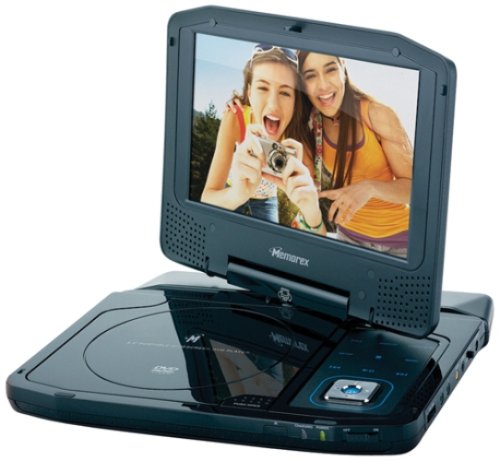
Image: The Memorex MVDP1078 Portable DVD Player shown with its 8-inch screen open, displaying the disc compartment and control buttons. The player is black with a sleek finish.


