
1. Uvod
Thank you for choosing the TFA Dostmann Digital Weather Station 35.1065. This device provides accurate indoor temperature, humidity, time, date, and a weather trend forecast. Please read this manual carefully before using the device to ensure proper operation and to prevent damage.
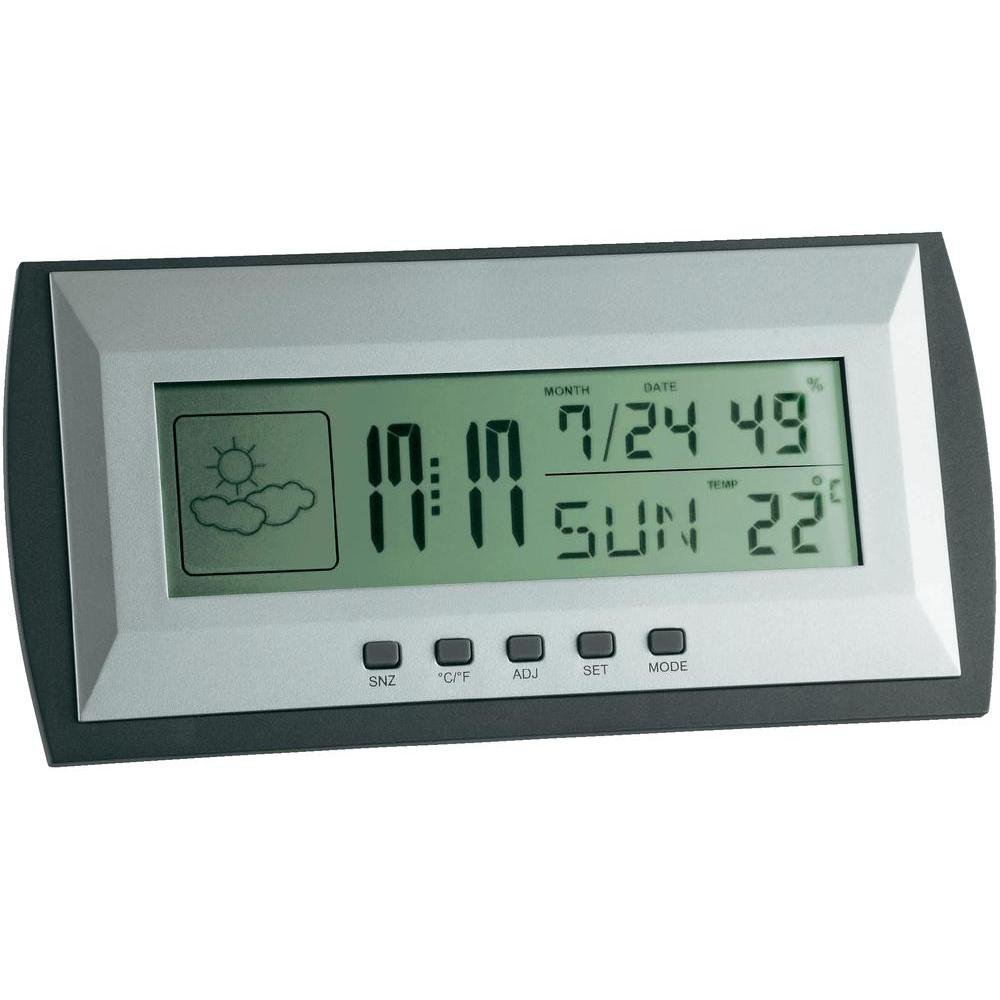
Figure 1: TFA Dostmann Digital Weather Station 35.1065 on a wooden desk. This image shows the weather station displaying time, date, and weather information in a typical home or office setting.
2. Varnostne informacije
- Ta priročnik shranite za poznejšo uporabo.
- Naprave ne izpostavljajte ekstremnim temperaturam, vibracijam ali udarcem.
- Izogibajte se neposredni sončni svetlobi in vlagi.
- Naprave ne potapljajte v vodo.
- Naprave ne poskušajte popravljati ali spreminjati sami. Za servis se obrnite na usposobljeno osebje.
- Izrabljene baterije zavrzite v skladu z lokalnimi predpisi.
3. Nastavitev
3.1 Vsebina paketa
Prepričajte se, da so vsi elementi prisotni:
- TFA Dostmann Digital Weather Station 35.1065
- 2 x AA baterije
- Uporabniški priročnik (ta dokument)
3.2 Namestitev baterije
- Locate the battery compartment cover on the back of the weather station.
- Odprite pokrov.
- Insert two (2) AA batteries, observing the correct polarity (+ and - markings).
- Trdno zaprite pokrov prostora za baterije.
The device will power on automatically and display initial readings.
3.3 Začetne nastavitve (čas, datum, enota temperature)
Upon first power-on or after battery replacement, you may need to set the time, date, and preferred temperature unit.
- Pritisnite in držite NASTAVI button for a few seconds to enter setting mode. The digit to be set will flash.
- Uporabite PRID gumb za nastavitev utripajoče vrednosti (npr. ura, minuta, leto, mesec, dan).
- Pritisnite NASTAVI Ponovno pritisnite gumb, da potrdite nastavitev in se premaknete na naslednji parameter.
- Repeat steps 2 and 3 until all desired settings (time, date) are configured.
- Za preklop med Celzijem (°C) in Fahrenheitom (°F) pritisnite ° C / ° F gumb.
4. Upravljanje vremenske postaje
4.1 Prikaz končanview
LCD-zaslon prikazuje različne informacije:
- Čas: Current time in 12-hour or 24-hour format.
- Datum: Current month, day, and day of the week.
- Temperatura: Indoor temperature, displayed in °C or °F.
- Vlažnost: Indoor humidity percentage.
- Ikona vremenske napovedi: Indicates a trend forecast (e.g., sunny, cloudy, rainy). This is a prediction based on atmospheric pressure changes and may not always reflect actual weather.
4.2 Funkcije gumbov
- SNZ (Dremež): Aktivira funkcijo dremeža za alarm.
- °C/°F: Preklaplja med prikazom temperature v stopinjah Celzija in Fahrenheita.
- PRILAGODITEV (Prilagodi): Uporablja se za prilagajanje vrednosti med nastavitvenim načinom.
- NASTAVITEV: Vnese in potrdi nastavitve.
- NAVODILA: Switches between different display modes (e.g., time, alarm time).
4.3 Nastavitev alarma
- Pritisnite NAČIN večkrat pritisnite gumb , dokler se ne prikaže čas alarma.
- Pritisnite in držite NASTAVI gumb. Ura budilke bo utripala.
- Uporabite PRID gumb za nastavitev želene ure budilke.
- Pritisnite NASTAVI za potrditev in premik na minute.
- Uporaba PRID za nastavitev želenih minut alarma.
- Pritisnite NASTAVI za potrditev in izhod iz nastavitve alarma.
- Za vklop/izklop alarma pritisnite PRID medtem ko je prikazan čas alarma. Ikona alarma se bo prikazala/izginila.
5. Vzdrževanje
5.1 Čiščenje
Napravo očistite z mehko, damp cloth. Do not use abrasive cleaners or solvents. Ensure no water enters the device.
5.2 Zamenjava baterije
When the display becomes dim or the device stops functioning, replace the batteries. Follow the steps in Section 3.2. Always replace both batteries at the same time with new AA batteries.
5.3 Shranjevanje
If the device will not be used for an extended period, remove the batteries to prevent leakage and damage. Store in a cool, dry place.
6. Odpravljanje težav
| Težava | Možen vzrok | rešitev |
|---|---|---|
| Brez zaslona ali zatemnjen zaslon. | Baterije so prazne ali nepravilno vstavljene. | Baterije zamenjajte z novimi in pri tem pazite na pravilno polarnost. |
| Napačen čas/datum. | Ura/datum ni pravilno nastavljen. | Refer to Section 3.3 to set the time and date. |
| Netočne meritve temperature/vlažnosti. | Device placed near heat sources, vents, or in direct sunlight. | Relocate the weather station to a stable indoor environment away from extreme temperature fluctuations. Allow time for readings to stabilize. |
| Weather forecast icon seems incorrect. | Weather forecast is a trend prediction based on atmospheric pressure, not a real-time forecast. | Understand that the icon indicates a general trend over the next 12-24 hours, not current conditions. |
7. Specifikacije

Figure 2: TFA Dostmann Digital Weather Station 35.1065 with dimensions. This image provides a detailed view of the device, including its width (18 cm), height (9 cm), and depth (3.81 cm).
- Znamka: TFA Dostmann
- Model: 35.1065
- vir energije: Battery-powered (2 x AA batteries, included)
- Material: Plastika
- Posebne lastnosti: Trend forecast
- Vrsta zaslona: LCD
- Mere predmeta (D x Š x V): 3.8 cm x 18 cm x 9 cm
- Teža artikla: 164 gramov
- Vključene komponente: Weather station, batteries, user manual
- Priporočena uporaba: Domača pisarna
- Posebne uporabe: Date, Humidity, Temperature, Time
- Država izvora: Kitajska
8. Garancija in podpora
For warranty information, please refer to the documentation provided at the time of purchase or visit the official TFA Dostmann website. For technical support or further assistance, please contact TFA Dostmann customer service through their official channels.
Official TFA Dostmann Webspletno mesto: www.tfa-dostmann.de