
Uvod
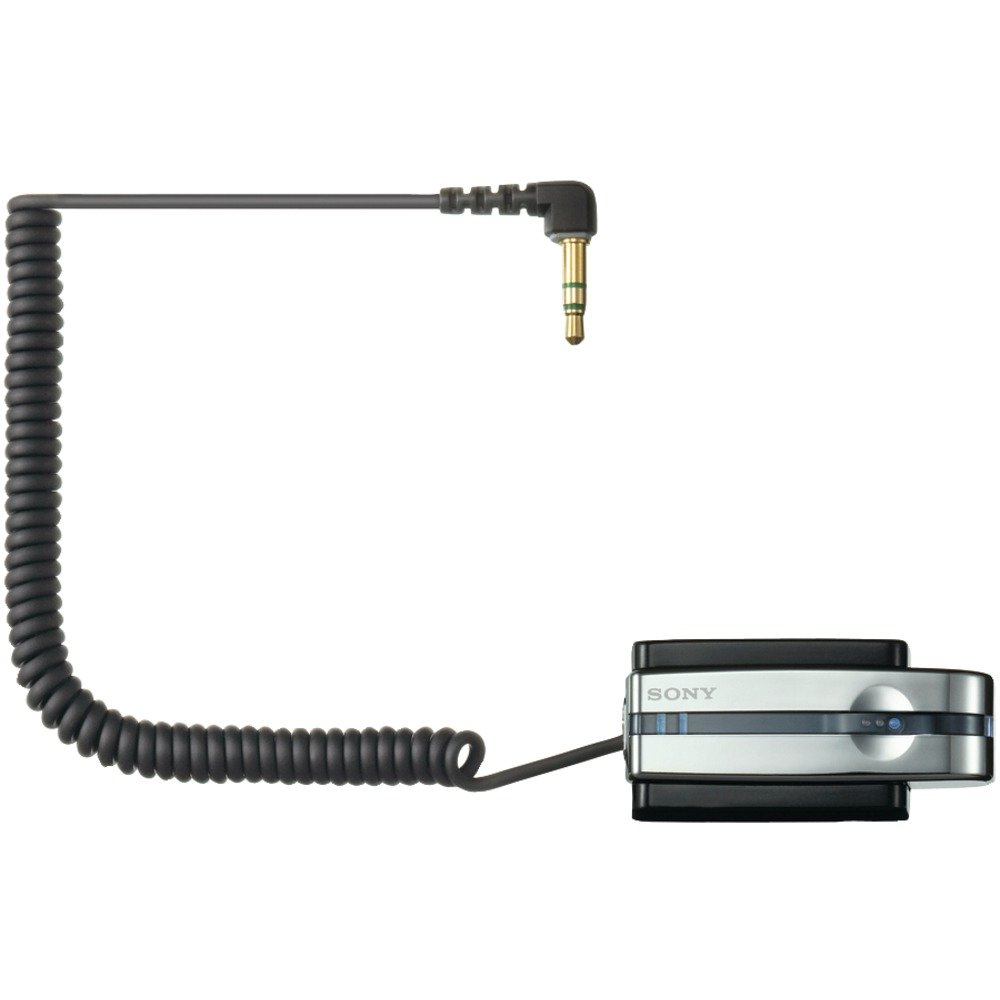
The Sony TMR-BT10A is a compact Bluetooth transmitter designed to wirelessly transmit stereo audio signals from your portable music player to compatible Bluetooth stereo audio receiving devices. This includes Bluetooth-enabled headsets, car audio systems, or home audio components. It connects to any audio device via a standard headphone jack, offering a convenient way to enjoy your music wirelessly.
Lastnosti izdelka
- Brezžični prenos: Transmits audio from your player to compatible Bluetooth devices.
- Compact and Rechargeable: Designed for portable use with a built-in rechargeable battery.
- Univerzalna povezava: Connects to any portable music player via a standard headphone jack.
- Bluetooth Version 2.0: Supports A2DP profile for high-quality stereo audio.
- Gold-plated Stereo Mini Plug: Ensures reliable audio connection.
- Battery Charging Stand: Includes a dedicated stand for convenient charging.
Vsebina paketa
Preden nadaljujete z namestitvijo, se prepričajte, da so prisotni vsi elementi:
- Sony TMR-BT10A Bluetooth Transmitter
- Battery Charging Stand
- AC napajalnik
- Navodila za uporabo (ta dokument)
Vodnik za namestitev
1. Charging the Transmitter
Before initial use, fully charge the TMR-BT10A transmitter. Place the transmitter into its dedicated charging stand and connect the AC power adapter to the stand and a wall outlet. The charging indicator light will illuminate. A full charge typically takes approximately 3 hours and provides up to 11 hours of playback time.
Slika: The Sony TMR-BT10A Bluetooth Transmitter placed in its charging stand, connected to power. This image illustrates the correct way to charge the device.
Opomba: The transmitter cannot be used while it is connected to the charging dock or actively charging.
2. Povezovanje z zvočno napravo
Plug the gold-plated stereo mini plug of the TMR-BT10A into the headphone jack of your portable music player (e.g., iPod, MP3 player) or any other audio source. Ensure the connection is secure.
3. Pairing with a Bluetooth Receiver
To establish a wireless connection, the TMR-BT10A must be paired with your Bluetooth stereo audio receiving device (e.g., headphones, car stereo).
- Turn on the TMR-BT10A transmitter.
- Put your Bluetooth receiving device into pairing mode. Refer to your receiver's manual for specific instructions.
- On the TMR-BT10A, press and hold the pairing button (if available, or power button for 7 seconds as indicated in some reviews) until the indicator light flashes rapidly, indicating it is in pairing mode.
- Once paired, the indicator lights on both devices will change to a steady illumination or a slower flash, confirming the connection. The TMR-BT10A can store pairing information for up to 8 devices.
Navodila za uporabo
- Vklop/izklop: Press and hold the power button on the TMR-BT10A to turn it on or off.
- Povežite se z zvočnim virom: Ensure the transmitter's mini-plug is securely inserted into your audio player's headphone jack.
- Activate Bluetooth Receiver: Turn on your paired Bluetooth headphones or audio system. The devices should automatically connect if they have been paired previously and are within range.
- Predvajaj zvok: Start playback on your audio source. The sound will be transmitted wirelessly to your Bluetooth receiver.
- Nadzor glasnosti: Adjust the volume directly on your Bluetooth receiving device or your audio source. The TMR-BT10A does not have its own volume controls.
Pomembno: For optimal performance, ensure a clear line of sight between the transmitter and the receiving device. Obstacles and distance can affect signal quality and range.
Vzdrževanje
- Čiščenje: Use a soft, dry cloth to clean the transmitter and charging stand. Do not use liquid cleaners or solvents.
- Shranjevanje: Ko naprave dalj časa ne uporabljate, jo shranite na hladnem in suhem mestu, stran od neposredne sončne svetlobe in ekstremnih temperatur.
- Vzdrževanje baterije: To prolong battery life, avoid fully discharging the battery frequently. Charge the device regularly, even if not in constant use. The battery is designed to be replaceable by removing two screws and unplugging it from the unit, though this is typically a service task.
- Vzdrževanje priključka: Handle the gold-plated stereo mini plug with care to prevent bending or damage.
Odpravljanje težav
| Težava | Možen vzrok | rešitev |
|---|---|---|
| Ni zvoka ali pa se zvok sliši prekinjeno. |
|
|
| Poor sound quality (hissing, static). |
|
|
| Audio latency (lip-sync issues). |
|
|
| Transmitter does not charge. |
|
|
Specifikacije
| Funkcija | Podrobnost |
|---|---|
| Številka modela | TMR-BT10A |
| Znamka | Sony |
| Tehnologija povezljivosti | Bluetooth |
| Različica Bluetooth | 2.0 (A2DP profile) |
| Vir napajanja | Napajanje na baterije (za ponovno polnjenje) |
| Življenjska doba baterije (približno) | 11 uri |
| Čas polnjenja (pribl.) | 3 uri |
| Zvočni priključek | Gold-plated Stereo Mini Plug |
| Teža predmeta | 8.64 unč |
| ASIN | B000P9CEVO |
| UPC | 027242697867 |
Garancija in podpora
Za informacije o garanciji in podporo strankam glejte garancijski list, ki je priložen izdelku, ali obiščite uradno spletno mesto za podporo Sony. webspletnega mesta. Shranite dokazilo o nakupu za morebitne garancijske zahtevke.
Spletna podpora: www.sony.com/electronics/support