
1. Uvod
This manual provides detailed instructions for the setup, operation, and maintenance of your Bushnell Onix 200 Portable GPS Navigator. The Onix 200 is designed for outdoor use, offering navigation capabilities with satellite and aerial photos on a 2.7-inch sunlight-readable LCD screen. It features a rugged, waterproof design (IPX7) and 32 MB of internal memory for storing navigational data.
2. Izdelek je končanview
2.1 Ključne lastnosti
- Navigation with satellite and aerial photos.
- Rugged rubber armor and IPX7 waterproof rating.
- Sunlight-readable 2.7-inch LCD screen.
- Uporabniški Profiles for customized activity settings.
- Night-mode screen viewing možnost.
- 32 MB internal memory.
- USB povezljivost.
2.2 Komponente
The Bushnell Onix 200 package typically includes:
- Bushnell Onix 200 GPS Unit
- Zapestni nosilec
- USB kabel (za prenos podatkov in polnjenje)
- Uporabniški priročnik (ta dokument)
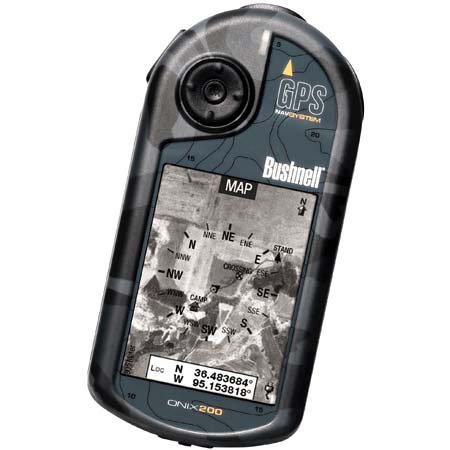
Figure 1: Bushnell Onix 200 handheld GPS unit, showing its rugged design and screen.
3. Nastavitev
3.1 Namestitev baterije
The Bushnell Onix 200 does not include batteries. It requires standard AA batteries (not included). To install:
- Poiščite pokrov predalčka za baterije na zadnji strani enote.
- Pokrov odprite tako, da ga potisnete ali odpnete v skladu z oznakami.
- Insert the required number of AA batteries, ensuring correct polarity (+/-).
- Za ohranitev vodoodpornosti tesnila tesno zaprite pokrov predalčka za baterije.
3.2 Začetni vklop in osnovne nastavitve
- Pritisnite in držite gumb za vklop, dokler se zaslon ne zasveti.
- Upon first use, the device may prompt you to set basic preferences such as language, time zone, and measurement units. Follow the on-screen instructions.
- Allow the device to acquire a GPS signal. This may take several minutes, especially during the first use or after a long period of inactivity. Ensure you are in an open area with a clear view neba.
3.3 Povezava z računalnikom
Use the provided USB cable to connect the Onix 200 to your computer for data transfer, map updates, or firmware updates. The device is compatible with Windows operating systems.
4. Navodila za uporabo
4.1 Navigation with Satellite/Aerial Photos
The Onix 200 allows you to overlay navigation information directly onto satellite or aerial photographs. This feature provides enhanced situational awareness, especially in unfamiliar terrain.
- Access the map view iz glavnega menija.
- Select the desired map type (e.g., satellite, aerial, USGS map) from the display options.
- Use the touch screen or voice controls to pan, zoom, and interact with the map.
- Your current position will be indicated on the map, along with any loaded waypoints or routes.
4.2 Uporabnik Profiles
The "User Profiles" feature allows you to customize the device's settings and menu options based on your activity (e.g., hiking, fishing, hunting). This streamlines access to relevant functions.
- Pomaknite se do razdelka »Pro«files" section in the main menu.
- Izberite obstoječega profesionalcafile ali ustvarite novo.
- Customize settings such as display preferences, data fields, and shortcut menus for that specific activity.
- Activate the desired profile before starting your activity.
4.3 Nočni način
For low-light conditions, activate the night-mode screen viewing option. This adjusts the display's backlight and color scheme to reduce eye strain and improve visibility in the dark.
- Access display settings from the main menu.
- Toggle the "Night Mode" option to ON.
4.4 Nadzorne metode
The Onix 200 supports both touch screen and voice control for interacting with the device. Refer to the on-screen prompts and the device's internal help system for specific voice commands.
5. Vzdrževanje
5.1 Čiščenje naprave
- Zaslon in zunanjost obrišite z mehko damp, krpo, ki ne pušča vlaken.
- Do not use abrasive cleaners, solvents, or aerosol sprays, as these can damage the device's finish and screen.
- Ensure all ports are dry before connecting cables.
5.2 Waterproofing Care (IPX7)
The Onix 200 is waterproof to IPX7 standards, meaning it can withstand immersion in water up to 1 meter for 30 minutes. To maintain this rating:
- Ensure the battery compartment cover and any port covers are securely closed before exposure to water.
- Do not intentionally submerge the device beyond its rated depth or duration.
- If the device gets wet, dry it thoroughly before opening any compartments or connecting to power.
5.3 Shranjevanje
Store the device in a cool, dry place away from direct sunlight and extreme temperatures when not in use. Remove batteries if storing for extended periods to prevent leakage.
6. Odpravljanje težav
6.1 Brez napajanja
- Check if batteries are correctly installed and fully charged.
- Zamenjajte stare baterije z novimi.
- Prepričajte se, da je gumb za vklop pritisnjen in dovolj dolgo pritisnjen.
6.2 GPS Signal Loss or Inaccuracy
- Prepričajte se, da ste na odprtem območju z neoviranim view of the sky, away from tall buildings, dense foliage, or strong electromagnetic interference.
- Allow the device more time to acquire a signal.
- Perform a soft reset (refer to the device's internal menu for this option, if available).
6.3 Zaslon se ne odziva
- Prepričajte se, da je zaslon čist in suh.
- If the touch screen is resistive, apply firm but gentle pressure.
- Ponovno zaženite napravo.
6.4 Device Not Connecting to Computer
- Verify the USB cable is securely connected to both the device and the computer.
- Poskusite druga vrata USB na vašem računalniku.
- Ensure necessary drivers are installed on your Windows operating system.
For further assistance, please refer to the official Bushnell support resources.
7. Specifikacije
| Funkcija | Specifikacija |
|---|---|
| Znamka | Bushnell |
| Ime modela | onix 200 |
| Številka modela | 36-2000 |
| Velikost zaslona | 2.7 palcev |
| Resolucija | 160 x 240 |
| Vrsta zaslona | LCD |
| Vrsta zaslona na dotik | Odporni |
| Zmogljivost pomnilnika | 32 MB |
| Tehnologija povezljivosti | USB |
| Vrsta zemljevida | Satelit |
| Podprti satelitski navigacijski sistem | GPS |
| Posebna funkcija | Vodotesen (IPX7) |
| Nadzorna metoda | Dotik, glas |
| Operacijski sistem | Windows (for PC connection) |
| Dimenzije (Š x V x G) | 1.1 x 8.0 x 2.2 palcev |
| Teža predmeta | 15.2 unč |
| Baterije priložene | No (Requires AA) |
| UPC | 029757362001 |
8. Garancija in podpora
For detailed warranty information, product registration, and technical support, please visit the official Bushnell webali se obrnite na njihov oddelek za pomoč uporabnikom.
Več informacij in podpornih virov najdete na Trgovina Bushnell na Amazonu.